
HTML to Image: 5 ways to convert HTML and CSS to a PNG
You have HTML. You need a PNG. Simple ask, five different answers, and the wrong one wastes a weekend.
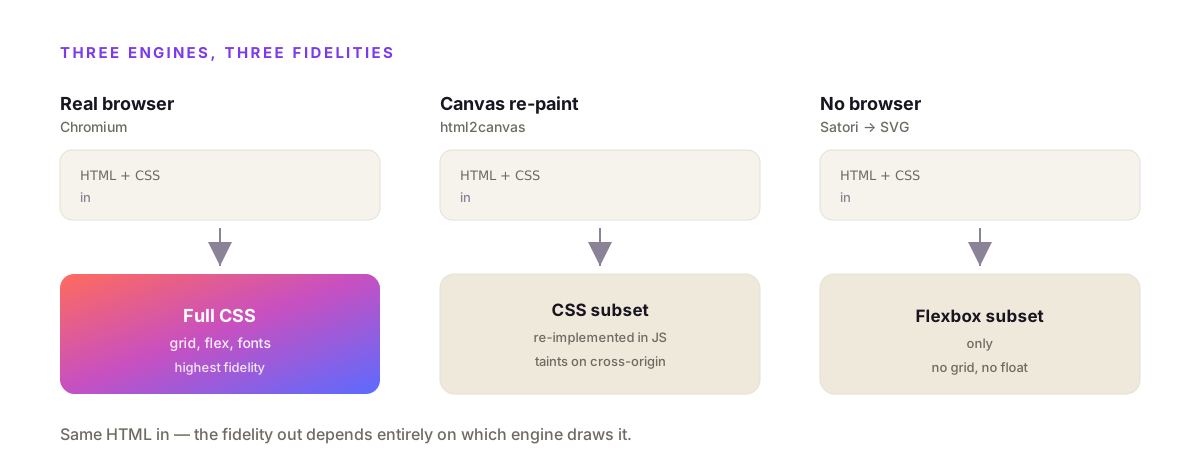
There are five real ways to convert HTML to an image: repaint the DOM to a canvas client-side with html2canvas, self-host a headless browser with Puppeteer or Playwright, use a wrapper like node-html-to-image, render HTML to an SVG with no browser using Satori, or POST it to a hosted HTML to image API. They differ on where the code runs, how much CSS survives, whether fonts and cross-origin images work, and how much infrastructure you own. This guide runs each one and names the trade-off it hides.
I build propzapi, an image generation API, so the hosted example uses it. But four of the five ways have nothing to do with any product, and I'll be straight about when you shouldn't reach for an API at all.
What does "HTML to image" actually mean?
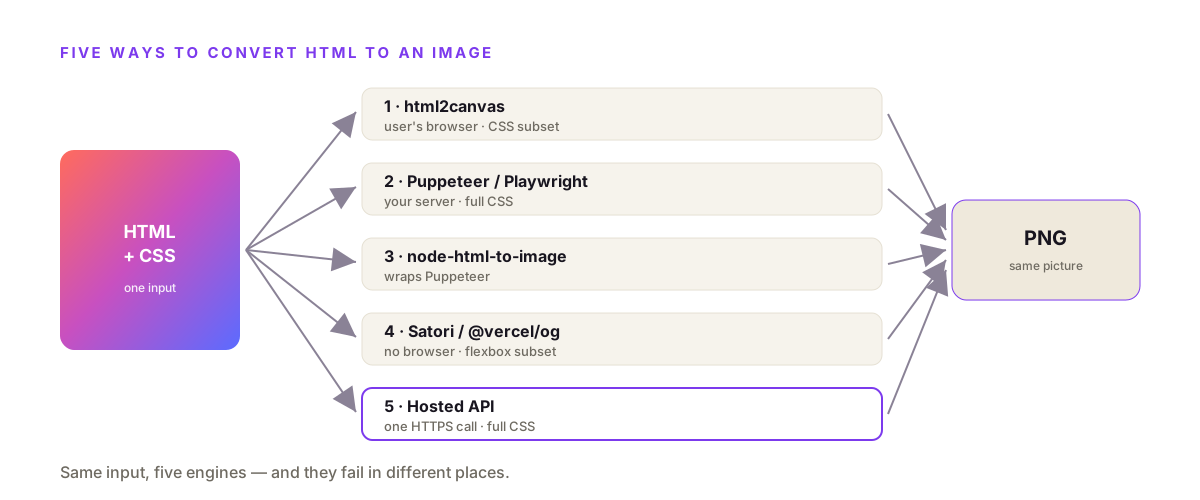
Turning HTML to an image means rasterising your markup and CSS into pixels, and there are only three engines that do it: a real browser (Chromium via Puppeteer or Playwright), a canvas re-paint of the DOM (html2canvas), or a from-scratch layout engine that skips the browser (Satori, which powers @vercel/og). Each reads your HTML differently, so each renders a different subset of what you wrote. That's why the same card can look perfect in one and broken in another.
The distinction that matters most is where the rendering happens.
A real browser engine paints your HTML the way Chrome does, because it is Chrome. Flexbox, grid, gradients, web fonts, pseudo-elements: if it works in your browser, it works in the image.
A canvas re-paint does not use a browser to draw. html2canvas reads the DOM and redraws each node onto a canvas by reimplementing how a browser would paint it. It only supports the CSS it has code for, so anything it hasn't implemented is silently skipped.
A no-browser engine like Satori converts HTML and CSS to an SVG using a flexbox layout engine, then rasterises the SVG. Fast and tiny, but it supports a deliberately small subset of CSS: no grid, no media queries, and you set display:flex on every container by hand.
Once you see it as three engines, the five "ways" are just how you reach them: in the user's browser, on your own server, or over someone else's HTTP endpoint.
The 5 ways to convert HTML to an image, compared
The five ways are client-side canvas libraries, self-hosted Puppeteer or Playwright, the node-html-to-image wrapper, no-browser Satori, and a hosted HTML to image API. Client-side is the least work but breaks on cross-origin assets and can't run on a server. Self-hosting gives full fidelity but you operate a browser forever. A hosted API is the fewest lines and no infrastructure, at a per-image cost. Match the method to where the image has to be produced.
Side by side, the trade stops being abstract.
| Way | Engine | CSS fidelity | Runs where | Ops burden | Best for |
|---|---|---|---|---|---|
| html2canvas / html-to-image | Canvas re-paint | Supported subset | User's browser | None, but client-only | In-browser "download as image" |
| Self-host Puppeteer / Playwright | Real Chromium | Full | Your servers | You run + patch + scale a browser | Rendering is your product |
| node-html-to-image | Real Chromium (wrapped) | Full | Your servers | Same browser, less boilerplate | Node teams who want less setup |
| Satori / @vercel/og | No browser (HTML→SVG) | Flexbox subset | Edge / serverless | Light, but limited CSS | Simple OG cards on Vercel |
| Hosted HTML to image API | Vendor's Chromium | Full | Over HTTP | One HTTPS call | Images from data, any stack |
The rest of this guide is that table with the receipts: the code for each, and the exact wall you hit.
How do you turn HTML into an image in Node?
In Node, launch headless Chromium with Puppeteer, call page.setContent(html), then page.screenshot(). Because it's real Chromium, every CSS feature renders correctly. The cost is the browser itself: installing puppeteer downloads a Chrome build of roughly 170 MB on macOS and 282 MB on Linux, and each instance eats hundreds of megabytes of RAM. node-html-to-image wraps this same path into one call.
The raw Puppeteer version is short. This is the whole thing (per Puppeteer's own docs):
import puppeteer from "puppeteer";

const browser = await puppeteer.launch();
const page = await browser.newPage();
await page.setViewport({ width: 1200, height: 630 });
await page.setContent(html, { waitUntil: "networkidle0" });
await page.screenshot({ path: "card.png" });   // element: locator.screenshot()
await browser.close();
Playwright is nearly identical and cross-browser, and it's the one I'd start with today. Both bundle their own browser build, so both carry the same weight.
If the boilerplate annoys you, node-html-to-image hides it and adds Handlebars templating, so you pass data straight into {{placeholders}}:
import nodeHtmlToImage from "node-html-to-image";

// wraps Puppeteer: one call launches Chromium, sets content, screenshots
await nodeHtmlToImage({
  output: "./card.png",
  html: "<html><body>{{title}}</body></html>",
  content: { title: "Ship an image for every row" },   // fills {{title}}
});
Read that second example carefully, because it's a trap dressed as convenience. It still installs and runs full Puppeteer and Chromium underneath. You've hidden the browser, not removed it. Every RAM, cold-start and CVE-patching problem is still yours, one node_modules layer down.
Why does html2canvas look different from my real page?
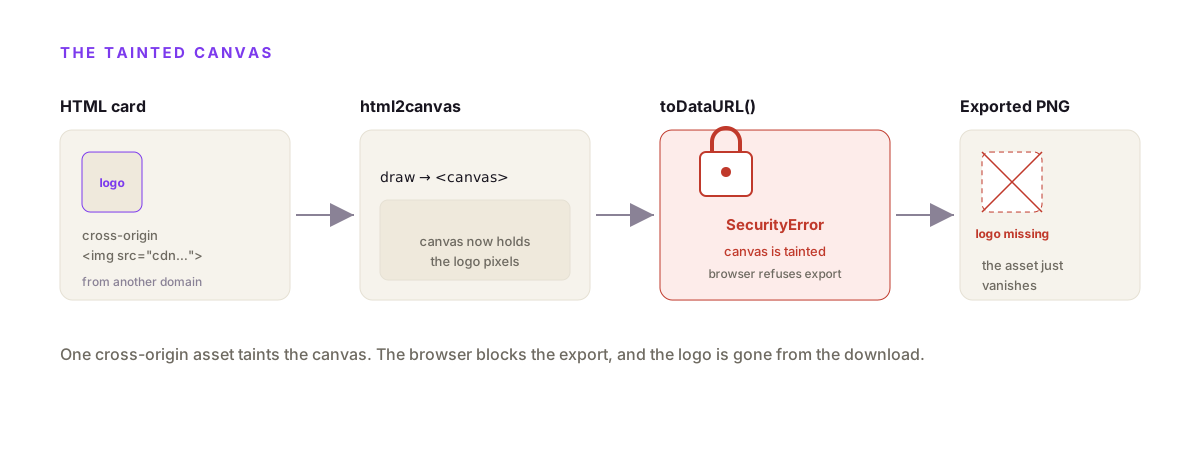
Because html2canvas never took a screenshot. It reads the DOM and redraws it onto a canvas by reimplementing browser painting, so it renders only the CSS it has explicit support for and skips the rest. Worse, per MDN, a cross-origin image or webfont "taints" the canvas, and a tainted canvas can't be exported: toDataURL() throws a SecurityError. The asset renders on screen, then vanishes from the download.
This is the failure that sends people hunting for something better.
You wire up html2canvas, it works on your test div, you ship it. Then a user's export comes back with the logo gone and the brand font replaced by Times New Roman. Nothing errored in your logs.
import html2canvas from "html2canvas";

// works on your test div, breaks on real assets
const canvas = await html2canvas(document.querySelector("#card"));
const png = canvas.toDataURL("image/png");
// SecurityError: a cross-origin <img> or webfont "tainted" the canvas,
// so the browser refuses to export it. The logo renders on screen,
// then disappears from the downloaded file. Nothing throws until export.
The fixes are all workarounds. Add crossorigin="anonymous" to every image and pray the host sends CORS headers. Base64-embed every font as an @font-face rule. Set allowTaint and lose the ability to read the canvas back. Each one is a paper cut.
And they only patch the client-side case. html2canvas runs in a browser, but you usually need the image on a server, generated from a database, with no user present. A queue worker has no DOM. A cron job has no canvas. That's the wall.
How do you convert HTML to an image in Python?
Use Playwright for Python: pip install playwright, launch Chromium, page.set_content(html), page.screenshot(). Do not reach for imgkit or wkhtmltoimage on new work. That binary was archived by its maintainers on January 2, 2023 and is read-only, so it renders on an old, unpatched Qt WebKit fork with limited modern CSS and no security fixes. Playwright drives a real, maintained Chromium.
For years the Python answer was imgkit, a thin wrapper that shells out to wkhtmltoimage. That answer is now out of date, and most tutorials haven't caught up.
The wkhtmltopdf and wkhtmltoimage project is archived. The GitHub repo carries a hard banner: "This repository was archived by the owner on Jan 2, 2023. It is now read-only." The last release predates it. Building new work on an abandoned rendering engine means no CSS3 features it never shipped, and no patches when a bug bites.
The modern replacement is Playwright, which speaks Python natively and drives the same Chromium your users run:
# modern Python: a real, maintained Chromium (not archived wkhtmltoimage)
from playwright.sync_api import sync_playwright

with sync_playwright() as p:
    browser = p.chromium.launch()
    page = browser.new_page(viewport={"width": 1200, "height": 630})
    page.set_content(html)
    page.screenshot(path="card.png")
    browser.close()
Same shape as the Node version, because it's the same engine. Whatever renders in Chrome renders in your file, and the project is alive.
Why is Puppeteer too big for AWS Lambda?
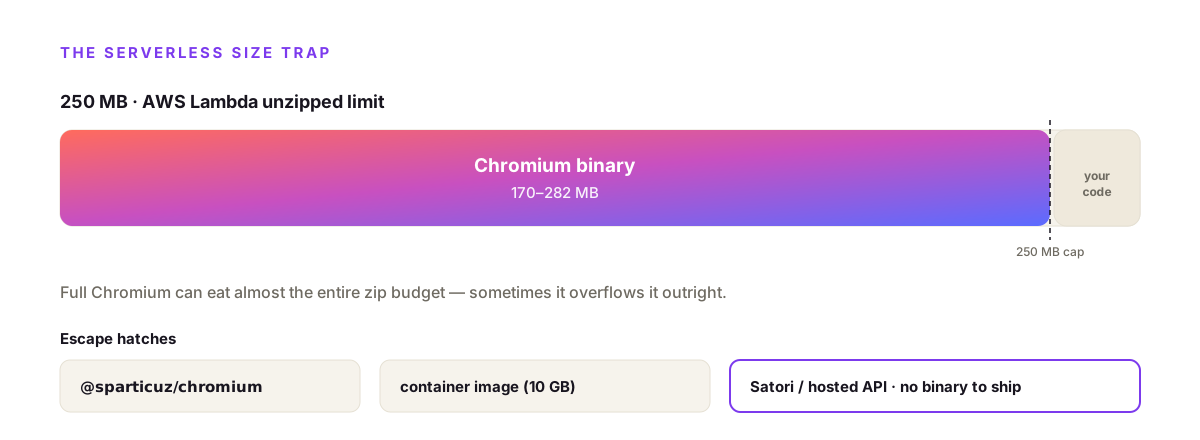
Because the browser doesn't fit. AWS caps a zip Lambda at 250 MB unzipped, and a full Chrome for Testing binary is roughly 170 to 282 MB, so it can eat the whole budget before your own code. The escapes are @sparticuz/chromium with puppeteer-core, a container-image Lambda with its 10 GB limit, a no-browser renderer like Satori, or handing the render to a hosted API. Each trades effort for a different ceiling.
This is where "just run Puppeteer" quietly falls apart in serverless.
You write the script, it works locally, you deploy to Lambda, and the package won't upload. The Chromium binary alone blew the 250 MB unzipped limit. So you swap to puppeteer-core plus @sparticuz/chromium, a stripped Lambda build, bump the function to 2048 MB, extend the timeout, and remember to close the browser in a finally block or leak memory every invocation.
None of it is hard. It's just a browser you now operate inside a function that was supposed to be simple.
The alternatives split by how much CSS you need. If your image is a basic card, Satori renders HTML to an SVG with no browser at all, small enough for an edge function. The moment your design needs grid, a media query, or a font Satori won't load, you're rewriting. If you need full fidelity without the browser, that's the job a hosted API does.
When should you use a hosted HTML to image API?
Use a hosted HTML to image API when you need images generated from data, on a server, in any language, and you don't want to run a browser. You POST a template and your data, the vendor's warm, patched Chromium renders it, and you get an image URL. With propzapi that's one call to /v1/images, billed one credit per delivered image, on a 50-image free tier with no card and no monthly floor. It's the fewest lines of the five ways and zero infrastructure.
Here is a real render. No HTML written, no browser installed:
# no browser to install: POST a template + data, get a hosted PNG URL
curl https://api.propzapi.com/v1/images \
  -H "X-API-Key: pk_live_…" -H "Content-Type: application/json" \
  -d '{"template":"og-article",
       "data":{"eyebrow":"GUIDE","title":"HTML to image, in one call"},
       "format":"png"}'
# → { "url": "https://images.propzapi.com/img_62087f99….png",
#     "width": 1200, "height": 630, "format": "png", "bytes": 90402 }
# X-Credits-Cost: 1   X-Credits-Remaining: 48
That's an actual response, not a mock. The URL resolves, the byte count is the real file, one credit moved. If the render had failed, nothing would have been charged, which matters more than it sounds once you're rendering thousands at a time.
The same call from Node is just as short:
// same render from Node, e.g. a deploy step or a queue worker
const res = await fetch("https://api.propzapi.com/v1/images", {
  method: "POST",
  headers: { "X-API-Key": process.env.PROPZAPI_KEY, "Content-Type": "application/json" },
  body: JSON.stringify({
    template: "og-article",
    data: { eyebrow: "GUIDE", title: post.title },
  }),
});
const { url } = await res.json();   // drops straight into <meta og:image>
For a deeper API walkthrough, including storing your own {{variable}} templates and rendering PNG, JPEG, WebP or PDF, see the HTML to image API guide. It's the same engine as self-hosted Puppeteer, run by someone else.
Cost is the honest part of buy-versus-build. Hosted screenshot and image APIs cluster around a similar shape: ScreenshotOne gives 100 free renders a month then $17 for 2,000, while template tools like Bannerbear start at a $49 monthly floor for 1,000 images. propzapi runs pay-as-you-go from $5 for 150 images with no subscription, so a quiet month costs nothing. Run the numbers against your own volume; at high, steady scale, self-hosting the browser can win.
One thing an API unlocks that a library can't: an AI agent can call it. propzapi ships a hosted MCP server, so an assistant can render a card from HTML as a tool call and get the image back inline. Most image libraries have no such surface. That's a real edge, not a claim of being first.
Which method should you pick?
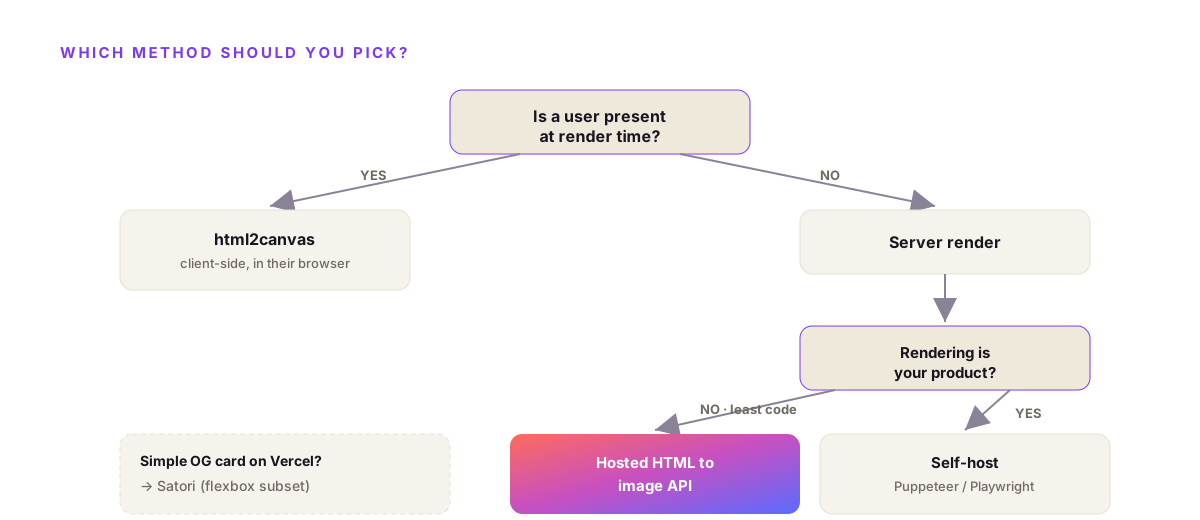
Pick by where the image is produced and how much CSS you need. User clicks "download this as an image" in the browser? html2canvas. Rendering is core to your product and you want to own the engine? Self-host Puppeteer or Playwright. Simple OG cards on Vercel? Satori. Images from data on a server, in any language, without babysitting a browser? A hosted HTML to image API. Volume and control decide the last two.
A quick decision tree, by the job in front of you:
- If the user is on the page and wants a download, use html2canvas or html-to-image. Client-side is fine here, because the user's own browser is the render environment.
- If you generate images from a database on your server, client-side is off the table. There's no browser to run in, so you need a headless browser or a hosted API.
- If rendering images is your actual product, self-host Puppeteer or Playwright and own the engine.
- If you want images from your data with the least code and no infrastructure, reach for a hosted HTML to image API.
- If you're on Vercel and your card is simple flexbox, Satori and @vercel/og are a great edge-native default, right up until your design outgrows the CSS subset.
Most "convert HTML to image" pain comes from picking a client-side library for a server-side job, then fighting tainted canvases for a week. Decide where the image is produced first. The method follows from that.
Frequently asked questions
How do I convert HTML to an image in JavaScript or Node?
Two ways. Client-side, html2canvas or html-to-image repaint a DOM node onto a canvas in the user's browser. Server-side, launch headless Chromium with Puppeteer or Playwright, set the viewport, load your HTML with page.setContent(), and call page.screenshot(). node-html-to-image wraps the Puppeteer path into one function. For images generated from data with no user present, use the server-side path or a hosted API.
How do I convert HTML to an image in Python?
Use Playwright for Python: pip install playwright, launch Chromium, page.set_content(html), page.screenshot(path="out.png"). Avoid imgkit and wkhtmltoimage for new work. That binary was archived by its maintainers on January 2, 2023 and is read-only, so it runs an old, unpatched Qt WebKit engine with limited modern CSS. Playwright drives a real, maintained Chromium instead.
Why are my fonts or images missing when I convert HTML to an image?
Because the canvas got tainted. Client-side libraries like html2canvas draw the DOM to a canvas, and the moment a cross-origin image or a webfont loaded by URL touches it, the browser refuses to export the canvas for security. The asset shows in the preview, then vanishes from the download. Rendering server-side in real Chromium off the user's machine avoids the taint entirely.
html2canvas vs Puppeteer, which should I use?
html2canvas runs in the browser and only redraws the CSS it explicitly supports, so the image can differ from the real page and taints on cross-origin assets. Puppeteer drives real Chromium on your server, so whatever renders in Chrome renders in the image. Use html2canvas for a quick in-browser download while the user is present. Use Puppeteer, Playwright or a hosted API for server-generated images.
Why is Puppeteer too big for AWS Lambda?
AWS Lambda caps a zip deployment package at 250 MB unzipped, and a full Chrome for Testing binary is roughly 170 to 282 MB on its own, so it can eat the whole budget before your code. The fixes are @sparticuz/chromium with puppeteer-core, a container-image Lambda with its 10 GB limit, a no-browser renderer like Satori, or offloading the render to a hosted HTML to image API.
What's the most reliable way to turn an HTML template into a PNG without running my own Chromium?
A hosted HTML to image API. You POST a template and your data, it renders in a warm, patched, memory-bounded Chromium the vendor operates, and you get an image URL back. No browser binary to ship, no fonts to install, no serverless size limit to dodge. With propzapi it's one call to /v1/images, billed one credit per delivered image, with a 50-image free tier and no monthly floor.
Decide where the image is produced, then pick
Every wrong turn in this topic starts the same way: grabbing html2canvas for an image that has to be made on a server.
So answer one question before you write any code. Is a user present at render time, or not? If yes, a client-side library is fine. If no, you need a real browser, whether you run it yourself with Puppeteer or Playwright, or hand it to a hosted API and skip the ops entirely.
If you want to try the no-browser path right now, grab a free key and render your first image in one call, 50 free, no card. Then read the HTML to image API guide to wire your own templates in.