
HTML to Image API: turn HTML and CSS into a PNG in one call
You already wrote the layout. It's a <div> with some CSS, and it looks right in your browser. Now you need it as a PNG, a few hundred times, one per row in your database. That gap, between a page you can see and an image file you can host, is the whole job.
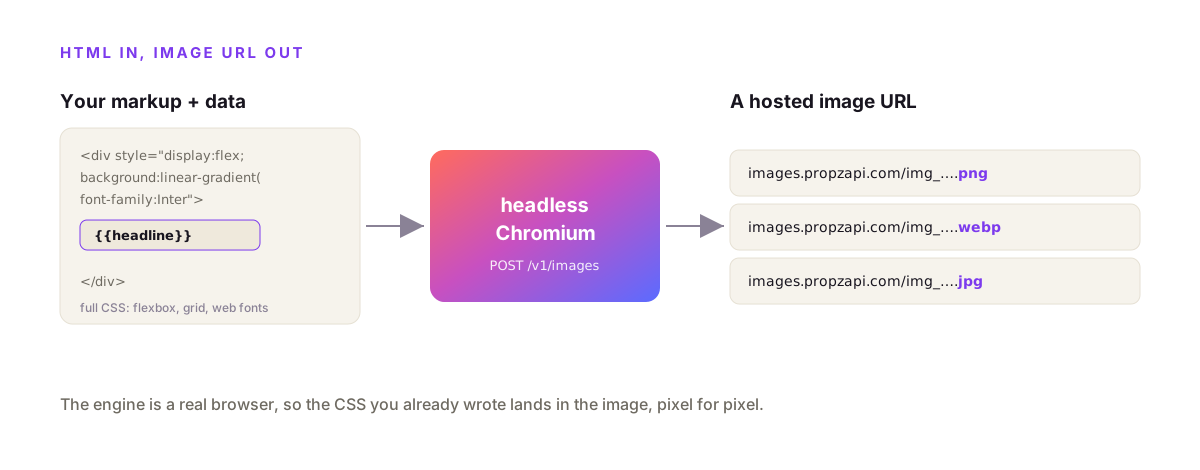
An HTML to image API takes the HTML and CSS you send it, merges in your data, renders it in headless Chromium, and returns a hosted PNG, JPEG or WebP URL. You store one layout with {{variables}}, then POST it with each record's data to get that record's image. With propzapi it's one call to /v1/images, one credit per image, billed only when an image actually comes back.
I build propzapi, so the examples use it. But the pattern holds for any HTML to image API, and I'll be straight about where you shouldn't reach for one at all.
What is an HTML to image API?
An HTML to image API is an HTTP endpoint that converts HTML and CSS into a raster image. You POST markup, or a stored template id plus data, and it renders that markup in a real browser engine and hands back an image URL. It's the "render html to image" idea as a service: no browser to install, no canvas library, no fonts to wrangle, just your HTML in and a PNG out.
The mental model is a browser you drive over HTTP.
Normally you write HTML, a browser paints it, and a human looks at it. An HTML to image API keeps the first two steps and swaps the human for a file. The same CSS, the same fonts, the same layout, captured as pixels at an exact size. Because it's a real engine doing the painting, what you see in Chrome is what lands in the image.
This is a different job from a screenshot API, and the difference trips people up. A screenshot API points at a URL that already exists and captures the whole page. An HTML to image API takes markup you send in the request and renders only that, at a size you set. One is for pages on the web; the other is for images generated from data, where there's no page to point at.
Why do fonts and images vanish from browser-based converters?
Because the canvas gets tainted. Browser libraries like html-to-image, dom-to-image and html2canvas serialise the DOM inside the user's browser and paint it to a canvas. The moment a cross-origin image or a webfont loaded by URL touches that canvas, the browser refuses to export it for security, so the asset renders in the live preview and then silently disappears from the download. A server-side HTML to image API sidesteps this entirely by rendering in a real browser off the user's machine.
This is the failure that sends people looking for an API in the first place.
You wire up html-to-image or html2canvas, it works on your test div, you ship it. Then a user's export comes back with the logo missing and the custom font replaced by Times. Nothing errored. The team at monday.com wrote up exactly this problem: a Google Font linked by URL shows in the preview and quietly vanishes from the rendered image, because the tainted canvas can't be read back.
The fixes are all workarounds. Add crossorigin="anonymous" to every image and hope the host sends CORS headers. Base64-embed every font as an @font-face rule. Wait for fonts to load before you capture. Each one is a paper cut, and they only patch the client-side case anyway.
There's a deeper problem: these libraries run in the browser, and you often need the image on your server, generated from a database, with no user present. A queue worker has no DOM. A cron job has no canvas. That's the wall. Server-side rendering in real Chromium doesn't taint anything, loads your fonts once, and runs wherever your code runs.
Why not run Puppeteer or Playwright yourself?
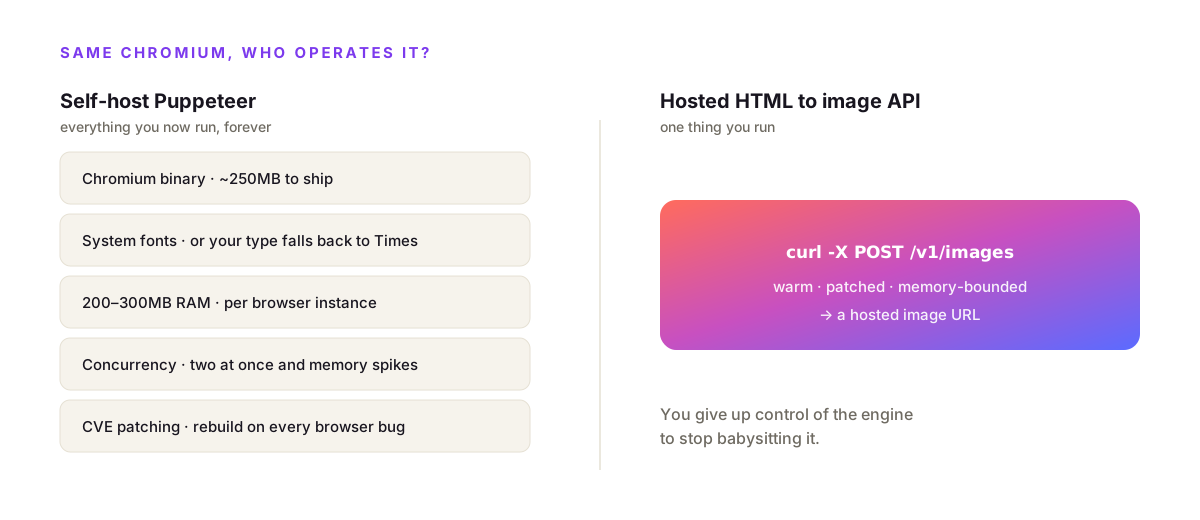
Converting HTML to an image is a solved problem: launch headless Chromium with Puppeteer or Playwright, set the viewport, load your HTML, screenshot the element. The catch is everything around it. A single headless Chrome instance runs 300–500MB of RAM and climbs past 1GB over repeated renders, needs system fonts installed, crashes under concurrency, and must be patched on every browser CVE. A hosted API is that same Chromium, kept warm and scaled by someone else, reached in one call.
The first render is easy. The ten-thousandth is the problem.
You can write the Puppeteer script in an afternoon. Then production shows up. Two requests hit at once and memory spikes. A font isn't installed on the server, so your carefully chosen typeface silently falls back. On AWS Lambda you can't even ship stock Puppeteer, because the full Chromium binary blows the 250MB package limit, so you reach for puppeteer-core plus @sparticuz/chromium, bump the function to at least 2048MB, extend the timeout past 30 seconds, and remember to close the browser in a finally block or leak memory on every invocation.
None of this is hard, exactly. It's just a browser you now operate, forever, to make pictures. A hosted HTML to image API moves that whole column onto someone else's on-call rotation. You send HTML; a warm, patched, memory-bounded Chromium renders it; you get a URL. The trade is honest: you give up total control of the engine to stop babysitting it.
The four ways to turn HTML into an image
There are four real ways to convert HTML to an image: make them by hand in a design tool, run a browser library like html-to-image, self-host Puppeteer, or call a hosted HTML to image API. They trade off on where the code runs, how much CSS survives, whether fonts and cross-origin images work, and how much infrastructure you own. The right pick depends on volume and where the image needs to be produced.
Laid out side by side, the trade is clear.
| Approach | Runs where | CSS fidelity | Fonts & cross-origin | Ops | Best for |
|---|---|---|---|---|---|
| Hand-made (Figma / Canva) | Your hands | Full | Fine, manual | None, but no scale | A few fixed images |
| Browser lib (html-to-image) | User's browser | Full-ish | Taints on cross-origin | None, but client-only | One image, user present |
| Self-host Puppeteer | Your servers | Full Chromium | You install fonts | You run + scale a browser | Rendering is core |
| Hosted HTML to image API | Vendor Chromium | Full Chromium | Handled server-side | One HTTPS call | Images from data, any stack |
The practical read: a browser library is great for a one-off export while the user is right there on the page. Self-hosting is right when rendering is your product and you want to own the engine. For everything in between, generating images from your data, on your server, at a volume you don't want to babysit, a hosted API is the least code and the fewest surprises.
Convert HTML to an image with propzapi
The fastest path is a built-in template: POST a template name and your data to /v1/images and get a PNG URL back. propzapi ships thirteen 1200×630-and-square layouts, so you can render a real image in one call before writing any HTML of your own. The response includes the URL, dimensions, format and byte size, plus X-Credits-Cost and X-Credits-Remaining headers so billing is never a mystery.
Here's a finished image from a single request, no HTML written yet.
# fastest path: a built-in 1200x630 template, filled with your data
curl https://api.propzapi.com/v1/images \
  -H "X-API-Key: pk_live_…" -H "Content-Type: application/json" \
  -d '{"template":"og-article",
       "data":{"eyebrow":"GUIDE","title":"Ship an image for every row"},
       "format":"png"}'
# → { "url": "https://images.propzapi.com/img_c548e6b2….png",
#     "width": 1200, "height": 630, "format": "png", "bytes": 95126 }
# X-Credits-Cost: 1   X-Credits-Remaining: 49
That's a real response. The URL is live and hosted, the bytes are the actual file size, and exactly one credit moved. If the render had failed, no credit would have moved at all, which matters more than it sounds when you're rendering in bulk.
Render your own HTML and CSS
Store your HTML once, render it with data forever. POST your markup with a width, a height, and {{variables}} to /v1/templates for a tpl_ id, then POST that id with your data to /v1/images. Because propzapi renders in full headless Chromium, whatever CSS works in your browser works in the image: flexbox, grid, gradients, web fonts. It's your real layout, not a stripped-down subset of it.
That last point is the one that bites people who tried @vercel/og first. It renders with Satori, which is a flexbox-only subset of CSS: no grid, no media queries, no pseudo-elements, and you have to set display:flex explicitly on every container. Fonts are limited to ttf, otf and woff, and advanced typography like ligatures and kerning isn't supported. It's fast and edge-native, and if your card is simple and you live on Vercel, it's a great default. The day your design needs a font it won't load or a layout it won't do, you're rewriting. Full Chromium renders the CSS you already wrote.
First, save the layout. The width and height define the canvas.
# store your own layout once — {{fields}} are the variables you fill per render
curl https://api.propzapi.com/v1/templates \
  -H "X-API-Key: pk_live_…" -H "Content-Type: application/json" \
  -d '{"name":"launch-card","width":1200,"height":630,
       "html":"<div style=\"width:1200px;height:630px;display:flex;align-items:center;justify-content:center;background:#0B0B0F;color:#fff;font-family:sans-serif;font-size:72px;font-weight:800\">{{headline}}</div>"}'
# → { "template": "tpl_d9a1905f…", "width": 1200, "height": 630 }
Then render it with whatever data you have, as often as you like.
# render that template with data — same one-call shape as the built-ins
curl https://api.propzapi.com/v1/images \
  -H "X-API-Key: pk_live_…" -H "Content-Type: application/json" \
  -d '{"template":"tpl_d9a1905f…","data":{"headline":"v2.0 is live"}}'
# → { "url": "https://images.propzapi.com/img_46fece27….png",
#     "width": 1200, "height": 630, "format": "png", "bytes": 10738 }
The template holds the design; the data is the words that change per image. That split is what turns "an image for every row" from a design chore into a one-line function. Here it is wired into Node, for a deploy step or a queue worker:
// Turn a record into a hosted image URL. Works anywhere Node runs:
// a Next.js route, a cron job, a queue worker, your deploy step.
export async function imageFor(record) {
  const res = await fetch("https://api.propzapi.com/v1/images", {
    method: "POST",
    headers: { "X-API-Key": process.env.PROPZAPI_KEY, "Content-Type": "application/json" },
    body: JSON.stringify({
      template: "tpl_d9a1905f…",
      data: { headline: record.title },
      format: "png",
    }),
  });
  if (!res.ok) throw new Error(`render failed: ${res.status}`);
  const { url } = await res.json();
  return url; // store it, embed it, email it
}
And the same in Python, where raise_for_status() turns a bad key into a loud error instead of a silent None:
import os, requests

def image_for(record):
    r = requests.post(
        "https://api.propzapi.com/v1/images",
        headers={"X-API-Key": os.environ["PROPZAPI_KEY"]},
        json={"template": "tpl_d9a1905f…",
              "data": {"headline": record["title"]},
              "format": "png"},
    )
    r.raise_for_status()          # a bad key fails loudly instead of parsing as data
    return r.json()["url"]         # a hosted PNG URL, ready to store or embed
Formats and retina: PNG, JPEG, WebP and scale
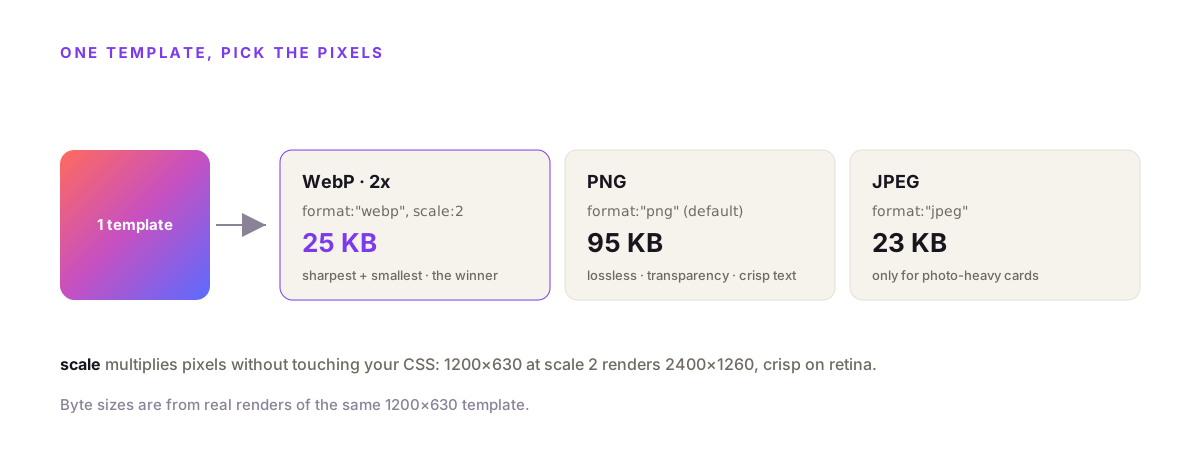
Set format to png, jpeg or webp, and scale to 2 or 3 for hi-dpi screens. PNG is the default and the right call for text and sharp edges, since it's lossless. WebP runs about 26% smaller than PNG on photo-heavy or gradient art, though Google's own data shows PNG can beat it for pure text. JPEG suits photographs. Scale multiplies the pixel dimensions without touching your CSS, so a 1200×630 template at scale 2 renders 2400×1260 and stays crisp on retina.
The same template, three ways, so you can see the trade in bytes:
# same template, three formats — measure the bytes and pick
# PNG (default): lossless, crisp text
{"template":"og-article","data":{"title":"Retina card"}}
# → …img_….png    bytes: 95126

# WebP at 2x for retina screens (scale doubles the pixels)
{"template":"og-article","data":{"title":"Retina card"},"format":"webp","scale":2}
# → …img_….webp   bytes: 25508   (2400x1260, sharper on hi-dpi)

# JPEG for photo-heavy cards where a smaller file wins
{"template":"og-article","data":{"title":"JPEG card"},"format":"jpeg"}
# → …img_….jpg    bytes: 22841
Those numbers are from real renders. Here the lossy WebP at 2x comes back smaller than the PNG while covering four times the pixels, which is why it's tempting to reach for it everywhere. Don't, quite. For flat, text-only cards, a lossless PNG keeps edges perfectly sharp and, per Google's format research, often lands smaller than a lossless WebP of the same art. Reach for WebP when there's a photo or a rich gradient in the frame, PNG when it's type and shapes, JPEG only when the image is mostly photograph and every kilobyte counts.
What it costs, and how billing works
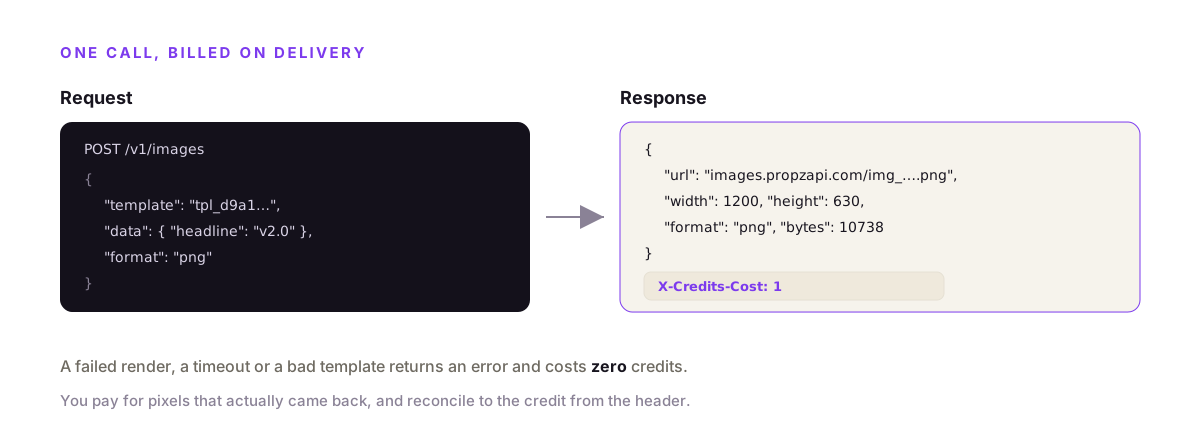
One render is one credit, billed only on delivery. A successful image costs a credit; a failed render, a timeout or a bad template costs nothing. Listing and creating templates is free. The free tier is 50 renders with no card, then pay-as-you-go packs from $5, so a few hundred images is a few dollars. There's no monthly floor to clear before the first image is worth it.
Two things make the metering fair.
First, you pay for pixels, not attempts. Plenty of image services bill the request whether or not an image comes back, which punishes you for their timeouts. propzapi charges when the render succeeds and returns the credit cost in a header on every call, so you can reconcile to the credit.
Second, there's no subscription to outgrow or forget. If you render a thousand images this month and none next month, you pay for a thousand and then zero. That fits how image generation actually clusters: a launch, a batch import, a busy week, then quiet. It's also the sharpest split from tools like Bannerbear or Placid, which start at a monthly floor whether you render or not.
When you don't need an HTML to image API
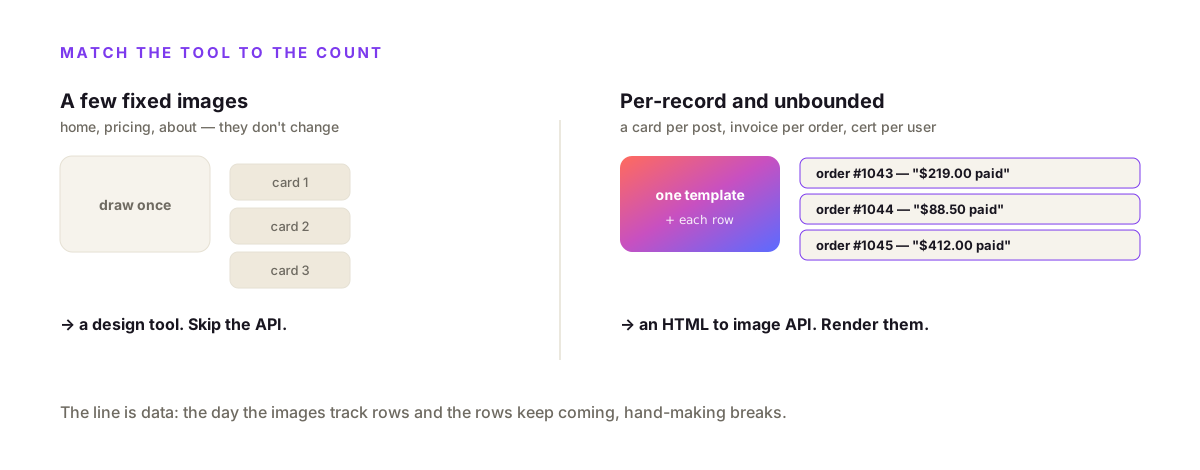
Skip the API when your image set is small and fixed. A landing page with three social cards has three images to make, and drawing them once in a design tool beats wiring up any API. An HTML to image API earns its place when the images are per-record and unbounded: a card per post, an invoice per order, a certificate per completion. Match the tool to the count, not to the hype.
An API is a dependency, and dependencies have to earn it.
If you can count your images on one hand and they don't change, generate them by hand and set them. You'll finish before you've read the docs. There's no shame in Figma for a fixed set. And if you need exactly one image inside a user's browser right now, a client-side library is lighter than a network round-trip, tainted-canvas caveats aside.
The line is data. The moment the images map to rows, and the rows keep coming, hand-making stops working the day you add the second hundred. Below that line, a design tool or a browser lib. Above it, a server-side HTML to image API. propzapi has a free 50-render tier precisely so you can find out which side of the line you're on before paying anything.
If you also need to capture pages that already exist on the web, propzapi's screenshot and PDF endpoints share the same engine and billing, so a URL becomes an image or a one-page PDF with the same key.
Frequently asked questions
- How do I convert HTML to an image from my server?
- POST your HTML, or a stored template id plus data, to an HTML to image API and it renders the markup in headless Chromium and returns an image URL. That keeps the browser off your own servers. With propzapi it's one call to /v1/images: send a template and data, get back a PNG, JPEG or WebP URL. No browser to install, no canvas library, no fonts to install on a box you maintain.
- Why does my font or image disappear when I use html-to-image or html2canvas?
- Because the canvas got tainted. Browser libraries like html-to-image, dom-to-image and html2canvas serialise the DOM in the user's browser, and the moment a cross-origin image or a webfont loaded by URL touches the canvas, the browser refuses to export it for security. The asset shows in the live preview, then vanishes from the download. A server-side HTML to image API renders in a real browser off the user's machine, so there's no tainting and no silent drop.
- Should I self-host Puppeteer or use an HTML to image API?
- Self-host if rendering is core to your product and you want total control of the engine. Otherwise use an API. A single headless Chrome instance eats 300–500MB of RAM and climbs past 1GB over time, needs system fonts, crashes under concurrency, and must be patched on every browser CVE. A hosted API is that same Chromium, kept warm and scaled by someone else, reached in one HTTP call.
- What's the difference between an HTML to image API and a screenshot API?
- They share an engine but not a job. A screenshot API points at a live URL and captures whatever that page renders. An HTML to image API takes HTML you send in the request body, merges your data, and rasterises just that markup at an exact size. Use a screenshot when the page already exists on the web; use HTML to image when you're generating a card, invoice or thumbnail from data and there's no page to point at. propzapi does both.
- PNG, JPEG or WebP for an HTML-rendered image?
- PNG for anything with text, sharp edges or transparency, which is most cards and UI, because it's lossless so text stays crisp. Google's own data shows PNG can even beat WebP for pure text. WebP wins on photo-heavy or gradient-heavy art, where it runs about 26% smaller than PNG. JPEG only when the image is mostly photograph and a small file matters more than clean edges. propzapi returns all three from the same call.
- Do I even need an HTML to image API for a handful of images?
- Probably not. If you need five images and they never change, make them by hand in Figma once and move on. An HTML to image API earns its place when the images are per-record and unbounded: a card per post, an invoice per order, a thumbnail per video. If the count tracks a database and keeps growing, generate them; if it's five files, don't.
Render your first image now
Grab a free key, POST a built-in template to /v1/images, and you have a hosted PNG in one call. Then store your own HTML and render it per record. Fifty renders on the house, no card. If you're building for an assistant, propzapi is also an MCP server, so an agent can turn HTML into an image as a tool call.