
HTML To PDF API: Convert HTML To PDF In One Call
wkhtmltopdf died. If your PDF pipeline still runs on it, you're shipping a 2012 browser engine with an unpatched critical security hole.
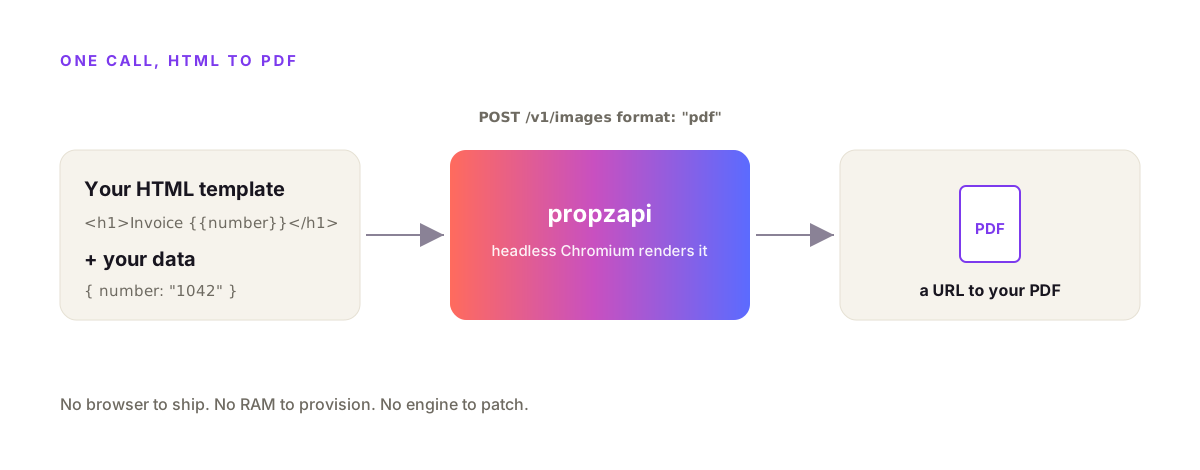
An HTML to PDF API takes your HTML and returns a finished PDF over one HTTPS call, so you never run a browser yourself. You POST a template and your data, the service renders the page with headless Chromium, and you get back a URL to the PDF. No 280MB browser to ship, no Lambda size limit to fight, no engine to patch. With propzapi that call is a single POST to /v1/images with format set to pdf.
I build propzapi, so the examples here use it. But most of this applies to any Chromium-based HTML to PDF API, and I'll be straight about where a hosted API is the wrong tool.
What is an HTML to PDF API?
An HTML to PDF API is an HTTP endpoint that turns HTML into a PDF for you. You send HTML, or a template id plus data, and the API runs a rendering engine server-side and returns the PDF, usually as a URL or raw bytes. You skip installing a browser, managing fonts, and scaling render workers. It's the pdf generation API pattern: rendering as a service instead of a dependency in your app.
The value is what you don't do.
You don't bundle Chromium. You don't keep it patched. You don't provision RAM for render spikes. You send a request and read a URL.
Under the hood, a good HTML to PDF API is almost always headless Chromium calling its print-to-PDF function. That matters, because Chromium prints with the same engine that draws your page in a browser. Your flexbox, your grid, your web fonts, your CSS variables all render the way you designed them.
Why not just run wkhtmltopdf or Puppeteer yourself?
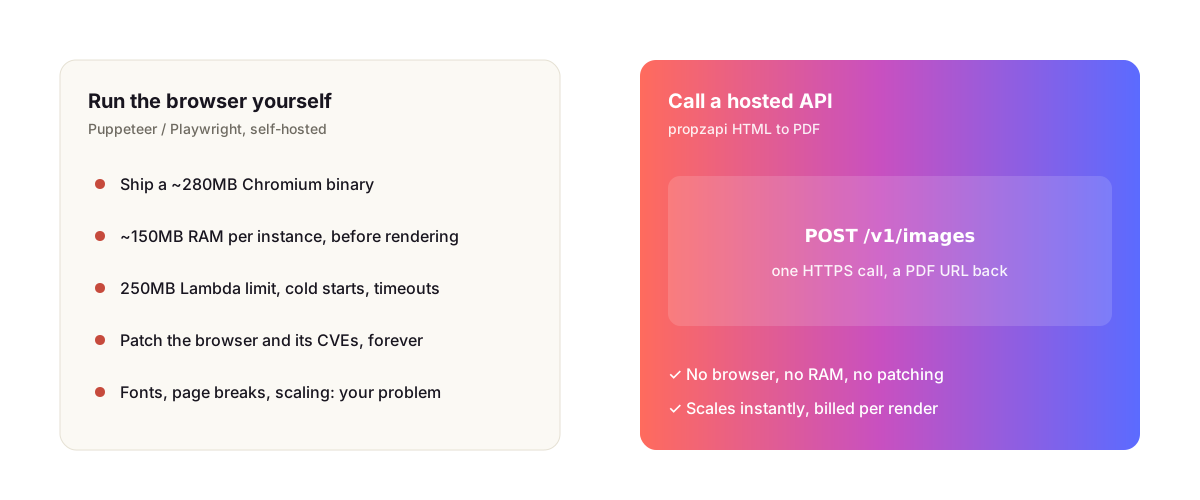
Because both have real costs. wkhtmltopdf is abandonware: its repo was archived in January 2023, the last release was 0.12.6 in 2020, and it carries an unpatched critical SSRF flaw, CVE-2022-35583, scored 9.8. Puppeteer is current and excellent, but you ship and scale a browser to use it, which gets painful in serverless.
Start with wkhtmltopdf, since a lot of code still depends on it.
Its engine is a fork of Qt WebKit from around 2012. That's before CSS flexbox and grid existed in any usable form. So a layout that looks right in Chrome falls apart in the PDF, and there's no fix coming, because nobody maintains it anymore.
Puppeteer and Playwright are the opposite problem. The rendering is great, current Chromium, full CSS. The pain is operational.
A full Puppeteer install pulls a Chromium binary of roughly 280MB. AWS Lambda caps an unzipped package at 250MB. So the naive install doesn't even fit, and you end up on puppeteer-core plus a slimmed Chromium layer, fighting cold starts and the default 3-second timeout.
Then there's memory. In one 2026 benchmark, a Chromium instance held around 150MB of RAM before it rendered anything. Run a few in parallel for a traffic spike and you feel it on the bill.
There's a third path worth knowing about, and I don't want to pretend Chromium is the only answer.
WeasyPrint is a pure-Python renderer with no browser and no JavaScript engine. It's light, it installs cleanly into a Lambda, and for plain, static invoices it's genuinely good. The catch is that it isn't Chromium, so anything that needs JavaScript to render, or leans on the newest CSS, won't come out the way it does in Chrome. If your templates are simple HTML and CSS and you already live in Python, WeasyPrint is a real, lower-overhead option. If they use the full modern CSS you'd write for a browser, you're back to a browser engine, which is the whole reason hosted Chromium APIs exist.
| Approach | Engine | CSS fidelity | Serverless | Upkeep |
|---|---|---|---|---|
| wkhtmltopdf | Qt WebKit (~2012) | Low, no flex/grid | Risky | Abandoned, unpatched CVE |
| Puppeteer / Playwright | Headless Chromium | Highest | Hard (250MB limit) | You patch the browser |
| WeasyPrint | Pure Python, no JS | Medium | Good | Light, but no JS |
| Hosted HTML to PDF API | Vendor Chromium | Highest | N/A (just a call) | Vendor patches it |
How the propzapi HTML to PDF API works
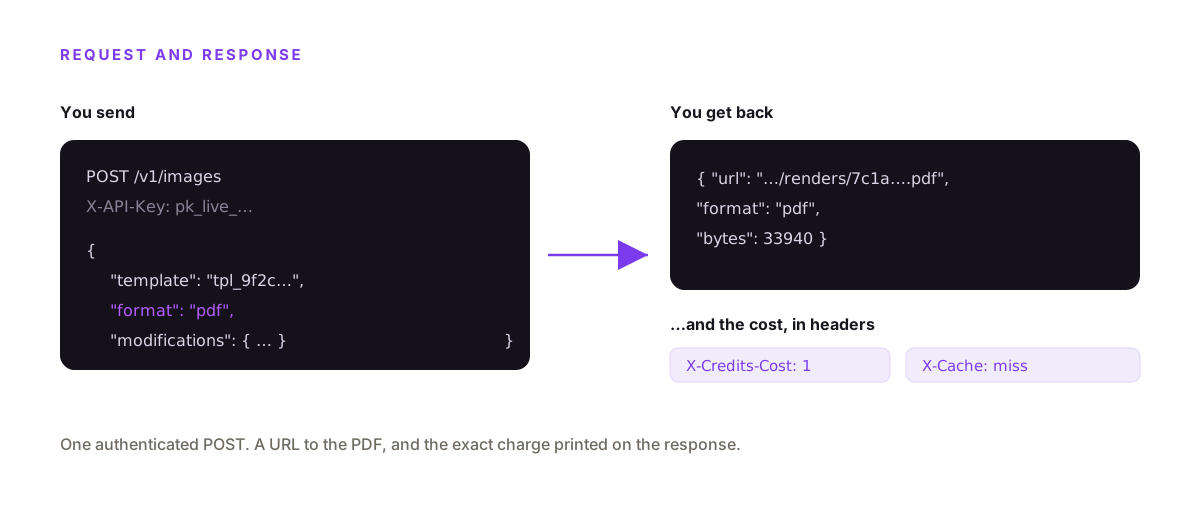
You POST to /v1/images with a template, your data, and format set to pdf. propzapi fills the template, renders it in headless Chromium, and returns a URL to the PDF plus its byte size. Built-in templates like certificate or event-ticket work out of the box, and you pass a certificate name, an invoice number, or any field as modifications. One authenticated call, one PDF.
Here's the whole thing against a built-in template.
curl https://api.propzapi.com/v1/images \
  -H "X-API-Key: pk_live_…" -H "Content-Type: application/json" \
  -d '{"template":"certificate","format":"pdf",
       "modifications":{"name":"Priya Nair","course":"Advanced SQL"}}' -i
# → { "url": "https://images.propzapi.com/img_def3….pdf",
#     "width": 1600, "height": 1130, "format": "pdf", "bytes": 85488 }
# X-Credits-Cost: 1   X-Credits-Remaining: 49   X-Cache: miss
The response is small: the URL, the format, and the byte size. The interesting part is in the headers.
X-Credits-Cost tells you the call charged one credit. X-Credits-Remaining shows your balance. X-Cache says whether this exact render was served from cache. You read spend off the response instead of guessing at a pricing table.
Generate a PDF from your own HTML
Store your HTML once, then render it with data as often as you want. POST your HTML with {{variables}} to /v1/templates and get back a tpl_ id. Then POST that id to /v1/images with format pdf and the values for this render. Your CSS renders the way it does in the browser, because propzapi emulates screen media rather than print, so screen-only styles don't silently drop out.
# 1. store your HTML once (returns a tpl_… id). {{fields}} are your variables.
curl https://api.propzapi.com/v1/templates \
  -H "X-API-Key: pk_live_…" -H "Content-Type: application/json" \
  -d '{"name":"Invoice","width":794,"height":1123,
       "html":"<html><body style=\"font:14px system-ui;padding:48px\"><h1>Invoice {{number}}</h1><p>Total {{total}}</p></body></html>"}'
# → { "template": "tpl_9f2c…", "name": "Invoice", "width": 794, "height": 1123 }
# 2. render it to PDF with this month's data
curl https://api.propzapi.com/v1/images \
-H "X-API-Key: pk_live_…" -H "Content-Type: application/json" \
-d '{"template":"tpl_9f2c…","format":"pdf",
"modifications":{"number":"1042","total":"$4,200.00"}}'
# → { "url": "https://images.propzapi.com/img_2ef7….pdf", "width": 794, "height": 1123, "format": "pdf", "bytes": 6679 }Same call from Node, with a check so an out-of-credits 402 throws instead of parsing as data.
const res = await fetch("https://api.propzapi.com/v1/images", {
  method: "POST",
  headers: { "X-API-Key": process.env.PROPZAPI_KEY, "Content-Type": "application/json" },
  body: JSON.stringify({
    template: "tpl_9f2c…",
    format: "pdf",
    modifications: { number: "1042", total: "$4,200.00" },
  }),
});
if (!res.ok) throw new Error(`render failed: ${res.status}`); // 402 = out of credits
const { url } = await res.json();
console.log(url, "cost", res.headers.get("X-Credits-Cost"));
And Python, where raise_for_status() does the same job.
import os, requests

r = requests.post(
    "https://api.propzapi.com/v1/images",
    headers={"X-API-Key": os.environ["PROPZAPI_KEY"]},
    json={"template": "tpl_9f2c…", "format": "pdf",
          "modifications": {"number": "1042", "total": "$4,200.00"}},
)
r.raise_for_status()          # a bad key or empty balance fails loudly
print(r.json()["url"], "cost", r.headers["X-Credits-Cost"])
The template stores your layout. The modifications are just the data that changes per render. That split is what makes an invoice or a certificate a one-line change each month instead of a string-building exercise.
Here's where it usually ends up in a real app. A payment webhook fires, say from Stripe or Razorpay, your handler POSTs the invoice template with that order's number and total, and you email the returned PDF URL to the customer. The whole thing is one request inside the webhook handler. And because a failed render costs nothing, a webhook that retries never quietly bills you twice for the same PDF.
How do I set the PDF's page size and margins?
Set the page size with the template's width and height in CSS pixels at 96 dpi: A4 is 794×1123, US Letter is 816×1056. Control the margins with the CSS @page rule, and force background colours and images to actually print with print-color-adjust: exact, which Chromium otherwise strips to save ink. Get those three right and the PDF matches what you designed instead of arriving with white gaps where your brand colour should be.
The pixel sizes trip people up, so pin them down.
An A4 page is 210 by 297 millimetres. At the CSS standard of 96 pixels per inch that's 794 by 1123 pixels, which is exactly why the invoice template above uses those numbers. US Letter is 8.5 by 11 inches, so 816 by 1056. Build the template at the real page size and nothing has to scale.
Margins live in CSS, not in the API. A @page { margin: 20mm } rule sets them, and you can give the first page a different margin from the rest if a letterhead needs room.
The one that surprises everyone is background colour. By default Chromium drops backgrounds when it prints, so your dark header comes out white. The fix is one line, print-color-adjust: exact on the element, and the colour prints as designed.
Why does an HTML to PDF render look different from the browser?
Three things cause most of the surprises: fonts, images, and print media. If a web font hasn't finished loading when the render fires, Chromium falls back to a system font. If an image URL isn't reachable from the render server, it comes out blank. And if the renderer prints with print media styles instead of screen, your screen-only CSS quietly drops out. propzapi waits for fonts and images to load and emulates screen media, so the three usual culprits don't bite.
Fonts are the most common one.
A render is fast, and a webfont fetched over the network isn't always ready in time. When it isn't, the PDF ships in Times or Arial and you notice a day later. Self-hosting Puppeteer, you handle this yourself by waiting on the font-load event. A good hosted API waits for you.
Images fail differently. A relative /logo.png works in your browser because the browser knows the origin. The render server doesn't, so use absolute, publicly reachable URLs for anything the PDF needs to show. If a logo lives behind auth, inline it as a base64 data URI instead, since the render server has no session to authenticate with.
Page breaks are the last rough edge, and they're genuinely hard. Chromium honours break-inside: avoid unevenly on large blocks, which is a long-standing open issue. Keep the blocks you don't want split small and test the real output rather than trusting the preview.
What a PDF generation API costs, and what a failed render costs
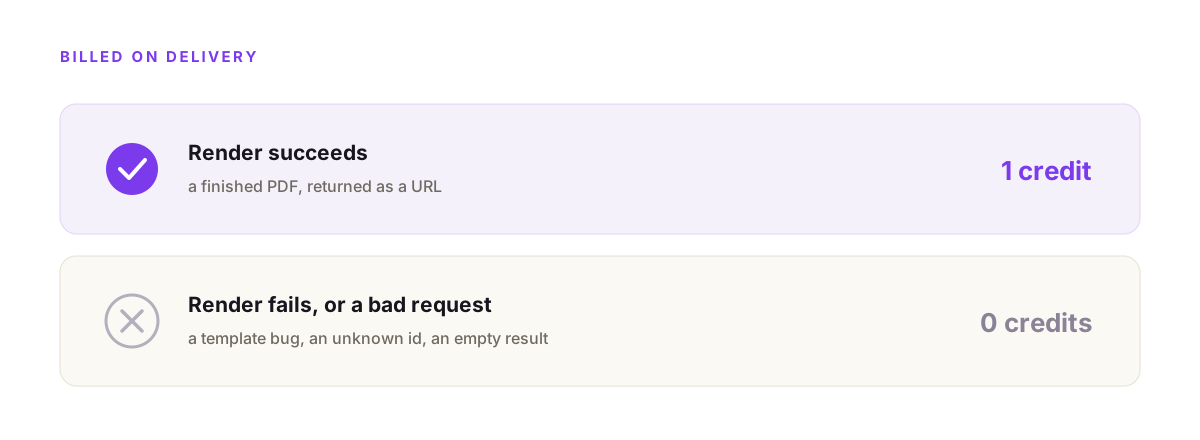
With propzapi, one successful render is one credit, and a failed render costs nothing. The exact charge comes back in X-Credits-Cost, so billing is a number you log, not a surprise. Identical renders are cached and return the same URL. You get 50 renders free with no card, then pay-as-you-go packs from $5, or a monthly plan. That is the honest shape of a pdf generation API's cost: per render, billed on delivery.
The billed-on-success part matters more than it sounds.
If your template has a bug and the render fails, you don't pay for it. A bad request, like an unknown template, returns an error and charges zero. So a typo in a deploy never quietly runs up a bill.
When a hosted HTML to PDF API is the wrong choice
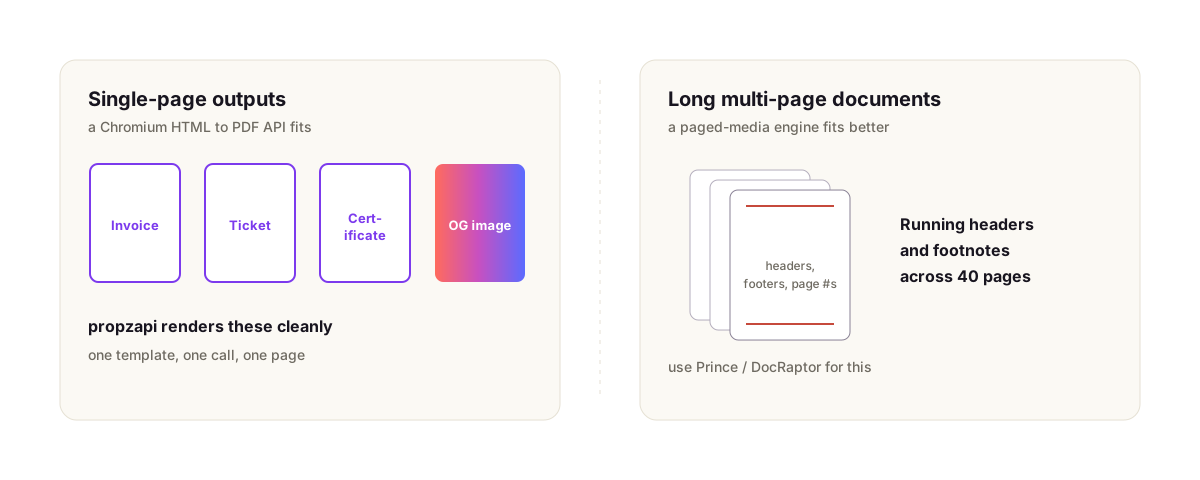
A Chromium HTML to PDF API is built for single-page outputs: invoices, receipts, tickets, certificates, one-page reports, social and OG images. It is not built for long multi-page documents that need running headers and footers, page numbering, and footnotes across dozens of pages. That's paged-media work, and a dedicated engine like Prince, which DocRaptor hosts, is purpose-built for it. Use the right tool.
Be honest with yourself about which one you have.
A 40-page contract with a footer on every page and a table of contents is a paged-media job. Chromium's page-break control is uneven, and break-inside: avoid on large blocks is a known open issue. You'll fight it.
A one-page invoice, a shipping label, a course certificate, an event ticket, or a share image is the common case. That's what propzapi renders cleanly, and what most teams actually need most of the time.
The document-generation market sits somewhere around $3 to $4 billion in 2026 and is projected to keep growing for a reason: nearly every app eventually has to hand a user a PDF. Pick the tool that fits the PDF you're making.
Frequently asked questions
- What is the best way to convert HTML to PDF?
- For anything with real CSS, render it in headless Chromium, because Chromium prints the PDF using the same engine that drew your page in the browser. You can run Puppeteer or Playwright yourself, or send the HTML to an HTML to PDF API that runs Chromium for you. Old wrappers like wkhtmltopdf use a 2012-era engine with no flexbox or grid, so skip them for new work.
- Is there a free HTML to PDF API?
- Yes. propzapi gives you 50 renders on a one-time free trial with no card, and a failed render costs nothing. Most hosted APIs have a free tier: PDFShift starts at 50 credits a month, DocRaptor has a free test mode. Free tiers are fine for a prototype; check the per-render price before you wire one into production traffic.
- How do I generate PDFs with Puppeteer on AWS Lambda?
- You strip Puppeteer down to puppeteer-core and add a Lambda-sized Chromium build like @sparticuz/chromium, because a full Puppeteer install bundles a ~280MB browser that blows past Lambda's 250MB unzipped limit. You also raise the default 3-second timeout. It works, but it is real setup and upkeep. A hosted HTML to PDF API skips all of it.
- Why is my CSS not rendering in the generated PDF?
- Usually because the renderer prints with print media styles, not screen. Chromium swaps to print media when it makes a PDF, so any screen-only CSS drops out. Emulate screen media before printing, wait for web fonts and images to load, and make sure linked stylesheets are reachable from the render environment. propzapi emulates screen media by default so your page looks like it does in the browser.
- Why is break-inside: avoid ignored when printing to PDF?
- Headless Chromium honors page-break CSS unevenly, and break-inside: avoid on large blocks is a long-standing open issue in the Puppeteer tracker. Keep the blocks you don't want split small, avoid huge flex or grid containers spanning a page boundary, and test the real output. Perfect page-break control across many pages is where a paged-media engine like Prince still wins.
- Is wkhtmltopdf still maintained?
- No. The wkhtmltopdf repository was archived in January 2023 and the whole organization was archived in July 2024, with the last release, 0.12.6, dating to January 2020. It also carries an unpatched critical SSRF vulnerability, CVE-2022-35583. Treat it as abandonware and move to a Chromium-based renderer or a hosted API.
Render your first PDF now
Grab a free key, POST your HTML to /v1/templates, then render it with format pdf. Fifty PDFs on the house, no card, and a failed render costs nothing. If you're wiring this into an assistant, propzapi is also an MCP server, so an agent can generate a PDF as a tool call.