
PDF Invoice API: Generate Invoices From HTML
An invoice is the one document where a rendering bug costs real money. A total that overflows its box, a line item that splits across a page, a currency symbol that drops. Any of those goes straight to a customer with your name on it.
A PDF invoice API turns an HTML/CSS template plus your data into a finished invoice PDF over one HTTP call. You store the template once with a line-item loop, POST each invoice's JSON, and get a PDF URL back, with no headless Chromium to run. propzapi adds the part that matters for a billing document: pass the total you expect and it confirms that number rendered as visible pixels, not clipped.
This is a developer's guide to doing it well: the template, the four gotchas that wreck invoice PDFs, how to verify the total, and where a hosted API beats self-hosting. I build propzapi, so I'll show it, but the CSS and the traps apply whatever renderer you use.
How do you generate a PDF invoice from HTML?
Store an HTML/CSS invoice template with placeholders for the changing fields, then send each invoice's data and get a PDF back. A headless-Chromium API renders the template with your JSON: you loop the line items, format the money, and it returns a one-page PDF. The template is just markup in your repo, so a layout change is a version-controlled diff rather than a support ticket to a design tool.
The shape is always the same: template in, data in, PDF out.
You write the invoice as normal HTML and CSS (a header with your logo, a table of line items, a totals block) and mark the changing parts as variables. propzapi uses sandboxed Jinja for that, so {{number}} is the invoice number, {% for i in items %} loops the rows, and {{ total|currency }} formats the money at render time.
# Store the invoice template once. HTML/CSS with placeholders and a line-item loop.
curl https://api.propzapi.com/v1/templates \
  -H "X-API-Key: pk_live_…" -H "Content-Type: application/json" \
  -d '{"name":"invoice","width":816,"height":1056,
       "html":"<div style=\"padding:56px;font:14px sans-serif\"><h1>Invoice {{number}}</h1><table style=\"width:100%\"><thead><tr><th>Item</th><th>Amount</th></tr></thead><tbody>{% for i in items %}<tr><td>{{i.name}}</td><td>{{i.amount|currency}}</td></tr>{% endfor %}</tbody></table><h2>Total {{total|currency}}</h2></div>"}'
# → { "template": "tpl_9f2c…", "width": 816, "height": 1056 }
Then you render it with each invoice's data. Send raw numbers and let the currency filter format them, so the maths stays in your code and the formatting stays in one place. Pre-formatted strings just get in the way here.
# Render it to a one-page PDF with each invoice's data (816x1056 is US Letter at 96dpi).
curl https://api.propzapi.com/v1/images \
  -H "X-API-Key: pk_live_…" -H "Content-Type: application/json" \
  -d '{"template":"tpl_9f2c…","format":"pdf",
       "modifications":{"number":"INV-1042","total":4200,
         "items":[{"name":"Design retainer","amount":3500},
                  {"name":"Extra revisions","amount":700}]}}'
# → { "url": "https://images.propzapi.com/img_2ef7….pdf", "format": "pdf", "bytes": 6679 }
# X-Credits-Cost: 1   (a failed render costs 0)
That returns a one-page PDF URL, billed one credit only if it rendered. Most invoices and receipts are one page, which is exactly what a template renders to. Long, many-page invoices are their own question, and I'll come back to that honestly below.
Why do invoice PDFs break? The four gotchas
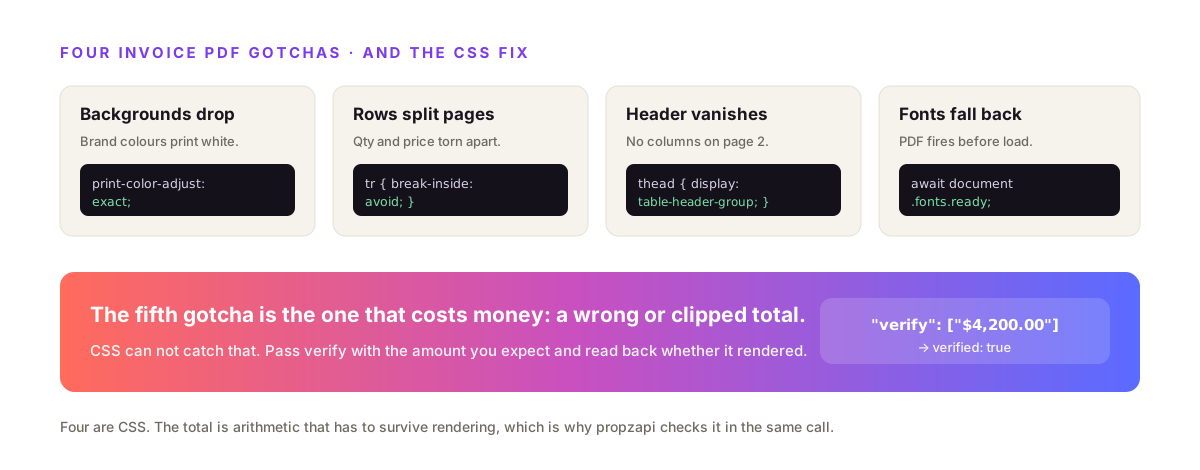
Four failures account for most broken invoice PDFs: backgrounds dropped, line-item rows split across pages, table headers that don't repeat, and web fonts that fall back to a system font. Every one of them is a CSS fix; you don't need to switch tools. Set print-color-adjust: exact, add break-inside: avoid to rows and the totals block, repeat headers with thead { display: table-header-group }, and wait for fonts before you print.
The nastiest one is the split row.
When the line-item table is taller than the page, the renderer cuts it wherever the page runs out, and a quantity ends up on one page with its price on the next. An accounts team spots that before it spots your typography. Guard every row and the summary:
/* Stop a line-item row splitting a quantity from its price across pages. */
tr        { break-inside: avoid; }
thead     { display: table-header-group; }  /* repeat the header on every page */
.totals   { break-inside: avoid; }          /* keep the summary block together */
.brand    { print-color-adjust: exact; }    /* force brand colours to actually print */
Chromium honours break-inside: avoid unevenly inside tables, a long-standing open issue, so keep the blocks you protect small (a single row, or the totals card) rather than wrapping half the document. The page-break behaviour is the same across every Chromium-based renderer, hosted or self-run.
The other three are quick. Backgrounds and brand colours vanish because print rendering strips them unless you force print-color-adjust: exact. Custom fonts fall back when the PDF fires before the web font loads, so wait for it explicitly. And propzapi renders with screen styles by default, so what you designed is what you get, without a separate print stylesheet fighting you.
Verify the total actually rendered
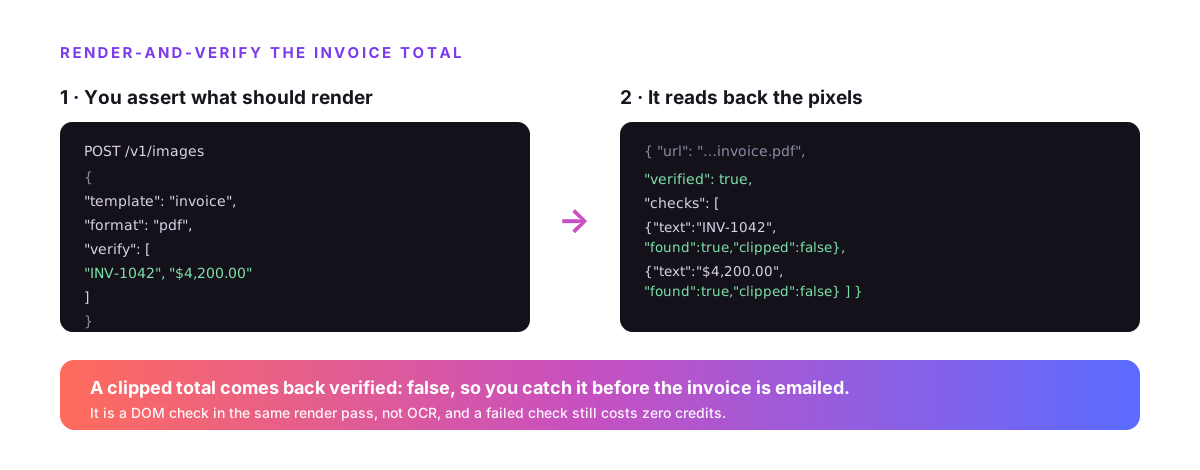
Pass verify with the exact strings you expect (the invoice number, the formatted total) and propzapi's response returns verified plus a per-string checks array marking each one found and whether it was clipped. It confirms the amount rendered as visible pixels, neither dropped nor overflowed off the edge. No other render or PDF API in this space offers proof-the-text-rendered, and on a billing document that is the whole point.
Everything else in this article, propzapi does about as well as its rivals. This is the one place it does something they don't.
Every other tool hands you a PDF and trusts that it's right. But a long customer name can push a total out of its box, a locale can format a number you didn't expect, and a font fallback can shift a layout just enough to clip a digit. You find out when the customer does. With verify you assert the values and read back whether they landed.
# Prove the total rendered: pass the exact strings you expect back.
curl https://api.propzapi.com/v1/images \
  -H "X-API-Key: pk_live_…" -H "Content-Type: application/json" \
  -d '{"template":"tpl_9f2c…","format":"pdf",
       "modifications":{"number":"INV-1042","total":4200,"items":[…]},
       "verify":["INV-1042","$4,200.00"]}'
# → { "url": "https://images.propzapi.com/img_2ef7….pdf",
#     "verified": true,
#     "checks": [ {"text":"INV-1042","found":true,"clipped":false},
#                 {"text":"$4,200.00","found":true,"clipped":false} ] }
It's a DOM check in the same render pass rather than OCR, and a failed check doesn't change the charge because the PDF still rendered. Wire it into your invoice job and a clipped total becomes an error you catch before the email goes out instead of a refund you process after it.
Build the template: line items, currency, tax
An invoice template is a header, a looped line-item table, and a totals block. In propzapi that's {% for i in items %} over your array, {{ i.amount|currency }} for each row, and {% if tax %} to show a tax line only when there is one. You send raw numbers in the JSON and the filters format them, so one template serves every customer, currency and tax situation you pass it.
The loop and the conditionals are what make it a template instead of a one-off.
Your line items come in as an array, so {% for i in items %} renders one row each. Subtotals, tax and discounts go in {% if %} blocks so an invoice with no tax simply doesn't show a tax row. The currency filter turns 3500 into your formatted amount, number handles quantities, and date formats the issue and due dates. It's the same sandboxed Jinja that APITemplate.io and propzapi both run, so a template written for one moves to the other with little more than a copy-paste.
Because the template is HTML in your repo, it's version-controlled next to your code and diffable in a pull request, which for a document that carries your company's numbers is worth more than a canvas you edit in a browser.
Self-host or use a hosted PDF invoice API?
Self-hosting Puppeteer or WeasyPrint is free to start, but you own the browser: the AWS Lambda 250MB trap, cold starts, and font management. wkhtmltopdf is out entirely, archived in 2023 with an unpatched 9.8 SSRF flaw. A hosted API removes the browser from your stack for a per-render fee. Run a handful of invoices a month and self-hosting is fine; run them in a serverless function and hosted usually wins.
Take the two live self-host options first.
Puppeteer runs real Chromium, so JavaScript-built tables and charts render, but the full package's Chromium is roughly 170MB and blows past Lambda's 250MB unzipped limit, so you end up on puppeteer-core plus a slimmed Chromium layer, minding cold starts. WeasyPrint is pure Python with no browser and installs cleanly into a Lambda, but it runs no JavaScript at all, so anything that needs JS to render won't.
wkhtmltopdf is the one to avoid outright. Its repo was archived in January 2023, the last release was 0.12.6 in 2020, and CVE-2022-35583 is an unpatched critical SSRF scored 9.8. Base a billing document on it and you've built on abandonware.
A hosted API trades that whole surface for a per-render cost: no Chromium in your function, no cold-start tuning, no CVE to track.
PDF invoice API pricing in 2026
The hosted field splits by billing model and pagination strength. DocRaptor (from $15/month, free 5 docs) runs the Prince engine and is the strongest at multi-page print output. APITemplate.io ($19) and CraftMyPDF ($39) add drag-and-drop editors. PDFMonkey (from €5) is thin HTML-to-PDF. propzapi is pay-as-you-go from a $5 pack that never expires, and the only one that verifies the total rendered.
| Tool | Approach | Free tier | Entry price | Best for |
|---|---|---|---|---|
| DocRaptor | HTML/CSS → PDF (Prince) | 5 docs/mo | $15/mo | Multi-page print docs, pagination |
| APITemplate.io | Editor + HTML | 50/mo | $19/mo | No-code template owners |
| CraftMyPDF | Visual editor | 50/mo | $39/mo | No-code template owners |
| PDFMonkey | HTML → PDF | free tier | €5/mo | Thin, developer-first conversion |
| propzapi | HTML/CSS + Jinja → PDF | 50 (one-time) | $5 PAYG · $29/mo | Single-page invoices, verify the total, pay-as-you-go |
Prices verified August 2026 from each tool's pricing page. Pick on the row that matches your job: heavy multi-page documents point at DocRaptor; a non-developer owning the template points at the editor tools; a code-first team rendering invoices from data, wanting to pay per render and prove the total, points at propzapi.
Single-page or multi-page invoices?
Be honest about the split. propzapi's template render returns a one-page PDF at the template's size, right for the invoices and receipts that fit one page, and most do. For long, many-page invoices that flow line items across paper pages with repeating headers, a Prince-based tool like DocRaptor is built for that and does it better. Use propzapi where verify and pay-as-you-go matter; reach for DocRaptor on a multi-page print job.
Most invoices are one page, so this rarely bites.
A template sized to Letter or A4 renders to a clean one-page PDF, and that covers a normal invoice, a receipt, or a statement summary. If your line items regularly run past a page, you have two honest options: render the page to a paginated, paper-sized PDF with propzapi's screenshot-to-PDF path (A4/Letter, backgrounds preserved), or use a print-engine API like DocRaptor whose whole design is multi-page pagination.
I'd rather tell you that than pretend one tool wins every row. propzapi's edge on invoices is the proof, not the pagination.
Which should you choose?
Choose propzapi when you render invoices from data in code, want to pay per render with no monthly floor, and want to verify the total on the kind of document where a wrong number gets expensive fast. Choose DocRaptor for multi-page print documents where pagination has to be flawless. Choose an editor tool like APITemplate.io if a non-developer owns the template. All three read the same HTML; pick on the job in front of you.
For a code-first team wiring invoices into a billing flow, the pitch is short: store your HTML template, render each invoice to a one-page PDF from JSON, and get back proof the total is right. Pay-as-you-go, no subscription floor.
Grab a free key, POST an invoice template, and render one with verify on. Fifty renders on the house, no card, then a $5 pack or a $29 plan.
Frequently asked questions
- How do I generate a PDF invoice from HTML?
- Store an HTML/CSS invoice template with placeholders for the changing fields, then send each invoice's data and get a PDF back. A headless-Chromium API like propzapi renders the template with your JSON: you loop the line items, format the money, and it returns a one-page PDF URL. No browser to run, no print server to keep alive.
- Why do line items split across pages in my invoice PDF?
- The renderer breaks the table wherever the page runs out, so a quantity can land on one page and its price on the next, the exact thing an accounts team notices first. Add break-inside: avoid to each line-item row and to the totals block, and thead { display: table-header-group } so the header repeats. Chromium honours break-inside unevenly inside tables, so keep the blocks small.
- How do I check the invoice total actually rendered correctly?
- With propzapi, pass verify with the exact strings you expect, like the invoice number and the formatted total. The response returns verified plus a per-string checks array marking each one found and whether it was clipped. It confirms the amount rendered as visible pixels, not dropped or overflowed. On an invoice, where a wrong or cut-off total is expensive, that check is the point.
- Is wkhtmltopdf still safe for generating invoices?
- No. The wkhtmltopdf repository was archived in January 2023, the last release was 0.12.6 in 2020, and it carries CVE-2022-35583, an unpatched critical SSRF flaw scored 9.8. It runs on an end-of-life Qt WebKit fork with no CSS updates coming. Treat it, and the pdfkit wrapper around it, as abandonware, not something to base a billing document on.
- Can I generate invoice PDFs on AWS Lambda?
- Yes, but not with the full puppeteer package: its bundled Chromium (~170MB) blows past Lambda's 250MB unzipped limit. Use puppeteer-core plus @sparticuz/chromium, or skip the browser entirely and call a hosted PDF invoice API so no Chromium ships in your function at all. Give a self-hosted function at least 512MB of memory.
- How do I format currency and totals in an invoice template?
- In a propzapi template, {{ amount|currency }} formats a number as money and {% for item in items %} loops the line rows. You send raw numbers in the JSON (4200, not '$4,200.00') and the filter formats them at render, so the same template handles any currency or locale you configure. It keeps the maths in your code and the formatting in one place.