
Open Graph Image API: Generate Dynamic og:image URLs In One Call
Every one of your blog posts shares the same flat OG image. That's a thousand links on X and LinkedIn that all look identical, and forgettable.
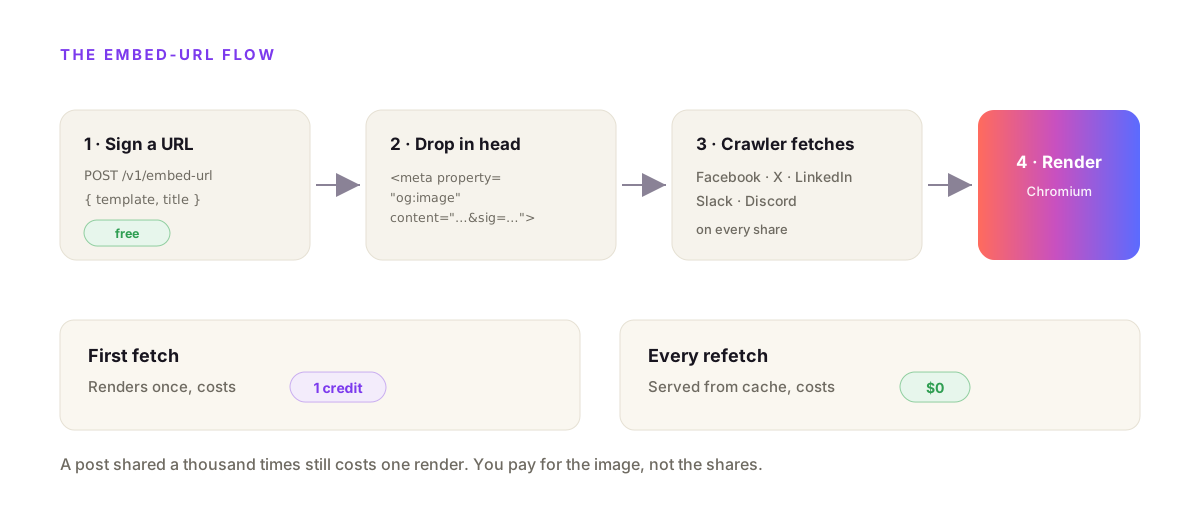
An Open Graph image API turns a template and your data into a per-page og:image and hands you a URL to drop into <meta property="og:image">. You store one 1200×630 layout with {{variables}}, then sign a URL per post from that post's title. With propzapi that's one POST to /v1/embed-url. The image renders the first time a crawler fetches it, and every refetch after that is free.
I build propzapi, so the examples use it. But the pattern applies to any Open Graph image API, and I'll say plainly where you don't need one at all.
What is an Open Graph image API?
An Open Graph image API is an HTTP endpoint that generates the image link previews use. The Open Graph protocol, created at Facebook in 2010, lets a page declare its share image with a <meta property="og:image"> tag. An OG image API produces that image from a template plus data, so every page can have its own without anyone opening a design tool. It's the og image generator idea, but automated and per-record.
Think about where the image comes from today.
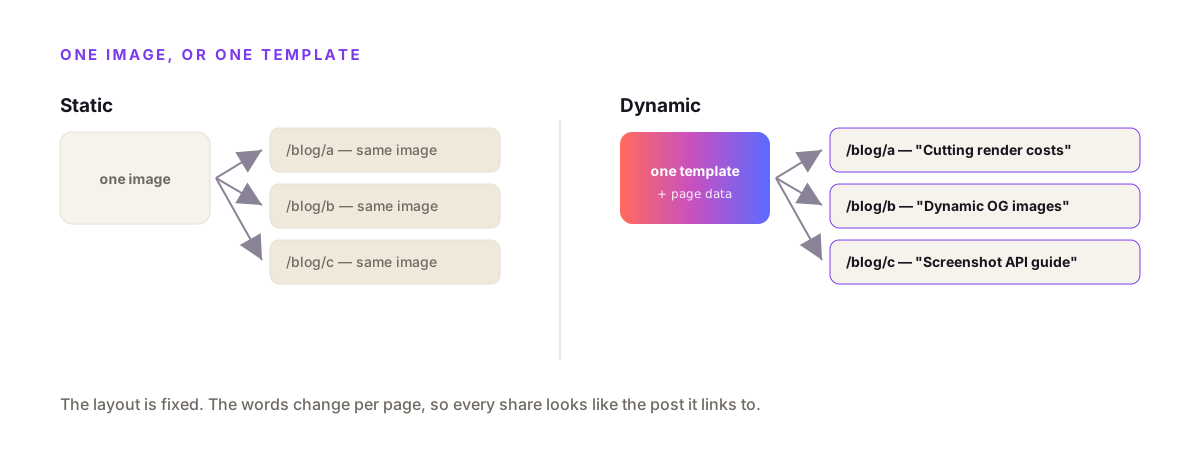
Someone designs one share image in Figma. It goes in the site header meta. Every page ships the same picture. New blog post, same image. New product, same image.
The API flips that. Your title, author, or price becomes part of the image at request time. The layout is fixed; the words change per page. That's the whole trick, and it's why "dynamic og image" is a search people actually run.
Why generate OG images dynamically instead of making them by hand?
Because you can't hand-make an image for content that doesn't exist yet. A blog with 400 posts, a store with 10,000 products, or a SaaS that mints a share card per user has no fixed set of images to design. Dynamic generation means the image is defined once as a template and produced on demand from the record's data, so coverage is automatic and nothing ships with a blank or generic preview.
Hand-made images are fine right up until they aren't.
Five landing pages? Make five images. Done. But the moment the images map to rows in a database, hand-making them breaks. You'd need a human in the loop for every new post.
The trend has a clear origin. When Vercel shipped @vercel/og in 2022, generating a per-page OG image at the edge went mainstream. The idea caught on because it solved a real gap: every page deserves its own preview, and no team can draw thousands by hand.
How the propzapi Open Graph image API works
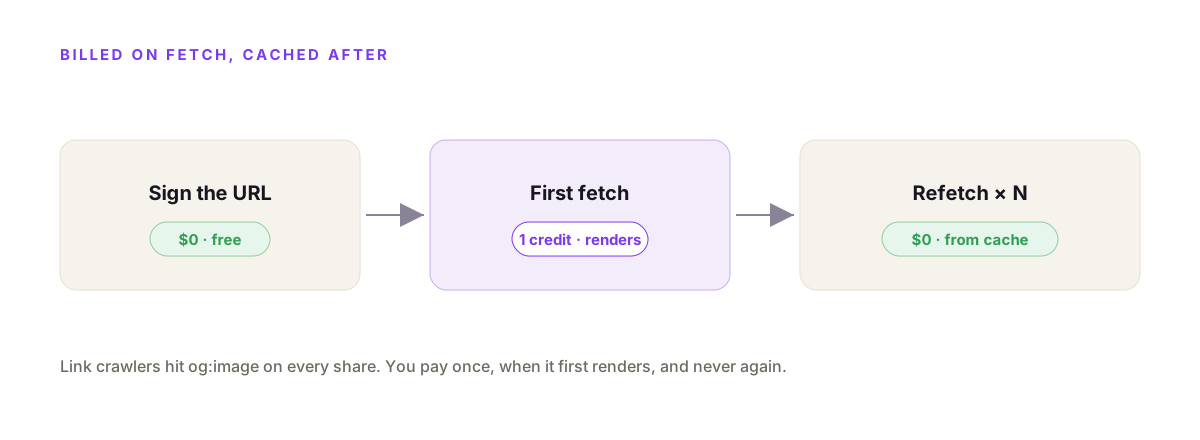
You POST a template id and your data to /v1/embed-url, and get back a signed URL for <meta property="og:image">. Signing is free. The image renders in headless Chromium the first time the URL is fetched, which costs one credit, and every fetch after that is served from cache for nothing. The built-in og-article template is already 1200×630, so you can ship a dynamic OG image today by passing a title.
Here's the fastest path, with a built-in template.
curl https://api.propzapi.com/v1/embed-url \
  -H "X-API-Key: pk_live_…" -H "Content-Type: application/json" \
  -d '{"template":"og-article",
       "modifications":{"eyebrow":"BLOG","title":"Dynamic OG images in one call"}}'
# → {
#   "url": "https://api.propzapi.com/v1/og/og-article?eyebrow=BLOG&title=Dynamic+OG+images…&sig=…",
#   "og_image_tag": "<meta property=\"og:image\" content=\"…\">"
# }
# Signing is free. The image renders on first fetch (1 credit), then it's cached.
The response hands you both the raw URL and a ready-made meta tag. You put the URL in your page head and you're done.
The signed URL is the important part. The signature is an HMAC over your account, the template, and the exact values, so a crawler hitting the URL can't tweak the title and bill a different render to your account. It renders what you signed, nothing else.
If you'd rather just fetch a PNG once and host it yourself, /v1/images returns the image URL directly.
curl https://api.propzapi.com/v1/images \
  -H "X-API-Key: pk_live_…" -H "Content-Type: application/json" \
  -d '{"template":"og-article",
       "modifications":{"eyebrow":"ENGINEERING","title":"How we cut render costs by 95%"}}' -i
# → { "url": "https://images.propzapi.com/img_95e5….png",
#     "width": 1200, "height": 630, "format": "png", "bytes": 95126 }
# X-Credits-Cost: 1   X-Credits-Remaining: 49   X-Cache: miss
That one is billed the moment it renders. The embed-url flow is better for og:image because the render is deferred to first fetch and then cached, which fits how link crawlers behave.
Generate an OG image from your own HTML template
Store your HTML once, then sign a URL per post. POST your 1200×630 HTML with {{variables}} to /v1/templates for a tpl_ id, then POST that id with each post's data to /v1/embed-url. Because propzapi renders in full headless Chromium, whatever CSS works in your browser works in the image: flexbox, grid, gradients, web fonts. Your brand's real layout, not a subset.
# store your OG layout once — {{fields}} are the variables you fill per post
curl https://api.propzapi.com/v1/templates \
  -H "X-API-Key: pk_live_…" -H "Content-Type: application/json" \
  -d '{"name":"og-post","width":1200,"height":630,
       "html":"<div style=\"width:1200px;height:630px;display:flex;flex-direction:column;justify-content:center;padding:80px;font-family:sans-serif;background:#0c0a10;color:#fff\"><div style=\"color:#b45cff;font-weight:700;letter-spacing:2px\">{{tag}}</div><div style=\"font-size:64px;font-weight:800;margin-top:16px\">{{title}}</div></div>"}'
# → { "template": "tpl_1ecf…", "width": 1200, "height": 630 }
# sign a per-post URL from your own template
curl https://api.propzapi.com/v1/embed-url \
-H "X-API-Key: pk_live_…" -H "Content-Type: application/json" \
-d '{"template":"tpl_1ecf…","modifications":{"tag":"BLOG","title":"Ship faster"}}'
# → { "url": "https://api.propzapi.com/v1/og/tpl_1ecf…?tag=BLOG&title=Ship+faster&sig=…", … }Now wire it into your framework. Signing is cheap and free, so calling it per page is fine.
// Build a per-page og:image tag from your post data (Next.js, Astro, anything).
// Signing is free, so you can call this at build or request time per page.
export async function ogImageUrl(post) {
  const res = await fetch("https://api.propzapi.com/v1/embed-url", {
    method: "POST",
    headers: { "X-API-Key": process.env.PROPZAPI_KEY, "Content-Type": "application/json" },
    body: JSON.stringify({
      template: "tpl_1ecf…",
      modifications: { tag: post.category, title: post.title },
    }),
  });
  if (!res.ok) throw new Error(`sign failed: ${res.status}`);
  const { url } = await res.json();
  return url; // <meta property="og:image" content={url} />
}
And the same in Python, where raise_for_status() turns a bad key into a loud error instead of a broken tag.
import os, requests

def og_image_url(post):
    r = requests.post(
        "https://api.propzapi.com/v1/embed-url",
        headers={"X-API-Key": os.environ["PROPZAPI_KEY"]},
        json={"template": "tpl_1ecf…",
              "modifications": {"tag": post["category"], "title": post["title"]}},
    )
    r.raise_for_status()          # a bad key fails loudly instead of parsing as data
    return r.json()["url"]         # drop into <meta property="og:image">
The template holds your design. The modifications are the words that change per page. That split is what turns "a share image for every post" from a design chore into a one-line function.
Because it's real Chromium, your brand fonts work too. Load a web font with an @font-face rule or a Google Fonts link in the template's HTML, and it renders in the image exactly as it does on your site. No re-uploading fonts to a dashboard, no subset to fight, just the CSS you already ship.
OG image API vs @vercel/og vs doing it yourself
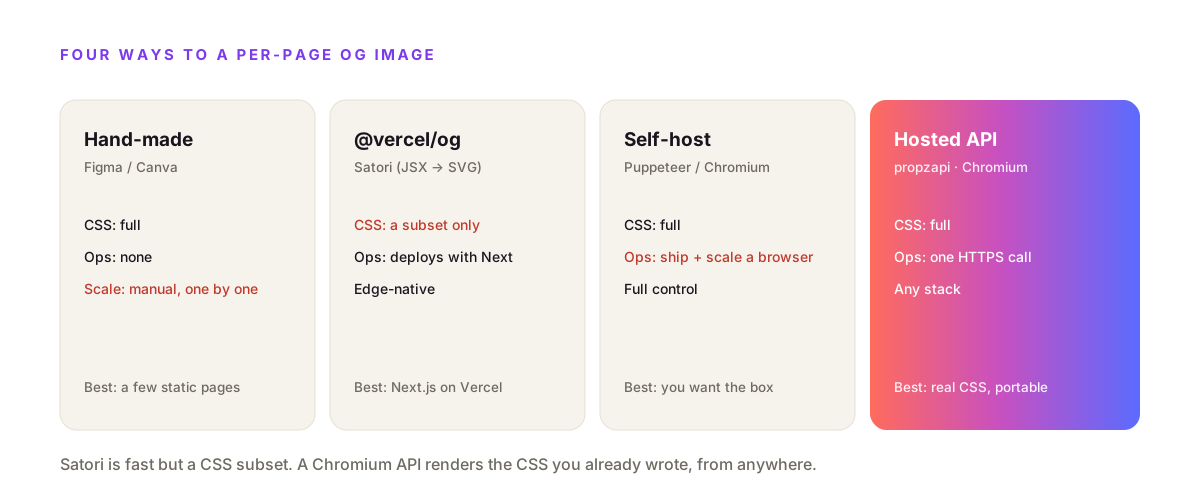
There are four ways to get a per-page OG image: make them by hand, use @vercel/og (Satori), run Puppeteer yourself, or call a hosted OG image API. Satori is fast and edge-native but renders a subset of CSS, so intricate layouts break. Running Chromium yourself gives full CSS but you ship and scale a browser. A hosted API gives full Chromium CSS with no infra, from any stack.
Each choice trades something.
| Approach | Engine | CSS fidelity | Ops | Best for |
|---|---|---|---|---|
| Hand-made (Figma / Canva) | You, manually | Full | None, but no scale | A few static pages |
| @vercel/og | Satori (JSX→SVG) | CSS subset | Deploys with Next on Vercel | Next.js on Vercel |
| Self-host Puppeteer | Headless Chromium | Full | You ship + scale a browser | Full control |
| Hosted OG image API | Vendor Chromium | Full | One HTTPS call | Any stack, real CSS |
The honest read: if you live inside Next.js on Vercel and your card is simple, @vercel/og is a great default and you should use it. The Satori CSS subset is the catch. Satori renders a flexbox-only slice of CSS: no grid, no media queries, no pseudo-elements, and you have to set display:flex on every container by hand. Fonts are limited to ttf, otf and woff, and advanced typography like ligatures and kerning isn't there. The day your design needs a font Satori won't load or a layout it won't do, you're rewriting. A Chromium API renders the CSS you already wrote.
What size should an OG image be, and what does it cost?
Render at 1200×630. Facebook recommends 1200×630 (a 1.91:1 ratio), a 200×200 minimum, and a file under 8MB. X's summary_large_image card wants 2:1, at least 300×157, under 5MB. Cost-wise with propzapi, one render is one credit, billed only when it actually renders, and every refetch is free.
The size story is simpler than the specs make it look.
Build at 1200×630 and you're safe on Facebook, LinkedIn and Slack, and close enough on X, which crops toward 2:1. A real render at that size is about 100KB as a PNG, well under every platform's cap. propzapi's built-in og-article is exactly 1200×630 for this reason.
Cost is where people get caught out.
Link crawlers are relentless. Facebook, Slack, LinkedIn and X each fetch your og:image, and every re-share can trigger another fetch. If you paid per fetch, a viral post would be a surprise bill. With the embed-url flow you pay once, when the image first renders, and cache serves the rest.
Put numbers on it. Say a blog post gets shared 800 times across X, LinkedIn and Slack over its life. Those platforms will fetch the og:image far more than 800 times, counting previews, re-shares and periodic re-scrapes. Under a bill-per-fetch model that's hundreds of charges for one image. Under the sign-once, render-on-first-fetch model it's a single credit, because every fetch after the first is a cache hit. The cost of an OG image should track how many distinct images you make, not how popular they get, and that's the whole reason to defer the render to first fetch.
Why isn't my og:image updating after I change it?
Almost always because the platform cached it. Facebook, LinkedIn, Slack and X scrape your og:image once and hold onto it, so a new image doesn't show until you force a re-scrape in their debugger or post inspector. It's rarely your API. Before you blame the image, confirm the URL is absolute, publicly reachable, the right size, and under the platform's file cap, then re-scrape to bust the cache.
This is the failure people misdiagnose most.
You ship a new card, share the link, and the old image shows up. Nothing is broken. Facebook's Sharing Debugger and LinkedIn's Post Inspector both let you paste a URL and click "scrape again," which refetches the tags and the image. Do that once and the new card appears.
The dynamic-URL approach actually helps here, because the render is deferred to first fetch. When you sign a fresh URL for a post, the very first crawler that hits it triggers the render, so there's no stale file sitting in your own storage to clear. The only cache left to worry about is the platform's, and that's a one-click re-scrape.
One more basic worth checking: the URL has to be absolute. A relative /og/post.png works in your browser but not for an external crawler. propzapi hands back a fully-qualified, signed URL for exactly this reason.
When you don't need an Open Graph image API
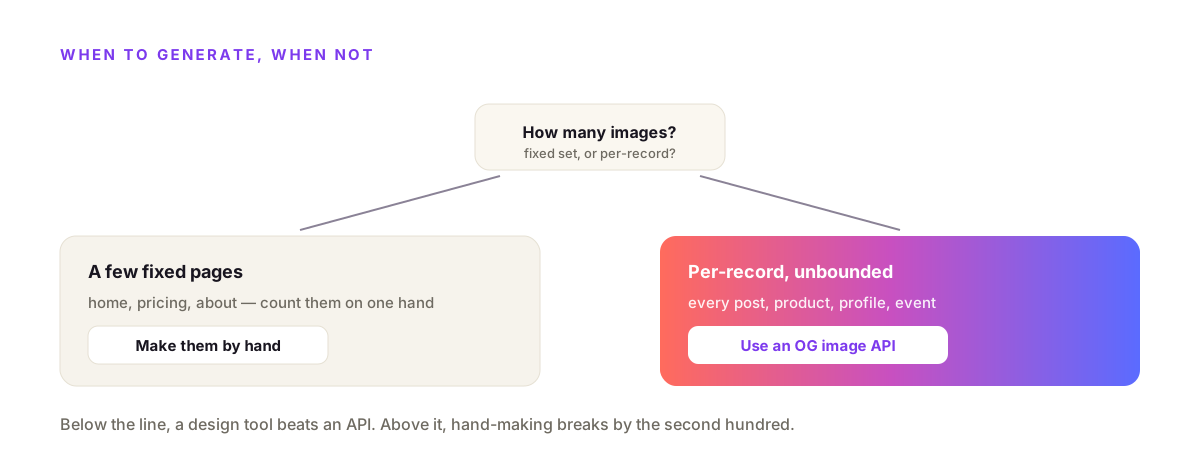
Skip the API when your image set is small and fixed. A marketing site with a home page, a pricing page, and an about page has three OG images to make, and hand-making them in a design tool once is faster than wiring up any API. Reach for an OG image API only when the images are per-record and unbounded: a post, product, profile, or event each needing its own. Match the tool to the count.
An API is a dependency. Dependencies earn their keep or they don't.
If you can count your pages on one hand, a generator is overkill. Draw the images, set the meta tags, ship. You'll spend less time than reading these docs.
But if the images track a database, hand-making stops working the day you add the second hundred records. That's the line. Below it, a design tool. Above it, an Open Graph image API.
Two free tools sit next to this if you want to feel the shape of it first: an OG image generator that makes a single card in your browser, and an OG preview checker that shows how a URL previews on X, Facebook, LinkedIn, Slack and Discord. Neither needs an account.
Frequently asked questions
- What size should an Open Graph image be?
- Make it 1200×630, a 1.91:1 ratio. Facebook's own guidance recommends 1200×630, a minimum of 200×200, and a file under 8MB. X's summary_large_image card wants a 2:1 image, at least 300×157, under 5MB. 1200×630 renders cleanly across Facebook, LinkedIn, Slack and X, so most teams standardise on it and stop worrying about the rest.
- How do I generate a different OG image for every blog post?
- Store one template with {{variables}}, then sign a URL per post from your post's data. With propzapi you POST the template id and the post's title to /v1/embed-url and get back a URL you drop into og:image. Each post gets its own image without you opening a design tool. The image renders the first time a crawler fetches the URL, then it's cached.
- Is @vercel/og or a hosted OG image API better?
- @vercel/og is great if you're on Next.js and Vercel, but it renders with Satori, which supports only a subset of CSS, so complex layouts and some fonts break. A hosted OG image API renders in full headless Chromium, so any CSS you'd use in a browser works, and it runs from any stack, not just Vercel. Pick Satori for tight Vercel integration, a Chromium API for CSS fidelity and portability.
- Why isn't my og:image showing on Facebook or LinkedIn?
- Almost always caching. Facebook, LinkedIn and Slack scrape your og:image once and hold it, so edits don't show until you force a re-scrape in their debugger or post inspector. Also check the basics: the URL must be absolute, publicly reachable, the right size, and under the size cap. propzapi returns an absolute, signed URL that renders on first fetch, which sidesteps the most common failures.
- Does a dynamic OG image URL cost a credit every time it's fetched?
- No. Signing the URL is free. The first time the image is actually fetched it renders once and costs one credit. Every refetch after that is served from cache for free, which matters because Facebook, Slack and X hammer og:image URLs on every share and re-share. So a post that gets shared a thousand times still costs you one render.
- Do I even need an OG image API for a small site?
- Probably not. If your site is a handful of static pages, make the images by hand in Figma or Canva once and move on. An Open Graph image API earns its place when the images are per-record and you can't hand-make them: every blog post, product, user profile, or event. If the count is unbounded, generate them; if it's five pages, don't.
Sign your first og:image URL now
Grab a free key, POST your HTML to /v1/templates, then POST the id to /v1/embed-url and drop the URL in your head. Fifty renders on the house, no card, and signing is free. If you're building for an assistant, propzapi is also an MCP server, so an agent can generate a share image as a tool call.