
Beyond @vercel/og: Dynamic OG Images With Full CSS
Your OG image looks perfect on localhost. Then it ships, and the card is blank, or the font is wrong, or the grid you built collapsed into a stack.
@vercel/og is the right tool for most Open Graph images, and it's free. You should reach for something else only when Satori, the engine underneath it, starts fighting you: no CSS grid, fonts you have to supply by hand, and a 500KB bundle ceiling. When your card outgrows those limits, the fix is to render it in a real browser instead. I build one of the tools that does that, so weigh this accordingly, but the trade-off is the same whichever you pick.
Here's when @vercel/og is plenty, exactly where it breaks, and what to do when you hit the wall.
Is @vercel/og good enough for your OG images?
For most sites, yes. @vercel/og renders a 1200×630 card from JSX in your own function for free, it's native to Next.js, and it's fast because it never boots a browser. Reach for an alternative only when you hit one of three specific walls: you need CSS grid or another layout Satori can't do, you're fighting fonts (non-Latin scripts, WOFF2, system fonts), or your assets blow past the 500KB bundle limit.
If your card is a title, a gradient, a logo and some text, stop reading and use @vercel/og. It's genuinely good, and free beats paid every time the free tool does the job.
The trouble starts when the design gets real. A dashboard-style card with a grid of stats. A certificate with a specific brand font. A receipt in Japanese. Those are the cases where Satori's limits stop being trivia and start being your afternoon.
So the question isn't whether @vercel/og is good. It is. The question is whether your specific card fits inside Satori's box.
How does @vercel/og actually render an image?
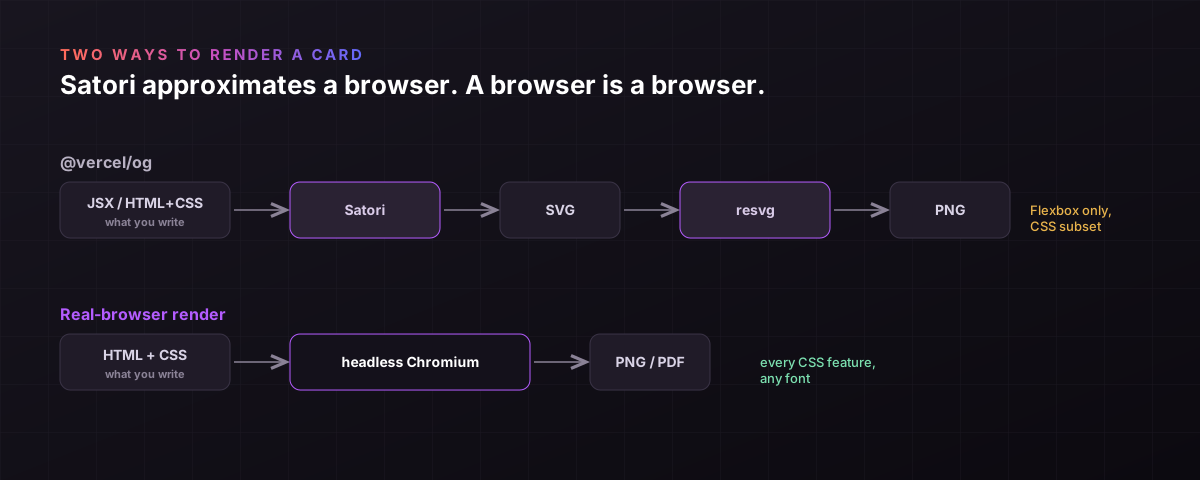
@vercel/og converts your JSX to an image in two hops: Satori turns the HTML and CSS into an SVG, then Resvg rasterises that SVG into a PNG. It runs in a Vercel function through the ImageResponse constructor. That's the whole pipeline, and every limitation below comes from the first hop, because Satori is not a browser.
This matters because a browser and Satori solve layout differently.
Per Vercel's own docs, "@vercel/og uses Satori and Resvg to convert HTML and CSS into PNG." Satori is a pure-JavaScript library with no browser dependency, which is exactly why it fits in constrained runtimes. Its layout is done by Yoga, the same Flexbox engine React Native uses.
One correction, because stale blog posts get it wrong: @vercel/og is no longer Edge-only. Vercel's docs now support the Node.js runtime for app/ routes too, where you can load a local font with fs.readFile instead of fetching it. Edge is the common path, not the only one.
The defaults are worth knowing. Output is 1200×630. The only bundled font is Noto Sans. Emoji work out of the box through a built-in emoji option that defaults to twemoji, so the raw-Satori "you need a custom emoji loader" advice doesn't apply to @vercel/og. Everything else you bring yourself.
Why doesn't CSS grid work in @vercel/og?
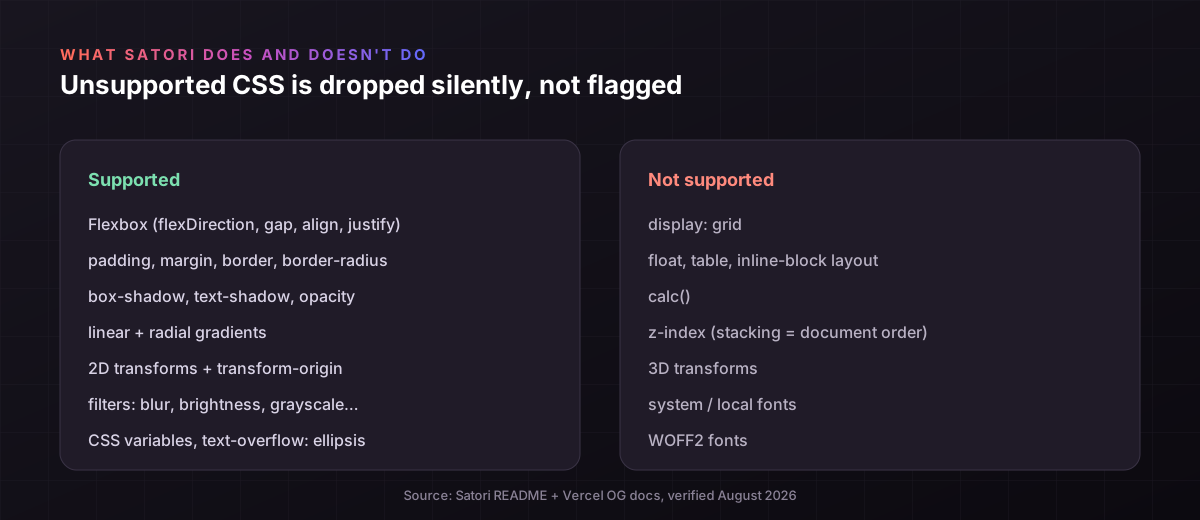
Because Satori has no grid. Its layout engine is Yoga, which is Flexbox-only, so display: grid is silently ignored and your grid collapses into the default flow. Vercel states it plainly: "Only flexbox and a subset of CSS properties are supported. Advanced layouts (display: grid) will not work." There's no error, the property just does nothing, which is why the card looks fine in your editor and wrong in the render.
The silent part is the real trap.
Satori doesn't throw when it meets CSS it can't handle. It skips the property and moves on, so a grid, a float, a calc() width or a z-index layer vanishes without a warning. The most-upvoted Satori feature request is literally a plea to make it error on unsupported CSS instead of ignoring it.
What does work is a decent Flexbox subset: flexDirection, wrap, grow, shrink, alignItems, justifyContent, gap, plus padding, borders, border-radius, box-shadow, gradients, 2D transforms and filters like blur. You can build a lot with that.
What doesn't: CSS grid, float, table, inline-block layout, calc(), z-index (stacking follows document order), and 3D transforms. If your design leans on any of those, you'll be rewriting it in Flexbox or moving off.
Why does my OG image font work locally but break in production?
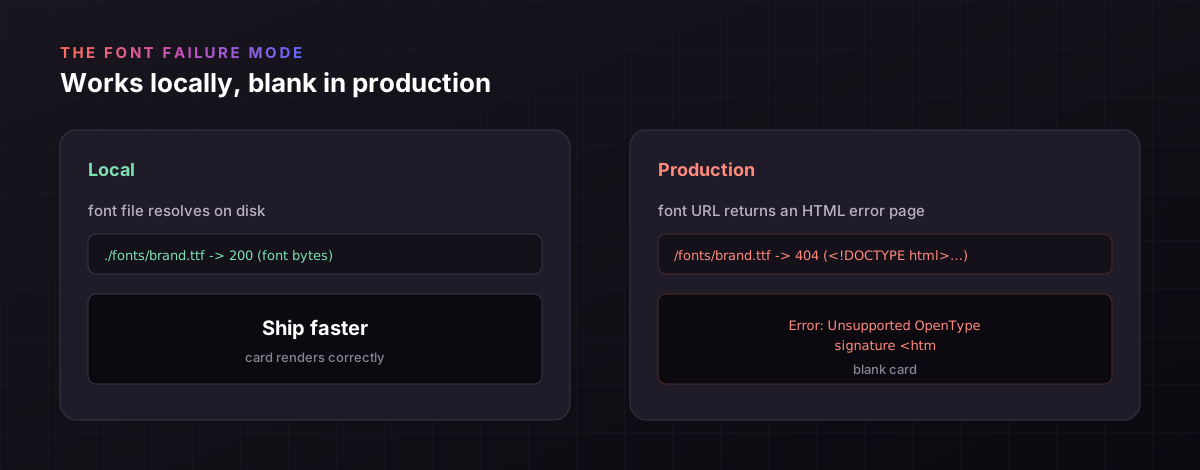
Because @vercel/og has no system fonts, so every font except Noto Sans has to be supplied by you as a raw TTF, OTF or WOFF buffer, and the way that fetch fails in production is ugly. If the font URL returns an HTML error page instead of the font binary, Satori throws an Unsupported OpenType signature error. It worked locally because the local file resolved; it breaks in prod because the deployed URL didn't.
Fonts are the single most common @vercel/og support thread, and it's always a variant of this.
You pass fonts explicitly in the fonts option as an ArrayBuffer, with a name, weight and style. Only TTF, OTF and WOFF are accepted, not WOFF2, which is the format most font CDNs hand you first, so grabbing the wrong URL is an easy miss. The signature error in Satori issue #511 is almost always a font route returning a 404 or redirect page.
Non-Latin scripts are the other half. Because only Noto Sans ships, a Japanese, Korean, Arabic or Devanagari string renders as tofu boxes until you supply a font subset that covers those glyphs. There's an open Satori issue about loading out-of-range characters, and it's a real amount of work for a card in another language.
None of this is a bug. It's the cost of not having a browser's font stack. But it's why "just add a custom font" turns into an afternoon.
When does the 500KB bundle limit bite?
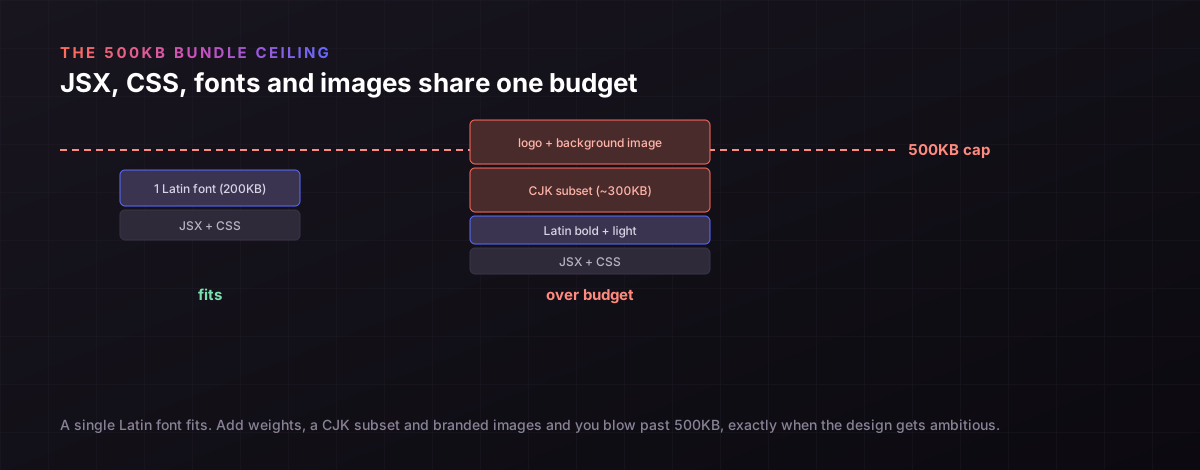
When your fonts and images get real. @vercel/og caps the entire bundle (your JSX, CSS, fonts and images together) at 500KB, per Vercel's limits. A single Latin font weight fits easily. Three weights plus a CJK subset plus a branded background image do not, and you hit the ceiling exactly when your card gets ambitious enough to need them.
This is the wall people don't see coming.
A CJK font subset alone can be hundreds of kilobytes. Add a bold and a light weight for your headings, a logo, and a background texture, and you're over budget before the design is done. Vercel's advice is to fetch assets at runtime instead of bundling them, which works, but now you're back to the production-fetch failure from the last section.
So the three limits compound. No grid pushes you to heavier layouts, custom fonts push up your bundle, and the 500KB cap pushes you to runtime fetches that fail in prod. Any one is livable. Together they're the signal you've outgrown the tool.
@vercel/og vs a real-browser render: the honest trade-off
@vercel/og is free, native and fast but limited to Satori's CSS; a real-browser render is paid or self-hosted and slower but supports every layout and font a browser does. The choice is that clean. If your card fits Satori, the free tool wins. If it doesn't, you render the exact same HTML in headless Chromium, self-hosted or through a hosted API, and everything just works, at the cost of money, a network hop, or ops.
Neither is strictly better. They're for different cards.
| @vercel/og (Satori) | Real-browser render | |
|---|---|---|
| Cost | Free, in your function | Paid API or self-host |
| Runs | Edge or Node runtime | Hosted service or your server |
| Layout engine | Yoga (Flexbox) | Full browser (Chromium) |
| CSS grid / calc / z-index | No | Yes |
| Fonts | You supply TTF/OTF/WOFF | Any web font, WOFF2, system-embedded |
| Bundle limit | 500KB total | None |
| Speed | Fast (no browser) | Slower (few hundred ms) |
| Also does PDF / screenshots | No | Usually yes |
The right read: don't leave @vercel/og because a comparison table exists. Leave it when a row in that table is a wall you actually hit.
How do you render OG images with full CSS?
You render the HTML in a real headless Chromium instead of Satori, which gives you every CSS feature a browser has: grid, calc(), z-index, filters, any web font including WOFF2, and system-embedded fonts. Two ways: self-host Puppeteer or Playwright, or call a hosted HTML-to-image API. Self-hosting is free but you own the browser pool, the memory and the 3am restarts; a hosted API is a paid call with no infra.
The trade-off is real, so name it honestly.
Self-hosting Puppeteer means a large Chromium binary that won't fit in an Edge function, plus the ops load of keeping it alive under traffic. Vercel itself built Satori partly to avoid shipping Puppeteer. For a lot of teams that ops load is the reason to pay someone else for the render.
A hosted API is the other route. You send HTML and get a PNG or PDF back, rendered in full Chromium. That's what I build (propzapi, HTML and CSS to an image or a one-page PDF, plus URL screenshots), so weigh that accordingly, but the honest cost is that it's a paid call with a network hop and a few-hundred-millisecond render, versus @vercel/og's free co-located one. You write HTML rather than JSX, and there's no ImageResponse ergonomics.
# render the exact same HTML in real Chromium, with full CSS
curl https://api.propzapi.com/v1/images \
  -H "X-API-Key: YOUR_API_KEY" -H "Content-Type: application/json" \
  -d '{"template":"og-article","modifications":{"title":"Ship faster"},"verify":["Ship faster"]}'
# -> { "url": "https://images.propzapi.com/img_0014.png", "width": 1200, "height": 630 }
The one thing a browser render adds that Satori structurally can't: because it's a real DOM, you can verify the exact text landed as visible pixels. Pass the strings you expect and the response confirms they rendered, which matters when the card is a receipt or a certificate and a silently-dropped font is a customer-facing bug.
How do you generate a dynamic OG image from your database?
You pass the per-page data into the render at request time, not build time. With @vercel/og you make an OG route that reads the values off the query string and fetches from your database inside the route. With a hosted API you store one template and send each page's data as JSON. Either way the image is generated per request and cached, so crawlers don't re-render it.
The pattern is the same idea, two shapes.
For @vercel/og, Vercel's dynamic OG guide shows passing content as query params to the image route. Watch one production gotcha: set metadataBase in your metadata, or og:image resolves to localhost and the card is blank when shared, which is the most common "works locally, not in prod" OG bug on Next.js.
For a hosted API, you render once and cache. propzapi signs an embed URL you drop into <meta og:image> that renders on the first crawl and serves cached after, so a shared post costs one render no matter how many times it's fetched. Store the template, send each page's values as JSON, done.
Which should you choose for dynamic OG images?
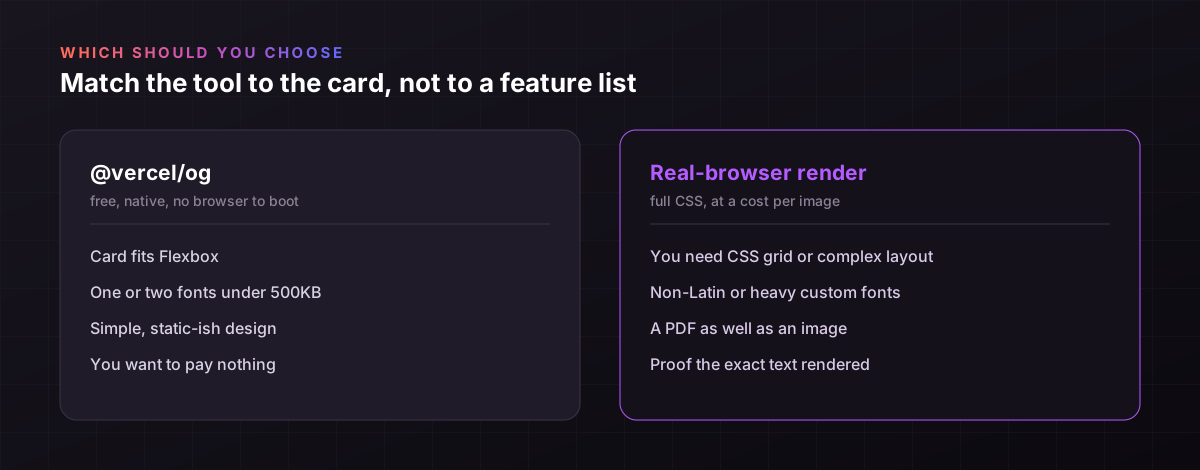
Choose @vercel/og when your card fits Flexbox, uses a font or two under 500KB, and you'd rather pay nothing and stay inside Next.js. Choose a real-browser render when you need CSS grid, non-Latin or heavy fonts, a PDF as well as an image, or proof the text rendered. Most sites start on @vercel/og and only some outgrow it. The trigger is a limit you actually hit, not a general upgrade.
I'm not going to tell you to leave a free tool that works.
If your OG images are simple, @vercel/og is the answer and a hosted render is a waste of money. That's the honest call for the common case, and it's most cases.
But if you've spent an afternoon fighting display: grid, tofu boxes, or the 500KB cap, that's the tool telling you your card outgrew it. Render the same HTML in a real browser and the fight ends. Start with whichever your card actually needs.
Frequently asked questions
- Why does display: grid do nothing in my OG image?
- Because @vercel/og uses Satori, whose layout engine is Yoga, which only does Flexbox. display: grid is unsupported and silently ignored, so your grid collapses into the default flow with no error. Vercel documents this directly under limitations. Rebuild the layout in Flexbox, or render the card in a real browser that supports grid natively. The silence is the trap: nothing warns you, the card just looks wrong in production.
- My OG image works locally but breaks in production. Why?
- Usually one of two things. Either metadataBase isn't set, so og:image resolves to localhost and breaks when shared, which is the most common Next.js OG bug. Or a font or image URL that resolved locally returns an HTML error page in production, which surfaces as an Unsupported OpenType signature error. Check the deployed asset URLs return real binaries, and set metadataBase in your root metadata.
- How do I use a custom font, and why do only some characters render?
- @vercel/og ships only Noto Sans, so you pass any other font explicitly in the fonts option as a TTF, OTF or WOFF ArrayBuffer, not WOFF2. Characters outside your supplied font render as tofu boxes, so a non-Latin string needs a font subset that covers those glyphs. This is why a Japanese or Arabic card shows empty boxes until you load a matching font, and it's a real amount of setup for each script.
- Why do I get an Unsupported OpenType signature error?
- Because the font URL returned an HTML page instead of the font file, and Satori tried to parse the HTML as a font header and rejected it. It works locally because the local file loads, and breaks in production because the deployed URL 404s, redirects, or returns an error page. Point the font URL at a real, reachable TTF/OTF/WOFF binary, and confirm it returns the font bytes in production, not a redirect.
- How do I generate an OG image from my database per page?
- Create an OG route that reads the page identifier from the query string or route params, fetches that record from your database at request time, and renders the values into the card. With @vercel/og that's the ImageResponse route pattern; with a hosted API you store one template and POST each page's data. Both generate per request from live data and cache the output, so crawlers hit the cache instead of re-rendering.
- Is @vercel/og free, and is an alternative worth paying for?
- @vercel/og is free, and it runs in your own Vercel function with no per-image charge. An alternative is worth paying for only when you hit a wall it can't clear: CSS grid, heavy or non-Latin fonts, the 500KB bundle cap, or a need for PDF, screenshots, or proof the text rendered. For simple cards, paying for a render is a waste. For cards that outgrew Satori, a real-browser render is cheaper than the hours you'd spend fighting it.
Start with what your card needs
Don't switch tools on principle. Ship your OG image on @vercel/og, and if it renders clean, you're done and it cost nothing. The day you lose an afternoon to a collapsed grid, a tofu string, or the 500KB cap, that's your signal to render the same HTML in a real browser instead. Match the tool to the card, not to a feature list.