
Screenshot API: Turn Any URL Into An Image In One Call
You need a picture of a web page. Not the HTML, not a link preview, the actual rendered pixels. And you need it from your server, on a schedule, a few thousand times. Running a browser to do that is more work than it sounds.
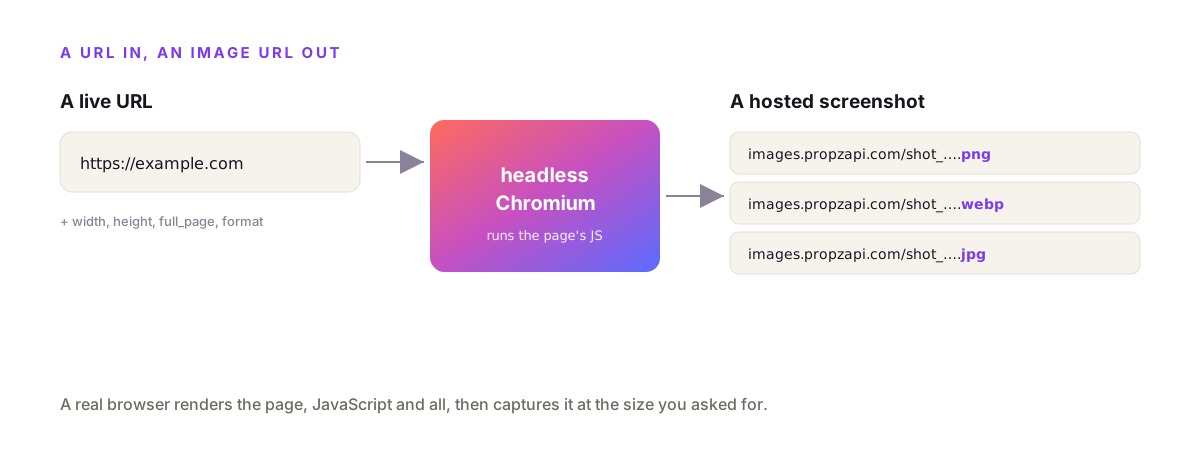
A screenshot API captures any public web page as an image over one HTTP call. You POST a URL, it loads the page in headless Chromium on the vendor's side, and returns a hosted PNG, JPEG or WebP. No browser to install, no lazy-load scrolling to script, no infrastructure to babysit. With propzapi it's one POST to /v1/screenshot, one credit per capture, and the same key that generates images and PDFs.
I build propzapi, so the examples use it. But I'll be straight about where a dedicated screenshot API beats it, because for some jobs one clearly does.
What is a screenshot API?
A screenshot API is an HTTP endpoint that turns a live URL into an image. You send the page address plus options like width, height, format and full-page, and the service renders the page in a real browser engine and hands back an image URL. It's the "url to image" job as a service: no headless browser to run, no fonts to install, no queue of render workers to keep alive.
The mental model is a browser you drive over HTTP.
Normally a browser loads a URL and a human looks at it. A screenshot API keeps the loading and rendering and swaps the human for a file. The page's real CSS, fonts and images get painted exactly as a visitor would see them, then captured at the size you asked for.
This is a different job from an HTML to image API, which renders markup you send it. A screenshot API points at a page that already exists on the web. Same engine, opposite input: one takes your HTML, the other takes someone's URL.
What can you do with a screenshot API?
Four jobs come up again and again: link-preview thumbnails, visual monitoring, archiving, and turning a live page into an asset. Teams generate a preview image for every URL a user shares, diff captures over time to catch visual regressions on each deploy, keep dated snapshots of pages for compliance, and build gallery thumbnails of sites. Anywhere you'd otherwise open a browser and hit print-screen on a schedule, a screenshot API does it programmatically.
The most common one is link previews.
A user pastes a URL into your app and you want a thumbnail of it, the way Slack or a chat app shows a card. One capture per URL, cached, and you have it.
Visual regression testing is the developer favourite. You capture the same set of pages on every deploy and diff the images. If a CSS change quietly shifts a layout, the pixel diff catches it before a user does.
Archiving is the compliance angle. A dated PNG of a page as it actually looked is evidence in a way an HTML snapshot isn't, which is why Urlbox markets certified archiving to regulated industries.
And plenty of teams just want the page inside something else: a thumbnail in a directory, a hero in a report, or a captured page dropped into a generated PDF.
Why use a screenshot API instead of running Puppeteer yourself?
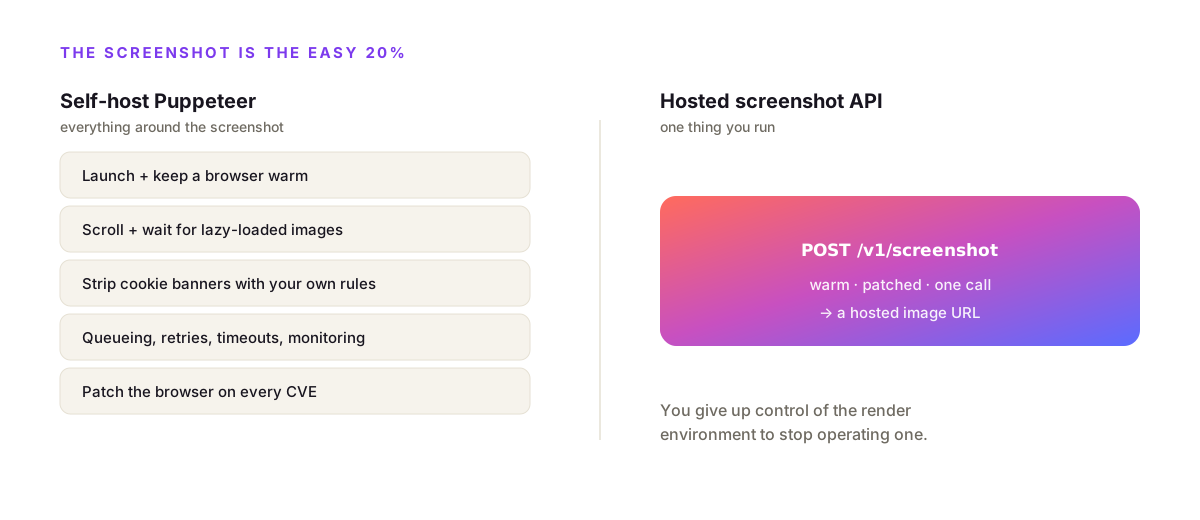
Because the screenshot is the easy 20%. Self-hosting Puppeteer or Playwright means launching a browser, waiting for content to load, scrolling to trigger lazy-loaded images, and stripping cookie banners with your own selector lists, then wrapping it all in queueing, browser patching, retries, timeouts and monitoring. A hosted screenshot API is that same Chromium kept warm and patched, reached in one HTTP call.
The script is deceptively short.
Ten lines of Puppeteer takes a screenshot on your laptop. Production is where it gets expensive. As Scrapfly's 2026 screenshot-API roundup puts it, the biggest hidden cost of Puppeteer isn't the library, it's everything around it: queueing, browser updates, sandboxing, retries, and monitoring.
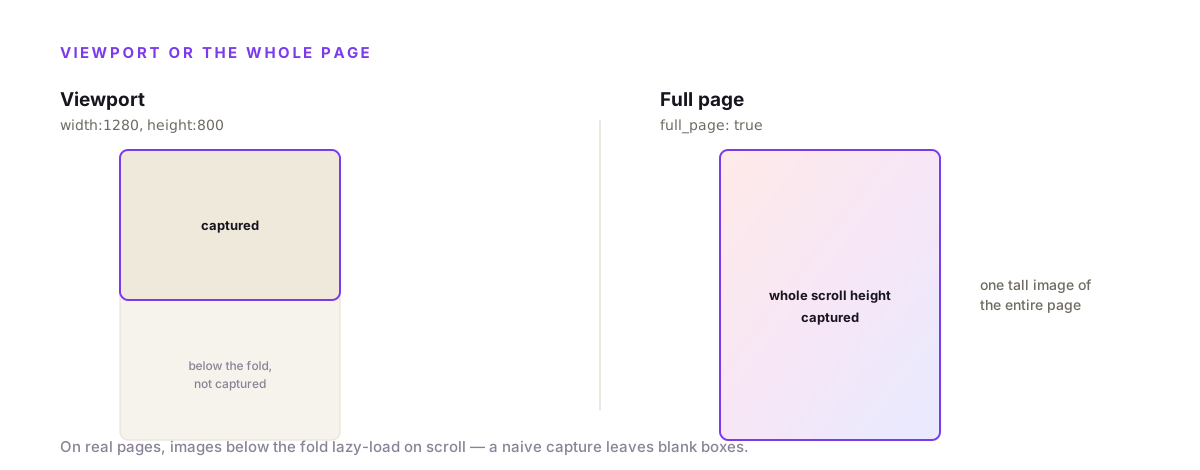
Then there's the page itself. Real sites lazy-load images as you scroll, and if you capture before they load, the full-page shot is full of blank boxes. Cookie banners and newsletter popups sit on top of the content. Dedicated screenshot APIs ship blocking engines with tens of thousands of rules to dismiss those before capture. Roll it yourself and you're maintaining selector lists forever.
The trade is simple: an API takes the browser off your plate, and you give up total control of the render environment to stop operating one.
Take a screenshot with propzapi
POST a URL to /v1/screenshot and get a hosted image back. Set width and height for a viewport capture, or full_page true for the whole scroll height. Choose png, jpeg or webp, and scale 2 for retina. Every capture is one credit, billed only when an image comes back, and the response includes the URL, dimensions, format and byte size. It's the same key and meter as generating images and PDFs.
Want to see it before writing any code? The free website screenshot tool captures any URL as a PNG right in your browser, no signup. Wire in the API when you need it at scale.
The basic call is a URL and a size.
# capture a public URL to an image
curl https://api.propzapi.com/v1/screenshot \
  -H "X-API-Key: pk_live_…" -H "Content-Type: application/json" \
  -d '{"url":"https://example.com","width":1200,"height":630}'
# → { "url": "https://images.propzapi.com/shot_50cdf5….png",
#     "source": "https://example.com", "width":1200, "height":630,
#     "format":"png", "full_page":false, "bytes":16323 }
# X-Credits-Cost: 1
That's a real response. The URL is live and hosted, the bytes are the actual file size, and one credit moved. For a whole page instead of a viewport, flip full_page on.
# full_page captures the whole scroll height, not just the viewport
curl https://api.propzapi.com/v1/screenshot \
  -H "X-API-Key: pk_live_…" -H "Content-Type: application/json" \
  -d '{"url":"https://example.com","full_page":true,"format":"webp"}'
# → { "url": "https://images.propzapi.com/shot_bd3965….webp",
#     "full_page":true, "format":"webp", "bytes":8946 }
Formats and retina work the same as the image endpoints: webp for smaller files, jpeg for photo-heavy pages, and scale for hi-dpi.
# scale doubles the pixels for retina; jpeg for smaller photo-heavy shots
curl https://api.propzapi.com/v1/screenshot \
  -H "X-API-Key: pk_live_…" -H "Content-Type: application/json" \
  -d '{"url":"https://example.com","scale":2,"format":"jpeg"}'
# → { "url": "https://images.propzapi.com/shot_23fd03….jpg", "format":"jpeg", "bytes":18196 }
Wired into Node, it's one function.
// Capture a URL to a hosted image. Works in any Node runtime.
export async function screenshot(url) {
  const res = await fetch("https://api.propzapi.com/v1/screenshot", {
    method: "POST",
    headers: { "X-API-Key": process.env.PROPZAPI_KEY, "Content-Type": "application/json" },
    body: JSON.stringify({ url, full_page: true, format: "png" }),
  });
  if (!res.ok) throw new Error(`screenshot failed: ${res.status}`);
  const { url: image } = await res.json();
  return image; // store it, embed it, diff it
}
And the same in Python.
import os, requests

def screenshot(url):
    r = requests.post(
        "https://api.propzapi.com/v1/screenshot",
        headers={"X-API-Key": os.environ["PROPZAPI_KEY"]},
        json={"url": url, "full_page": True, "format": "png"},
    )
    r.raise_for_status()          # a bad key fails loudly instead of parsing as data
    return r.json()["url"]         # a hosted screenshot URL
A typical place this lands: a user saves a bookmark or shares a URL, your handler calls the function, and you store the returned image URL as that link's thumbnail. One call on save, and every link in your app has a preview without you touching a browser.
Does a screenshot API handle JavaScript-heavy pages?
Yes, because it renders in a real browser. A screenshot API runs the page's JavaScript in headless Chromium, so single-page apps, canvas charts, and content injected after load all paint before capture, exactly as a visitor's browser would. The variable is timing: the API has to wait for that JavaScript to finish. Specialists expose fine-grained wait controls; a basic endpoint waits a sensible default and captures.
This is the big advantage over a plain HTTP fetch.
Fetching a URL and screenshotting its HTML gets you an empty shell for any modern site, because the content arrives via JavaScript after load. A real browser engine runs that JavaScript, so a React or Vue app renders its actual UI before the capture.
The hard part is knowing when the page is "done." A specialist lets you wait until the network goes idle, pause a fixed delay, or block until a specific element appears. propzapi captures after the page loads with a default wait, which is fine for most pages. If your target renders slowly or streams content in, a specialist's explicit wait-for-selector is the more reliable tool, and that's a fair reason to reach for one.
Is it safe to send URLs to a screenshot API?
Mostly, if the vendor guards against SSRF. You hand the target URL to a third party's browser, so a careless service can be tricked into screenshotting your own internal network, a cloud metadata endpoint, or a private admin panel. A screenshot API worth using blocks private and localhost addresses. propzapi rejects any non-public URL, so a capture call can't be turned into a probe of internal infrastructure.
This is the risk most people never think about.
If you let users submit URLs to screenshot, you've built a proxy. An attacker submits http://169.254.169.254/, the AWS metadata endpoint, or http://localhost/admin, and a naive renderer happily fetches it from inside your network and hands back the image. That's a server-side request forgery, and it's how screenshot features leak cloud credentials.
propzapi blocks it at the door. I tested it while writing this: a screenshot request for localhost, 169.254.169.254, or a 10.x private address comes back with "url must be a public http(s) address (private/localhost blocked)." The endpoint only captures public pages, full stop.
The other half of the question is trust, and no guard fixes it: you're still sending the URL, and therefore what you're capturing, to a third party. For a genuinely sensitive internal dashboard, self-host the render or use a vendor with a private-network option. For public pages, a hosted API with an SSRF guard is fine.
The best screenshot APIs compared
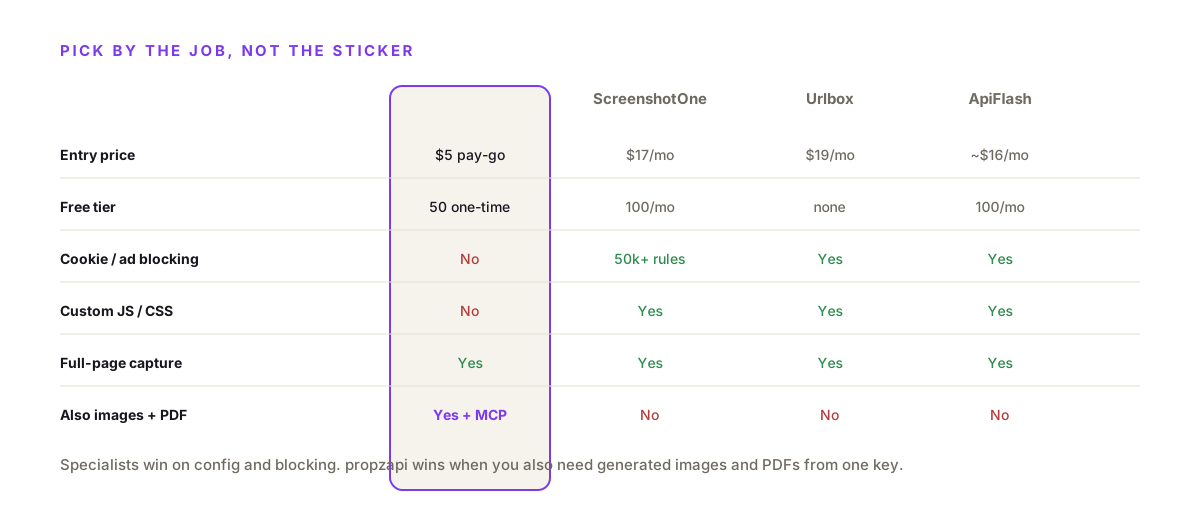
There are four honest picks. ScreenshotOne is the most configurable, with 50,000+ ad and cookie-banner blocking rules and custom JS/CSS. Urlbox targets enterprise and compliance, running since 2012. ApiFlash is the cheapest, on AWS Lambda. propzapi bundles a basic screenshot with template image generation and PDFs on pay-as-you-go pricing. Pick on whether you need config depth, low price, enterprise features, or a screenshot that lives inside a wider image API.
Side by side, the trade-offs are clear.
| propzapi | ScreenshotOne | Urlbox | ApiFlash | |
|---|---|---|---|---|
| Entry price | $5 pay-as-you-go (150) | $17/mo (2,000) | $19/mo (2,000) | ~$16/mo (1,000) |
| Free tier | 50 renders, one-time | 100/mo | None | 100/mo |
| Cookie / ad blocking | No | 50,000+ rules | Yes | Yes |
| Custom JS / CSS | No | Yes | Yes | Yes |
| Full-page capture | Yes | Yes | Yes | Yes |
| Also generates images / PDF | Yes (+ MCP) | No | No | No |
| Pricing model | Pay-as-you-go or plan | Subscription | Subscription | Subscription |
The read: if screenshots are your whole job and you hit messy public sites, a specialist earns its keep. ScreenshotOne, Urlbox and ApiFlash each do things propzapi doesn't. propzapi's angle is narrower and specific: one key and one meter for screenshots, generated images, and PDFs.
What does a screenshot API cost?
About a cent a shot on a subscription, or a few cents pay-as-you-go. ScreenshotOne is $17/month for 2,000 (about $0.0085 each) per its pricing, Urlbox starts at $19 for 2,000, and ApiFlash is roughly $16 for 1,000. propzapi's $5 pack covers 150 captures at about $0.033 each and never expires. The subscriptions are cheaper per shot at volume; pay-as-you-go avoids a monthly floor when usage is low or spiky.
The per-shot number isn't the whole story.
ScreenshotOne, usefully, doesn't count failed renders or cached responses against your quota, which matters when you screenshot the same URLs repeatedly. propzapi bills on delivery too: a failed capture costs nothing, and the credit cost rides in a response header so you can reconcile every call.
The math that decides it is volume shape. If you capture 20,000 pages every month like clockwork, a subscription at half a cent a shot wins. If you capture 300 this month and 4,000 next, pay-as-you-go with no floor and non-expiring credits usually comes out ahead.
Make it concrete, and I'll argue against myself.
Say you snapshot 2,000 competitor pages a month for a monitoring dashboard, steady. On ScreenshotOne that's the $17 Basic plan, about $0.0085 a shot. On propzapi's pay-as-you-go that's roughly $66 in packs, plainly worse at that volume, so the specialist wins and you should use it. Now flip it: you capture 40 link previews a month. The subscription still costs $17; propzapi is about $1.30, and the leftover credits don't expire. The sticker price never decides this, the volume shape does.
When propzapi is the right screenshot API, and when it isn't
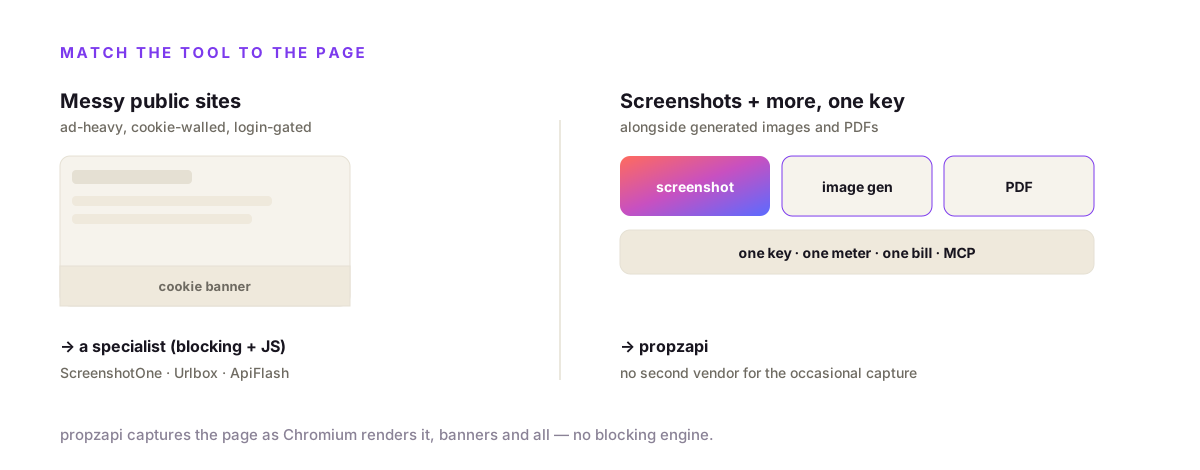
Choose propzapi when screenshots sit next to image generation and PDFs in your product and you want one key for all of it, or when an agent needs to capture a page as an MCP tool call. Choose a specialist when screenshots are the whole job on messy public sites: propzapi does not block cookie banners or ads, inject custom JS/CSS, or target a single element, and ScreenshotOne, Urlbox and ApiFlash do. Match the tool to how much the page fights back.
I'm not going to pretend propzapi wins the pure-screenshot race.
If your targets are ad-heavy, cookie-walled, login-gated pages and you need pixel-perfect captures at scale, a dedicated API with a blocking engine and JS injection is the right tool, full stop. propzapi captures the page as Chromium renders it, banners and all.
Where propzapi fits is the bundle. If you're already generating OG images or PDFs from templates and you also need to grab the occasional live page, adding a whole second vendor for screenshots is overhead. One key, one meter, one bill covers all three, and an AI agent can call any of them as an MCP tool and get the image back inline.
Frequently asked questions
- What's the best screenshot API?
- It depends on the job. ScreenshotOne is the most configurable, with 50,000+ ad and cookie-banner blocking rules and custom JS/CSS injection. Urlbox suits enterprise and compliance, running since 2012. ApiFlash is the cheapest, built on AWS Lambda. propzapi is the pick when you need screenshots alongside template image generation and PDFs from one pay-as-you-go key. Match the tool to whether you need config depth, low price, or a bundled image API.
- How much does a screenshot API cost per screenshot?
- Roughly a cent, and it varies by plan. ScreenshotOne is $17/month for 2,000 shots (about $0.0085 each), Urlbox starts at $19 for 2,000, and ApiFlash runs about $16 for 1,000. propzapi is pay-as-you-go: a $5 pack covers 150 renders (screenshots or generated images), about $0.033 each, and never expires. Subscriptions win at steady high volume; pay-as-you-go wins for spiky or low usage.
- When should I use a screenshot API instead of Puppeteer or Playwright?
- Use an API when the job is just 'get a screenshot of this URL' and not full browser automation. Self-hosting Puppeteer means launching a browser, waiting for content, scrolling for lazy-loaded images, and stripping cookie banners with your own selector lists, plus queueing, browser patching, retries and monitoring. A screenshot API is one HTTP call against Chromium that someone else keeps warm and patched.
- How do I take a full-page screenshot?
- Set full_page to true and the API captures the entire scroll height, not just the viewport. With propzapi, POST the URL with full_page true to /v1/screenshot and you get the whole page as one image. The dedicated screenshot APIs also wait for lazy-loaded images and dismiss cookie banners first so nothing is cut off and no popup repeats down a long capture.
- Is there a free screenshot API?
- Yes. ScreenshotOne gives 100 screenshots a month with no card. propzapi's free tier is a one-time 50 renders, no card, covering screenshots and generated images. ApiFlash advertises $7/month but that only buys 100 shots. Urlbox has no free tier. Free tiers are fine for a prototype; check the per-render price and rate limits before wiring one into production traffic.
- Is it safe to send URLs to a screenshot API?
- Mostly, with two caveats. First is SSRF: if users can submit URLs, a service without a guard can be tricked into capturing your internal network or a cloud metadata endpoint. propzapi blocks private and localhost addresses, so a capture can't probe internal infrastructure. Second, you're sending the URL to a third party, so for a sensitive internal dashboard, self-host the render instead of using a public API.
- Why is my screenshot cut off or showing a cookie banner?
- Two separate problems. A cut-off capture usually means you grabbed the viewport instead of the full page, so set full_page true. A cookie banner or ad in the shot means the renderer didn't dismiss it. Config-heavy APIs like ScreenshotOne ship 50,000+ blocking rules to strip banners before capture. A basic screenshot endpoint doesn't, so on messy public sites reach for a specialist.
Capture your first screenshot now
Grab a free key, POST a URL to /v1/screenshot, and you have a hosted image in one call. Fifty renders on the house, no card, shared across screenshots, generated images and PDFs. If you're building for an assistant, propzapi is also an MCP server, so an agent can screenshot a page as a tool call and get the picture back inline.