
APITemplate.io Alternative: Same Jinja2, Pay-As-You-Go
APITemplate.io is a solid product. It's also a monthly subscription and a visual editor, and if you're a developer rendering documents from data, you may want neither.
propzapi is an APITemplate.io alternative built for developers: it renders PDFs and images from your own HTML templates using the same Jinja2 engine, so your template code barely changes, but it bills pay-as-you-go from a $5 pack that never expires, screenshots any public URL, and adds render-and-verify that confirms your exact text landed as visible pixels. APITemplate.io keeps the visual editor, the recurring free tier, and the no-code integrations propzapi doesn't have. This is where each one fits.
I build propzapi, so I have a side. I'll still tell you plainly where APITemplate.io is the right call, because for a lot of teams it is. And I'll be careful about its real feature set, because the two products overlap more than most comparisons admit.
What is APITemplate.io, and who is it for?
APITemplate.io is a template-to-document SaaS. You build a template in either a drag-and-drop editor or a code editor, then generate PDFs and images (PNG, JPEG) from it by POSTing JSON data. It uses Jinja2 for dynamic content, and connects to Zapier, Make and n8n for no-code workflows. It's aimed at teams automating invoices, reports and certificates who want the template owned in a UI, not in a repo.
Give credit where it's due.
APITemplate.io has been generating documents at scale for years, and its docs are good. The code editor gives you full HTML, CSS and JavaScript control, and the Jinja2 layer handles variables, loops and conditionals. For a team that wants a designer to edit a template without a deploy, the visual editor is the whole point.
It also splits its plans into a PDF-only track and a combined PDF-and-image track, which tells you where its center of gravity is. This is a documents-first tool that also does social images, and it's genuinely good at the documents half.
What can APITemplate.io do that propzapi can't?
A real list, and it's worth being specific. APITemplate.io has a drag-and-drop visual editor, so a non-developer can own the template. It ships native no-code connectors for Zapier, Make and n8n. Its plans include team collaboration, async webhooks, CDN storage and AWS S3 export on higher tiers. Its free plan renews 50 renders every month, and its enterprise tier allows unlimited templates. propzapi has none of the no-code tooling and caps templates at 200 per account.
This is the part a biased comparison would skip, so let me be exact.
The visual editor is the big one. In APITemplate.io a marketer can drag a text box, bind it to a field, and change the layout without touching code. propzapi has a code editor with live preview, but no drag-and-drop canvas. If a non-technical person owns your templates, that difference decides it on its own.
The integration list is the second. APITemplate.io plugs into Zapier, Make and n8n directly, so you can wire "new row in a sheet, generate a PDF, email it" without writing a service. propzapi expects you to call the API from your own code. For a no-code stack, that's a real gap.
And the platform features add up: team seats, webhooks that fire when a render finishes, CDN-backed storage, and an S3 export on the higher plans. propzapi stores renders in Cloudflare R2 when it's configured, which is durable object storage, not a CDN, and it has no team seats or webhooks today. If you need those, APITemplate.io is the more complete platform.
Why look for an APITemplate.io alternative?
Three reasons come up: the billing model, the template caps, and the editor overhead. APITemplate.io's standard plans are subscriptions with no pay-as-you-go option (only enterprise unlocks it, by email request), so occasional usage pays a full month. Its cheaper tiers cap templates hard, at 3 on free and 15 on the $35 Starter. And if you're a developer, editing a template in a canvas can feel slower than writing HTML in your repo.
Look at the billing first, because it's the most common trigger.
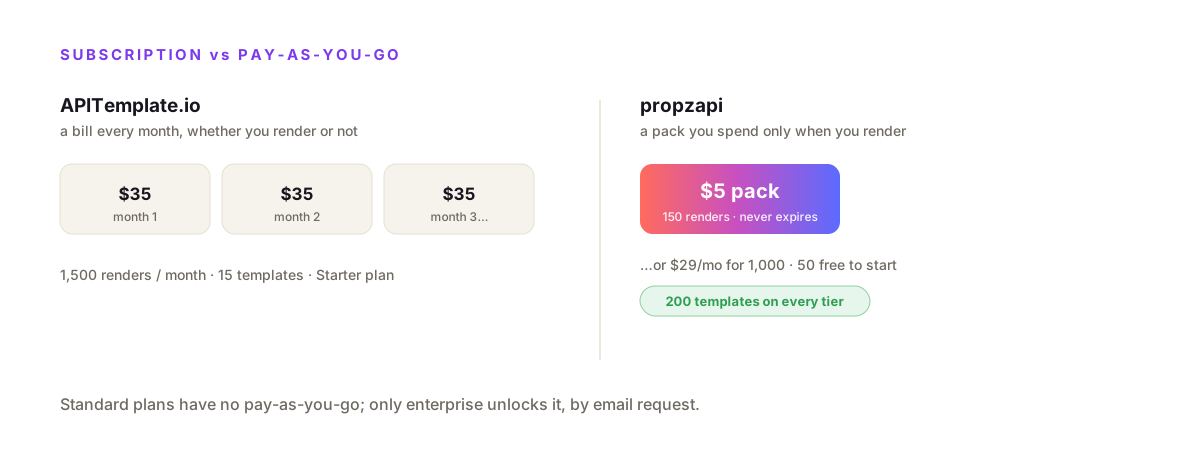
Per APITemplate.io's pricing (verified August 2026), the combined image-and-PDF plans are Starter at $35/month for 1,500 renders and 15 templates, Standard at $89 for 9,000 renders and 150 templates, and Enterprise at $179 for 20,000 renders and unlimited templates. The PDF-only track starts at $24 for 3,000 PDFs. The free plan is a recurring 50 renders a month with 3 templates. Pay-as-you-go is enterprise-only, activated by emailing their team.
Do the math on a small project. If you ship a few hundred documents a month, you pay $35 whether you render 60 or 1,500, and you're limited to 15 templates. That subscription floor is the same story that pushes people off most template APIs: you pay for the plan, not for what you render.
The template cap bites earlier than people expect. Fifteen templates on the Starter plan sounds like plenty until you're generating a certificate, three invoice variants, an OG card per content type, and a couple of report layouts. Then you're either pruning templates or jumping to the $89 tier for headroom.
This isn't only my read. On G2, APITemplate.io reviewers rate it well overall but keep flagging the same two things: a limited template allowance on the cheaper tiers and a template-editor UI that stops short of what they want. The friction is the plan shape and the caps, not the render quality.
One more thing worth naming, because you'll hit it the moment you search. Most "APITemplate alternative" lists are written by other visual-editor tools, Robolly, Templated and Orshot among them, and they mostly add a canvas and video on top of the same subscription idea. If what you wanted was less no-code, not more, a code-first API is the option those roundups skip.
APITemplate.io pricing in 2026
APITemplate.io is subscription-only on its standard plans, with two tracks. The combined image-and-PDF track runs $35/month (1,500 renders, 15 templates), $89 (9,000 renders, 150 templates) and $179 (20,000 renders, unlimited templates). The PDF-only track runs $24, $89 and $179. The free plan gives 50 renders a month and 3 templates. Annual billing saves up to 20%, and pay-as-you-go is available on enterprise plans only, by request.
| Plan | Price | Renders / mo | Templates |
|---|---|---|---|
| Free | $0 | 50 | 3 |
| Starter (image + PDF) | $35/mo | 1,500 | 15 |
| Standard (image + PDF) | $89/mo | 9,000 | 150 |
| Enterprise (image + PDF) | $179/mo | 20,000 | Unlimited |
| PDF Basic (PDF only) | $24/mo | 3,000 | 20 |
Contrast that with propzapi. A $5 pack buys 150 renders that never expire, the free trial is 50 renders, and a monthly plan is $29 for 1,000. You can skip the subscription entirely and only pay when you render.
APITemplate.io vs propzapi, feature by feature
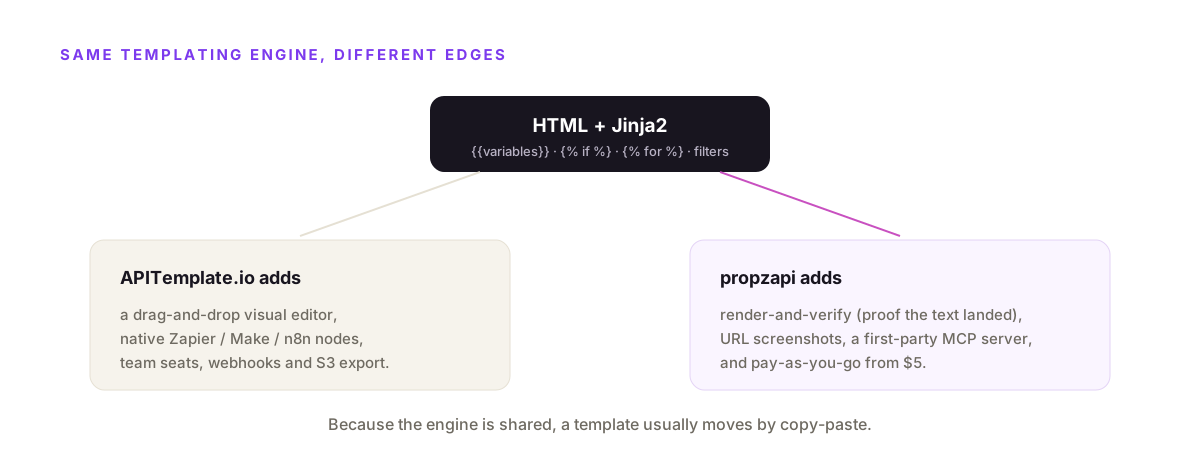
They share the core, so the differences are at the edges. Both render HTML-with-Jinja2 to images and PDFs. APITemplate.io wins on the visual editor, no-code integrations, team features and free-tier renewal. propzapi wins on pay-as-you-go pricing, URL screenshots, a first-party MCP server, a 200-template cap on every tier, and render-and-verify, which no other tool in this field offers. Pick on which edge you actually feel.
| APITemplate.io | propzapi | |
|---|---|---|
| Templating | HTML + Jinja2 | HTML + sandboxed Jinja2 |
| Entry price | $35/mo (1,500) | $5 pay-as-you-go (150) · $29/mo (1,000) |
| Pricing model | Subscription (PAYG enterprise-only) | Pay-as-you-go or monthly |
| Free tier | 50 renders / month, 3 templates | 50-render one-time trial, up to 200 templates |
| Visual editor | Yes (drag-and-drop) | No (code editor + live preview) |
| Zapier / Make / n8n | Native | Call the REST API yourself |
| URL screenshots | Not offered | Yes |
| Render-and-verify | No | Yes |
| Agent / MCP | Via Zapier's MCP | First-party hosted |
| Team seats / webhooks | Yes | No |
Where propzapi is the better pick
Choose propzapi when you render documents from data in code, want to pay for what you use, and already write HTML. Because it runs the same Jinja2, your APITemplate.io template moves over with little more than a copy-paste. You POST the HTML once, then render it with each record's data as an image or a one-page PDF. For an indie project, a side feature, or an agent that produces documents, the pay-as-you-go model fits better than a platform subscription.
The template is HTML you already have, because you wrote it for APITemplate.io in the same language.
# APITemplate templates are HTML + Jinja2. Paste the same HTML into propzapi.
curl https://api.propzapi.com/v1/templates \
  -H "X-API-Key: pk_live_…" -H "Content-Type: application/json" \
  -d '{"name":"invoice","width":816,"height":1056,
       "html":"<div style=\"padding:64px;font:16px sans-serif\">Invoice {{number}} — total {{total|currency}}</div>"}'
# → { "template": "tpl_9f2c…", "width": 816, "height": 1056 }
# render it with each row's data: image or one-page PDF
curl https://api.propzapi.com/v1/images \
-H "X-API-Key: pk_live_…" -H "Content-Type: application/json" \
-d '{"template":"tpl_9f2c…","format":"pdf",
"modifications":{"number":"INV-1042","total":1290}}'
# → { "url": "https://images.propzapi.com/img_7c1a….pdf",
# "format": "pdf", "bytes": 41022 }
# X-Credits-Cost: 1 X-Credits-Remaining: 49Two things land here that APITemplate.io's cheaper plans don't. You pay per render, not per month, so a $5 pack replaces a $35 subscription. And you get 200 templates on every tier, so you're not rationing template slots at the low end. (Both tools export one-page PDFs, so that's not the reason to switch.)
What propzapi does that APITemplate.io doesn't
The one that matters most is render-and-verify. Pass the exact strings you expect, and propzapi's response confirms each rendered as visible text, not dropped or clipped, in the same call. It also screenshots any public URL to an image or a paginated PDF, and ships a first-party hosted MCP server an agent calls as a native tool. No template API in this field offers proof-the-text-rendered.
Verify is the one that's genuinely ahead, so start there.
When you generate an invoice, a certificate or a statement, the number has to be right and it has to be visible. A long name can overflow its box. A web font can fail to load and fall back, shifting the layout. With most render APIs you find out when a customer does. With propzapi you pass the strings you expect and read back whether each one landed.
# prove the amount rendered: no competitor in this field does this
curl https://api.propzapi.com/v1/images \
  -H "X-API-Key: pk_live_…" -H "Content-Type: application/json" \
  -d '{"template":"tpl_9f2c…",
       "modifications":{"number":"INV-1042","total":1290},
       "verify":["INV-1042","$1,290.00"]}'
# → { "url": "https://images.propzapi.com/img_7c1a….png",
#     "verified": true,
#     "checks": [ {"text":"INV-1042","found":true,"clipped":false},
#                 {"text":"$1,290.00","found":true,"clipped":false} ] }
It's a DOM check in the same render pass, not OCR, and a failed check doesn't change the charge, because the image still rendered. For anything where a wrong value is expensive, that's a guarantee an image tool can't otherwise make.
The screenshot endpoint is the second. propzapi renders any public URL to an image or a paper-sized PDF, backgrounds preserved, lazy content scrolled in first. APITemplate.io is template-first and doesn't capture arbitrary URLs, so this is a capability you'd otherwise bolt on with a separate tool.
The MCP server is the third. APITemplate.io is reachable from an agent through Zapier's MCP, but propzapi is an MCP server itself, hosted for you, so a Claude or Cursor agent adds it as a tool and gets the file back inline with no glue code.
Which one should you choose?
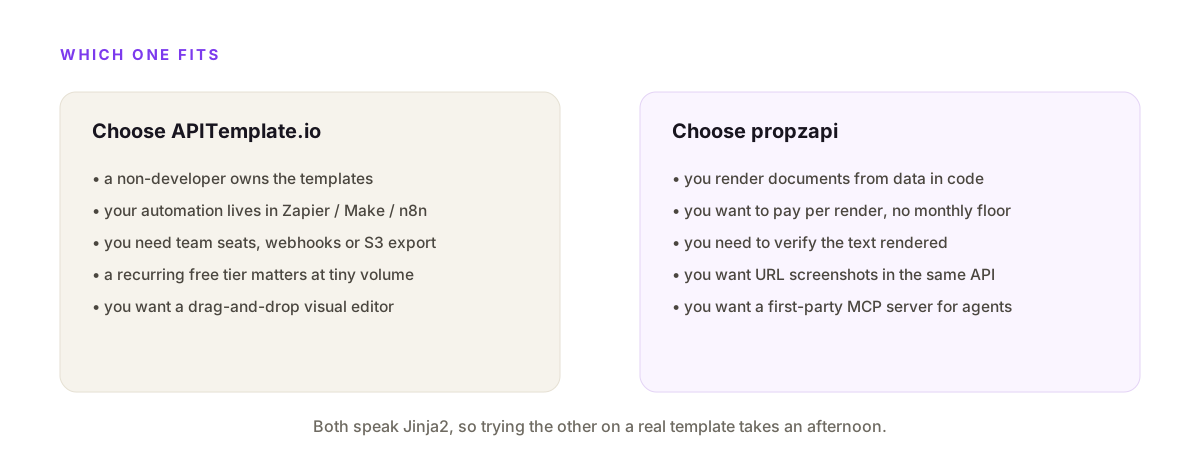
Choose APITemplate.io if a non-developer owns the templates, if you live in Zapier, Make or n8n, or if you need team seats, webhooks and S3 export. Choose propzapi if you render documents from data in code, want to pay per render with no monthly floor, need to verify the output, or want a first-party MCP server. Since both speak Jinja2, the switching cost is low enough that you can try the other on a real template in an afternoon.
I'm not going to pretend propzapi wins every row.
If your designer edits templates in a canvas, a code-only API is the wrong tool. If your automation lives in n8n, APITemplate.io's native node saves you a service. And its recurring free tier beats propzapi's one-time trial for tiny, steady volume.
But if you're a developer rendering invoices, certificates or OG cards from a database, on a budget, and you'd like proof the text came out right, the pay-as-you-go price and verify land where a subscription platform doesn't. Two clean answers, and the figure below is the short version.
How to move an APITemplate.io template to propzapi
Copy the HTML, store it once, render it with your data. Because both platforms render HTML with Jinja2 placeholders, an APITemplate.io template usually moves by copy-paste: you POST the same markup to propzapi's /v1/templates endpoint for a tpl_ id, then POST that id with each row's JSON to /v1/images. There's rarely a rewrite. The only things to check are any APITemplate-specific image helpers or CDN paths, which become plain public URLs.
The mental shift is almost nothing, which is the point.
Your {{variable}} placeholders stay as they are. Your {% for %} loops over line items stay as they are. A filter like {{ total|currency }} works the same. You paste the HTML, propzapi rasterises it in headless Chromium, and the output is the same document, now billed per render.
Two caveats, in the spirit of honesty. propzapi's Jinja2 runs sandboxed, so a template plus attacker data can't reach Python internals, which also means a few exotic constructs are off the table. And if your APITemplate.io template leaned on the visual editor's managed image hosting, point those <img> tags at your own public URLs instead. After that, every render is one API call, priced per document.
Frequently asked questions
- Is there a pay-as-you-go alternative to APITemplate.io with no subscription?
- Yes, and for low or spiky volume it's cheaper. APITemplate.io's standard plans are subscriptions, with pay-as-you-go on enterprise only. propzapi is pay-as-you-go by default: a $5 pack covers 150 renders and never expires, and a 1,000-render month on a plan is $29 against APITemplate's $35 Starter for 1,500. The honest catch is that APITemplate's price also buys a visual editor and a recurring free tier propzapi doesn't match.
- What's the difference between APITemplate.io and propzapi?
- Both render PDFs and images from HTML templates, and both use Jinja2 as the templating language, so the template code is nearly identical. APITemplate.io adds a drag-and-drop visual editor and no-code integrations for Zapier, Make and n8n. propzapi drops the visual editor, bills pay-as-you-go instead of a subscription, screenshots any URL, and adds render-and-verify that confirms your text landed as visible pixels.
- Does propzapi support Jinja2 like APITemplate.io?
- Yes, and that's why migration is easy. propzapi runs sandboxed Jinja2 with the same {{variable}} syntax, {% if %} conditionals and {% for %} loops APITemplate.io uses, plus filters like upper, truncate, default, number, currency and date. A template written for APITemplate's code editor usually renders on propzapi with little more than a copy-paste of the HTML.
- Can I move my APITemplate.io templates to propzapi?
- Usually by copy-paste. Because both platforms render HTML with Jinja2 placeholders, you POST the same HTML to propzapi's /v1/templates endpoint and get a template id back, then render it with your JSON data. There's no import button, but there's rarely a rewrite either. The one thing to check is any APITemplate-specific helper or CDN image path, which you swap for a plain URL.
- Can I check that the text actually rendered in the PDF or image?
- On propzapi, yes. Pass verify with the exact strings you expect, and the response returns verified plus a per-string checks array marking each value found or clipped. It confirms the text rendered as visible pixels, not dropped or overflowed. APITemplate.io has no equivalent, so you'd inspect the output yourself. This matters most for invoices, certificates and statements where a wrong number is expensive.
- Can an AI agent generate documents with propzapi?
- Yes. propzapi ships a first-party hosted MCP server, so a Claude, Cursor or Cline agent calls generate_image or screenshot_url as a native tool and gets the file back inline. APITemplate.io is reachable from agents too, but through Zapier's MCP wrapper rather than a first-party endpoint. Both work; propzapi's difference is that the MCP server is its own, hosted for you.
Try propzapi on your own template
Grab a free key, paste an APITemplate.io template's HTML into /v1/templates, and render it with data. Fifty renders on the house, no card, and after that a $5 pack or a $29 plan instead of a subscription floor. If you need a visual editor or native n8n nodes, use APITemplate.io, no hard feelings. If you want to render your own HTML, pay per render, and verify the output, this is for you.