
Bannerbear Alternative: A Pay-As-You-Go Image Generation API
Bannerbear is a good product. It's also a $49-a-month subscription and a visual editor, and neither of those is what every team wants.
propzapi is a Bannerbear alternative built for developers: you store your own HTML/CSS templates and render them to images or one-page PDFs over a plain API, you pay per image instead of a subscription (a $5 pack covers 150 renders and never expires), and it screenshots any URL too. Bannerbear is the broader platform, with a no-code editor, video, batch generation and AI image tools that propzapi doesn't have. This is where each one fits.
I build propzapi, so I have a side. I'll still tell you plainly where Bannerbear is the right call, because for a lot of teams it is. And I'm going to be careful about Bannerbear's real feature set, because it does more than a quick glance suggests.
What is Bannerbear, and who is it for?
Bannerbear is a mature, no-code media generation platform. You design a template in a drag-and-drop editor, then generate images, videos or PDFs from it over an API or through integrations like Zapier, Make and Airtable. It's aimed at marketing teams and product teams who want automated visuals without writing rendering code. If a non-developer needs to own the template, Bannerbear is genuinely hard to beat.
Give credit where it's due.
Bannerbear has been doing this for years, the editor is polished, and the integration list is long. For a marketer who wants to change a template without a deploy, that visual editor is the whole point. It exposes a proper REST API too, documented at developers.bannerbear.com, with official Ruby, Node and PHP SDKs.
The category matters here. Bannerbear and Placid are template-editor APIs: you design in their canvas, then fill fields over the API. propzapi and tools like htmlcsstoimage are HTML-rendering APIs: you send markup, they rasterise it. Third-party roundups of the space draw the same line, splitting image-generation APIs into visual-editor tools and code-first renderers. Same job, opposite starting point, and it's the fault line this whole comparison runs along.
What can Bannerbear do that propzapi can't?
Quite a lot, and it's worth being specific. Bannerbear generates video, not just stills, through a dedicated video API that adds watermarks, logos and subtitles. It has AI face detection that auto-centres faces in a photo, and a Smart Crop that picks a crop anchor from the image's own colour and edges. It has a no-code editor, batch multi-image generation, and years of production maturity. propzapi has none of these.
This is the part I got wrong in an earlier draft, so let me be exact.
Bannerbear's video API turns a template into a rendered video in a few moments, with overlays like subtitles and logos baked in. propzapi renders still images and one-page PDFs, full stop. No video, no roadmap promise of it here.
Its face detection is genuinely clever: enable it and the AI finds the face in an uploaded photo and positions it in the container, with a custom anchor if you want it elsewhere. It costs 2 credits per image instead of 1, per Bannerbear's own docs, which is fair for what it does. Smart Crop is the same spirit: instead of CSS cover always anchoring to the centre, an algorithm reads the image and crops to the part that matters. If your inputs are user-uploaded photos, these two features alone can justify the whole subscription.
There's more around the edges. Bannerbear has a batch endpoint that generates many images from one call, a large connector catalogue for Zapier, Make, Airtable and WordPress, and a Collections feature for bulk workflows. It's a platform, not just a render endpoint, and that breadth is exactly what a marketing team is buying.
So don't read "cheaper" as "better." Read it as "narrower, for less money." If you need what's in this section, stop here and use Bannerbear.
Why look for a Bannerbear alternative?
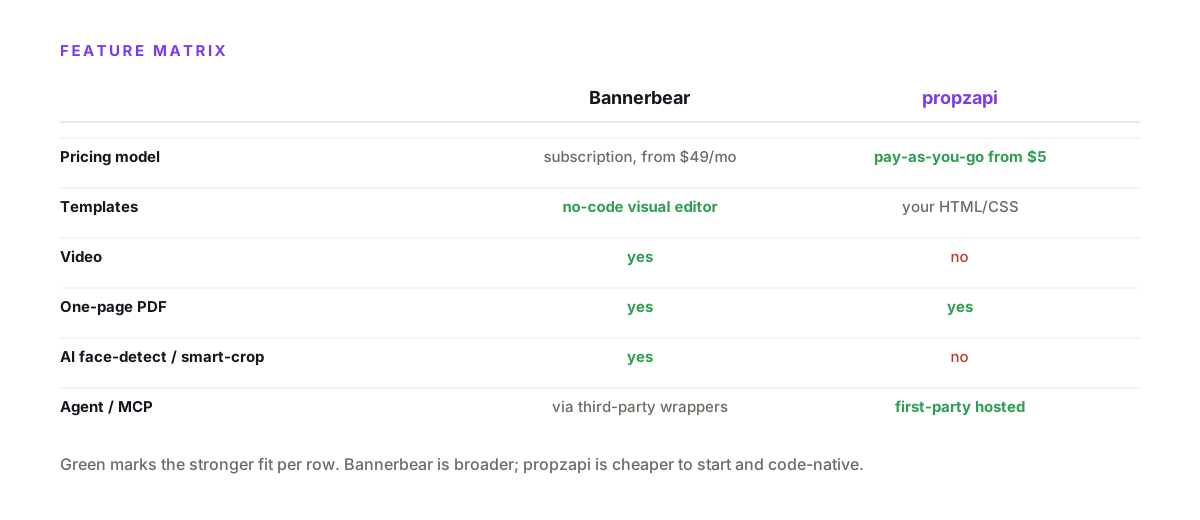
Three reasons come up again and again: the price model, the editor, and the fit. Bannerbear's cheapest paid plan is $49 a month for 1,000 images, so occasional or spiky usage pays a full subscription for a fraction of it. Its templates live in a visual editor, which developers often find slower than writing HTML. And its plans bundle video and no-code tooling you may never touch. If any of those is you, a lighter image-only API is worth a look.
Look at the pricing first, because it's the most common trigger.
Per Bannerbear's pricing (verified August 2026), the tiers are Automate at $49/month for 1,000 credits, Scale at $149 for 10,000, and Enterprise at $299 for 20,000. One image is one credit; PDFs and videos cost more. The free tier is a one-time 30-credit trial, not an ongoing free plan.
Do the per-image math and the on-ramp is the sticking point. Bannerbear's entry tier works out to about $0.049 an image, and you pay the $49 whether you render 40 images or 1,000. propzapi's $5 pack is roughly $0.033 an image and never expires, so 200 images cost you a few dollars, not a monthly floor.
Make it concrete. Say you run a side project that ships three OG images a week, about 13 a month. On Bannerbear you pay $49 for the month and use 13 of your 1,000 credits, so roughly $3.77 per image you actually made. On propzapi's $5 pack that's 13 of 150 renders, around $0.43 each, and the leftover 137 renders don't expire. The subscription only starts to make sense once your steady volume climbs past a few hundred a month.
That's fine at steady volume. It's less fine if you render 200 images one month and 4,000 the next, because you're either overpaying for the quiet months or hitting a ceiling in the busy ones.
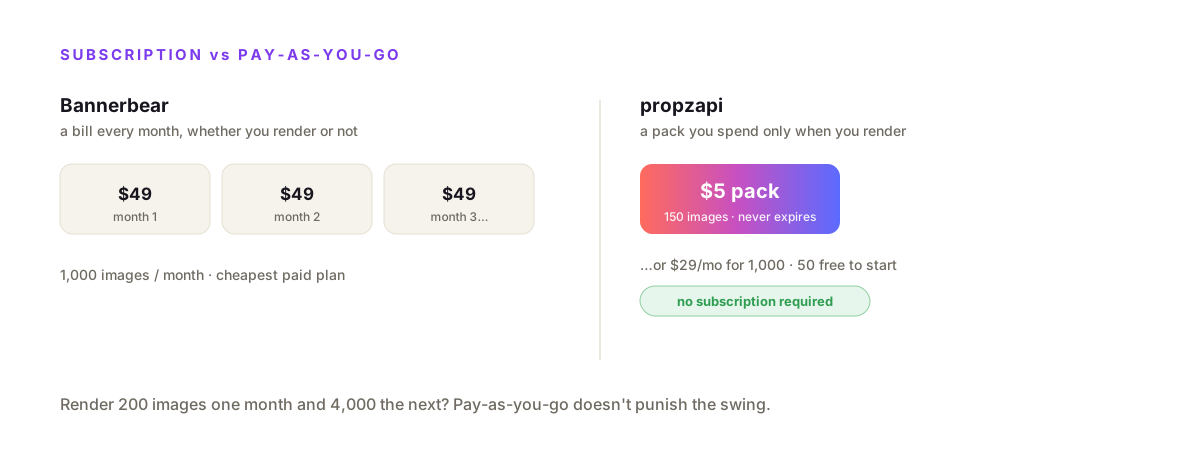
The second trigger is the editor. If you'd rather express a template as HTML and CSS in your repo, version-controlled next to your code and diffable in a pull request, a visual canvas feels like a detour.
propzapi vs Bannerbear, feature by feature
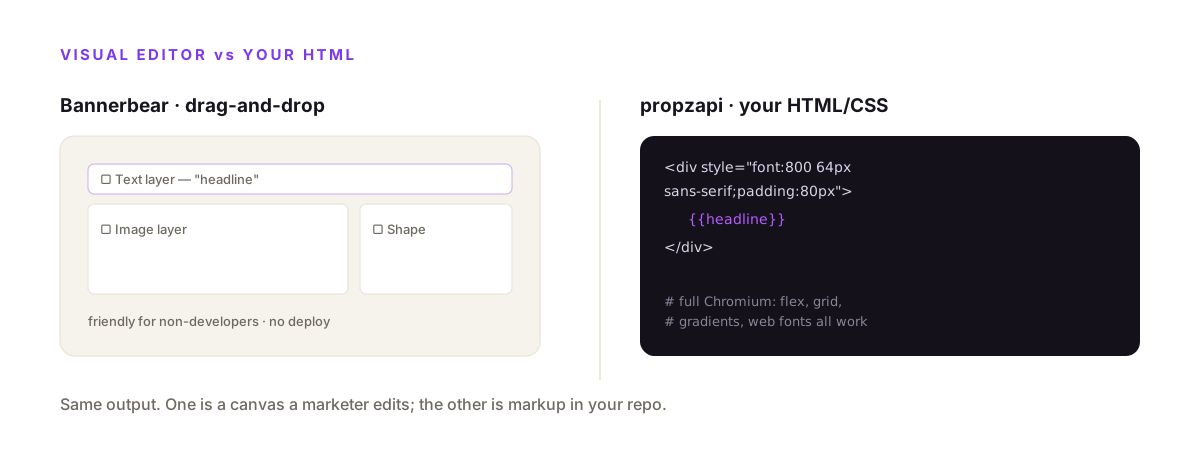
propzapi is cheaper to start and code-native; Bannerbear is broader and no-code. propzapi renders your own HTML in headless Chromium, does one-page PDFs and URL screenshots, and bills pay-as-you-go from $5 or $29/month for 1,000 images. Bannerbear gives you a visual editor, video generation and a large integration catalogue on a subscription from $49/month. Pick on which gaps you actually feel.
| Bannerbear | propzapi | |
|---|---|---|
| Entry price | $49/mo (1,000 images) | $5 pay-as-you-go (150) · $29/mo (1,000) |
| Free tier | 30-credit trial | 50-image trial |
| Pricing model | Subscription | Pay-as-you-go or monthly |
| Templates | No-code visual editor | Your HTML/CSS + {{variables}} |
| Video | Yes | No |
| AI face-detect / smart-crop | Yes | No |
| One-page PDF + URL screenshots | Yes | Yes |
| Agent / MCP | Via third-party wrappers | First-party hosted |
Where propzapi is the better pick
Choose propzapi when you render images from data, want to pay for what you use, and would rather write HTML than click a canvas. You bring a template as HTML/CSS, render it with each record's data, and get a URL back. It also screenshots any public URL and signs og:image URLs. For an indie project, a side feature, or an agent that produces images, the pay-as-you-go model and code-first templates fit better than a platform subscription.
The template is just HTML you already know how to write.
# Bannerbear: design in a visual editor. propzapi: store your HTML once.
curl https://api.propzapi.com/v1/templates \
  -H "X-API-Key: pk_live_…" -H "Content-Type: application/json" \
  -d '{"name":"promo","width":1200,"height":630,
       "html":"<div style=\"width:1200px;height:630px;display:flex;align-items:center;padding:80px;font:800 64px sans-serif;background:#0c0a10;color:#fff\">{{headline}}</div>"}'
# → { "template": "tpl_9f2c…", "width": 1200, "height": 630 }
# then render it with this row's data — as many times as you want
curl https://api.propzapi.com/v1/images \
-H "X-API-Key: pk_live_…" -H "Content-Type: application/json" \
-d '{"template":"tpl_9f2c…","modifications":{"headline":"Q3 is live"}}'
# → { "url": "https://images.propzapi.com/img_7c1a….png", "format": "png", "bytes": 78210 }Or skip your own template and render a built-in like og-article straightaway.
curl https://api.propzapi.com/v1/images \
  -H "X-API-Key: pk_live_…" -H "Content-Type: application/json" \
  -d '{"template":"og-article",
       "modifications":{"eyebrow":"LAUNCH","title":"Ship faster with propzapi"}}'
# → { "url": "https://images.propzapi.com/img_95e5….png",
#     "width": 1200, "height": 630, "format": "png", "bytes": 95332 }
# X-Credits-Cost: 1   X-Credits-Remaining: 49
Two things land here that Bannerbear's cheapest plan doesn't. You pay per image, not per month, so a $5 pack replaces a $49 subscription. And you write the template in real CSS you control, so a font, a gradient or a layout is never blocked by an editor's limits. That's the pitch in one line: cheaper to start, and fully code-native. (Both tools screenshot URLs and export PDFs, so those aren't the reason to switch.)
What propzapi does that Bannerbear doesn't
Three things, and they're the reasons to pick it beyond price. propzapi ships a first-party hosted MCP server, so an AI agent calls generate_image or screenshot_url as a native tool and gets the image back inline. It signs og:image embed URLs that render on first fetch and then cache, so a shared post costs one render no matter how many crawlers hit it. And it bills on delivery: a failed render costs zero credits, where subscription tools charge the month regardless.
The MCP piece is the one that's genuinely ahead.
Bannerbear's REST API can be reached from an agent through third-party wrappers, but propzapi is an MCP server itself, hosted for you, so a Claude, Cursor or Cline agent adds it as a tool with no glue code. If part of your product is an agent that needs to produce an image, that's a real gap in your favour.
The billing model is the quieter win. You only ever pay for pixels that came back, and the credit cost rides in a response header, so you can reconcile every render. No monthly floor sits on your card during a slow month.
Which one should you choose?
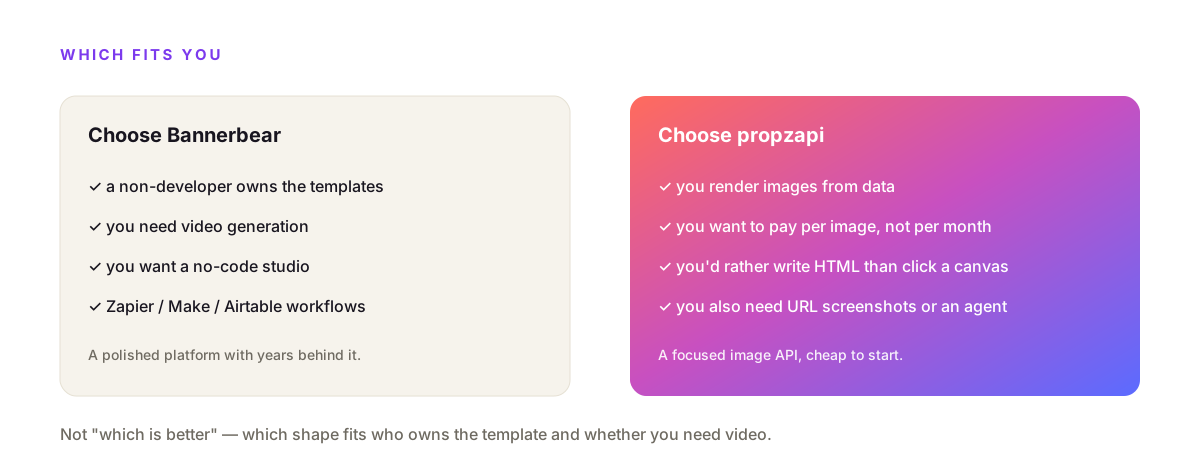
Choose Bannerbear if a non-developer owns the templates, if you need video, or if you want AI face-detection and smart-crop for user-uploaded photos. Choose propzapi if you render images from data in code, want to pay per image with no monthly floor, and would rather write HTML than click a canvas. The decision is less "which is better" and more "which shape fits your team and your volume."
I'm not going to pretend propzapi wins every row.
If your designer or marketer needs to edit templates themselves, a code-only API is the wrong tool, full stop. If you need video, propzapi simply doesn't do it. And Bannerbear's track record is real where propzapi is new.
But if you're a developer rendering cards, invoices or OG images from a database, on a budget, the pay-as-you-go price and HTML-first templates land where a platform subscription doesn't. Two clean answers, and the figure below is the short version.
How to move a Bannerbear template to propzapi
Rebuild the layout as HTML, store it once, and render it with your data. A Bannerbear template's dynamic fields become {{variables}} in HTML/CSS; you POST that HTML to /v1/templates for a tpl_ id, then POST the id with each row's values to /v1/images. There's no import tool, but a one-off rewrite of the markup is usually an hour, and after that every render is one API call.
The mental shift is small.
In Bannerbear you drew boxes and bound them to fields. In propzapi you write the same layout as a div with CSS and mark the changing parts as variables. Your title becomes {{title}}, your price becomes {{price}}, and the render call fills them in.
Once it's stored, it behaves exactly like a Bannerbear template does over the API: one call in, one image URL out, priced per render instead of per month. If you script the rewrite, propzapi's batch endpoint takes up to 25 records in a single call, so a whole set of cards can migrate at once.
Frequently asked questions
- Is there a cheaper alternative to Bannerbear?
- Yes, if your volume is low or spiky. Bannerbear's cheapest paid plan is $49/month for 1,000 images. propzapi is pay-as-you-go: a $5 pack covers 150 images and never expires, and 1,000 images a month on a plan is $29 versus Bannerbear's $49. The catch is fair: Bannerbear's price also buys a visual editor and video, which propzapi doesn't have. Cheaper only counts if you don't need those.
- What's the difference between Bannerbear and propzapi?
- Bannerbear is a mature no-code platform: you design in a visual editor, and it does images, video and PDF on a monthly subscription. propzapi is a developer-first API: you bring your own HTML/CSS templates, it renders images and one-page PDFs with headless Chromium, it also screenshots any URL, and you pay per image with no subscription. Bannerbear is broader; propzapi is cheaper to start and code-native.
- Does propzapi do video like Bannerbear?
- No. propzapi renders still images (PNG, JPEG, WebP) and one-page PDFs, plus URL screenshots. It has no video generation. Bannerbear has a Videos API and is the better choice if you need programmatic video. If you only ever needed images and were paying for a plan that includes video you don't use, that's exactly the case where a lighter image-only API saves money.
- Can I use my own HTML templates instead of a visual editor?
- Yes, that's propzapi's whole model. You store an HTML/CSS template with {{variables}} over the API, then render it with data. Because it rasterises in real headless Chromium, any CSS that works in a browser works in the image: flexbox, grid, gradients, web fonts. Bannerbear takes the opposite approach with a drag-and-drop editor, which is friendlier for non-developers but less flexible than writing your own markup.
- Is propzapi cheaper than Bannerbear?
- For images, usually. At 1,000 images a month propzapi is $29 versus Bannerbear's $49, and with pay-as-you-go packs from $5 you can avoid a subscription entirely and only pay for what you render. But compare like for like: Bannerbear's plans bundle video and a no-code editor. If you use those, the price difference isn't apples to apples. If you just render images from data, propzapi is the cheaper on-ramp.
- Can an AI agent generate images with propzapi?
- Yes. propzapi ships its own hosted MCP server, so a Claude, Cursor or Cline agent calls generate_image or screenshot_url as a tool and gets the image back inline. Bannerbear's REST API can also be reached from agents through third-party MCP wrappers like Composio. So both work with agents; propzapi's difference is that the MCP server is first-party and hosted for you.
Try propzapi on your own template
Grab a free key, POST your HTML to /v1/templates, and render it with data. Fifty images on the house, no card, and after that a $5 pack or a $29 plan instead of a subscription floor. If you need a visual editor or video, use Bannerbear, no hard feelings. If you want to render your own HTML and pay per image, this is for you.