
Canva API Alternative: No Enterprise Plan Needed
You wanted to generate a few hundred certificates from a spreadsheet. You found Canva's API. Then you found out it's Enterprise-only, and the wall went up.
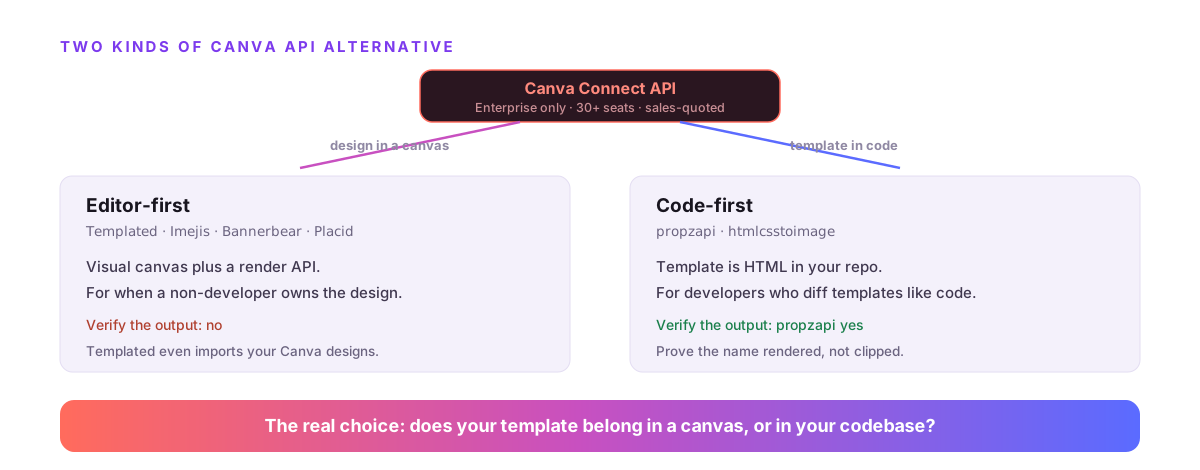
Canva's Autofill API is real and good, but it's locked behind a Canva Enterprise plan built for teams of 30+ and priced through sales. The alternatives split into two camps: editor-first tools that pair a visual canvas with an API, and code-first render APIs where your template is HTML in your repo. propzapi is the code-first one, and it's the only option among them, or Canva itself, that verifies the output rendered.
I build propzapi, so I'll be straight about where it fits and where it doesn't. If you want a drag-and-drop editor, I'll point you at the tools that have one. What propzapi is for is a narrower, real thing: rendering from templates you write in code, with proof the result is correct.
Does Canva have an API?
Yes. Canva ships the Connect API, and its Autofill API takes a Brand Template plus your data and returns a rendered design you export as PNG or PDF. It's a capable, well-documented API. The problem isn't capability, it's access: the Autofill and Brand Template endpoints require your integration to act on behalf of a Canva Enterprise member.
So the API exists, and it does exactly what you'd want.
You define a Brand Template in Canva's editor, then call the Autofill endpoint with a data object, and Canva returns a design job you poll and export. It's the clean version of the job everyone in this space is solving: template plus data, out comes a finished asset.
The gap is who's allowed to call it. That's the next question, and it's the one that sent you here.
Can you use the Canva API without an Enterprise plan?
Not for the part you want. The Autofill and Brand Template APIs require a Canva Enterprise organization, which Canva designs for teams of 30+ and prices through a sales process. Free, Pro, and Teams plans don't get Autofill at all. You can request dev-only trial access in the Developer Portal while your integration is in development, but shipping to production means the Enterprise gate.
This is the whole reason a "Canva API alternative" is even a search.
An individual developer, a startup, or a small team can't self-serve their way to the Autofill API. There's no plan you click to buy. You enter a sales conversation for a product built around 30-plus seats, and if that's not you, the door doesn't open.
The dev-trial exception is real but limited: it exists so you can build against the API before you have Enterprise, not so you can run production on a Pro plan. Once you go live, you need the seats.
So the honest question isn't "how do I get around Canva's gate." It's "what should I use instead." And the answer depends on one thing about how you want to work.
What are the real Canva API alternatives?
They fall into two camps. Editor-first tools (Templated, Imejis, Bannerbear, Placid) give you a Canva-like visual canvas plus a render API, so a non-developer designs and your code fills it. Code-first render APIs (propzapi, htmlcsstoimage) skip the canvas: your template is HTML and CSS you write and version. Both autofill a template with data; they differ on where the template lives and who edits it.
Here's the field, honestly labeled.
| Tool | Camp | Template built in | Access | Verify output? |
|---|---|---|---|---|
| Canva Connect API | Design tool + API | Canva editor | Enterprise only (30+) | No |
| Templated | Editor-first | Visual editor (imports Canva) | Self-serve, from $29/mo | No |
| Imejis | Editor-first | Visual editor | Self-serve, from $14.99/mo | No |
| Bannerbear / Placid | Editor-first | Visual editor | Self-serve subscription | No |
| htmlcsstoimage | Code-first | HTML/CSS (stateless) | Self-serve | No |
| propzapi | Code-first | HTML/CSS in your repo | Self-serve, 50 free · $5 PAYG | Yes |
Every one of these is self-serve, which is the first thing Canva's API isn't. The split that actually decides it for you is the middle column: do you want to design in a canvas, or write a template in code?
Editor-first or code-first: which fits you?
Pick editor-first if a non-developer owns the design or you want a visual canvas without the Enterprise gate. Templated even imports your existing Canva designs, so it's the closest drop-in. Pick code-first if your templates are the kind of thing you'd rather keep in version control, review in a pull request, and diff like code. Neither is better; they serve different teams and different template lifecycles.
Be honest with yourself about who edits the template.
If the answer is a designer or a marketer who lives in a visual tool, you want an editor-first product, and I'd genuinely send you to Templated or Imejis. They rebuilt Canva's canvas without the seat requirement, which is exactly what that person needs. propzapi has no visual editor, so it would only frustrate them.
If the answer is a developer, and the template is really markup with your logic in it, code-first wins. A template that's HTML lives next to your code, changes through a pull request, and doesn't need a separate login to edit. That's the camp propzapi is built for.
Where propzapi fits, and where it doesn't
propzapi is a code-first Canva API alternative. You write an HTML/CSS template with {{variable}} placeholders and Jinja loops, keep it in your repo, and render it with data to a PNG, JPEG, WebP, or PDF over one call. What it is not: a visual editor, a Canva import, or a template marketplace. If you need to design in a canvas, it's the wrong tool, and I'll say so plainly.
Let me draw the line clearly, because a vague pitch helps no one.
propzapi does the autofill job. Your template holds {{name}}, {% for row in items %}, and a currency filter; you POST the data; it fills the template and renders the finished image or PDF with headless Chromium. It also screenshots any URL and runs as an MCP server, so an AI agent can render in one tool call.
# Store an HTML template once. Your design, in your repo, with {{variables}}.
curl https://api.propzapi.com/v1/templates \
  -H "X-API-Key: pk_live_…" -H "Content-Type: application/json" \
  -d '{"name":"certificate","width":1600,"height":1130,
       "html":"<div style=\"padding:120px;font:40px sans-serif;text-align:center\"><h1>Certificate</h1><p>Awarded to {{name}}</p><p>{{course}}</p></div>"}'
# → { "template": "tpl_9d06…", "width": 1600, "height": 1130 }
What it deliberately doesn't have: a drag-and-drop designer, the ability to import a Canva or Figma file, or a marketplace of ready-made designs. Those are real features that editor-first tools own, and pretending otherwise would waste your time. propzapi's bet is that for a developer, a template that's plain HTML in the repo beats a canvas you edit in a browser.
Prove the generated output is correct
This is the one thing no Canva API alternative offers, and neither does Canva. With propzapi you pass verify with the exact strings you expect, and the response returns verified plus a per-string check that each one rendered as visible pixels and wasn't clipped. On the personalized documents this job produces, a certificate, an invoice, an offer letter, a misspelled or clipped name is expensive, and this turns a manual spot-check into an assertion.
Think about what this job actually generates.
It's rarely one image. It's a thousand certificates from a roster, or an invoice per customer, where each output has a name and a number that has to be right. Autofill the wrong field, or let a long name overflow its box, and you've mailed a thousand broken documents. Nobody eyeballs a thousand PDFs.
Verify closes that gap in the same call that renders the file. Here's the certificate from earlier, rendered with data and checked:
# Autofill it with data and PROVE the name rendered, in one call.
curl https://api.propzapi.com/v1/images \
  -H "X-API-Key: pk_live_…" -H "Content-Type: application/json" \
  -d '{"template":"tpl_9d06…","format":"pdf",
       "modifications":{"name":"Ada Lovelace","course":"Analytical Engines 101"},
       "verify":["Ada Lovelace"]}'
# → { "url":"https://images.propzapi.com/img_5b2f….pdf",
#     "verified": true,
#     "checks": [ {"text":"Ada Lovelace","found":true,"clipped":false} ] }
That verified: true is a DOM check in the render pass, not OCR, and a failed check doesn't change the charge because the file still rendered. Wire it into your batch and a clipped name becomes a caught error before anything is sent. Canva returns you a design and trusts it's right; propzapi returns you the proof.
Canva API alternative pricing in 2026
Canva's Autofill API has no public price; it rides on Enterprise, which is sales-quoted and estimated in the thousands to tens of thousands a year. The self-serve alternatives are far cheaper: Imejis from $14.99/month, Templated from $29/month, and propzapi pay-as-you-go from a $5 pack that never expires, with 50 renders free and no card. The real gap isn't the number, it's that Canva can't be bought self-serve at all.
| Tool | Model | Free tier | Entry price |
|---|---|---|---|
| Canva Connect API | Enterprise, sales-quoted | dev trial only | Not public (est. $2k–$30k+/yr) |
| Imejis | Subscription | 100/mo | $14.99/mo |
| Templated | Subscription | 50 credits | $29/mo |
| propzapi | Pay-as-you-go | 50 (one-time) | $5 PAYG · $29/mo |
Prices checked August 2026 from each tool's public pricing; Canva's Autofill access terms are from its Connect API docs. Per CAPABILITIES, propzapi is not the price leader in every row, and it doesn't claim to be. It's the self-serve, code-first option that also verifies.
Which should you choose?
Choose Canva's API only if you already run Canva Enterprise. Otherwise, if a non-developer designs and you want a visual canvas, choose an editor-first tool like Templated or Imejis. If you're a developer who'd rather template in HTML and needs proof the output rendered, choose propzapi. The one thing that's clearly wrong is waiting on a sales call to generate a few hundred certificates.
The honest summary: the Enterprise gate is real, the self-serve alternatives are cheap and good, and the only real decision left is whether your template belongs in a canvas or in your codebase.
If it belongs in your codebase, grab a free key, POST an HTML template, and render one with verify on. Fifty renders on the house, no card, then a $5 pack or a $29 plan.
Frequently asked questions
- Does Canva have an API?
- Yes. Canva ships the Connect API, and its Autofill API takes a Brand Template plus your data and returns a rendered design you export as PNG or PDF. It's a real, capable API. The catch is access: the Autofill and Brand Template endpoints require your integration to act on behalf of a Canva Enterprise member, so most developers can't reach them on a normal plan.
- Can you use the Canva API without an Enterprise plan?
- Not for the useful part. The Autofill and Brand Template APIs require a Canva Enterprise organization, which is built for teams of 30+ and priced through sales. Free, Pro, and Teams plans don't get Autofill. You can request dev-only trial access in the Developer Portal while an integration is in development, but production means the Enterprise gate.
- How much does the Canva API cost?
- Canva doesn't publish it. The Autofill API rides on Canva Enterprise, which is quote-only through their sales team, and third-party estimates put it in the low-thousands to tens-of-thousands of dollars a year depending on team size. For an individual developer or a small team, the real cost is that you can't self-serve at all, not a number on a pricing page.
- What is the best Canva API alternative for developers?
- It depends on whether you want a visual editor. If you want Canva's drag-and-drop canvas without the Enterprise gate, editor-first tools like Templated, Imejis, or Bannerbear fit. If you'd rather template in HTML you keep in your repo, a code-first render API like propzapi or htmlcsstoimage fits. Match the alternative to how you want to build the template, not to price alone.
- Can I import my Canva designs into propzapi?
- No. propzapi has no Canva import and no visual editor. Its templates are HTML and CSS with {{variable}} placeholders that you write and keep in your repo. If your workflow depends on designing in Canva's canvas, an editor-first tool that imports Canva designs, like Templated, is the honest fit. propzapi is for teams that would rather template in code.
- How do I confirm the generated image or PDF rendered correctly?
- With propzapi you pass verify with the exact strings you expect, like a recipient's name on a certificate, and the response confirms each one rendered as visible pixels and wasn't clipped. It's a DOM check in the same render pass, not OCR. No other render API in this space, and not Canva, offers proof-the-text-rendered, which matters most on the personalized documents this job produces.