
Certificate Generation API: Render Certificates From Data
Someone finishes your course. You need to send them a certificate with their name on it, correctly spelled, today. Now do that a thousand times, from a spreadsheet, without opening a design tool.
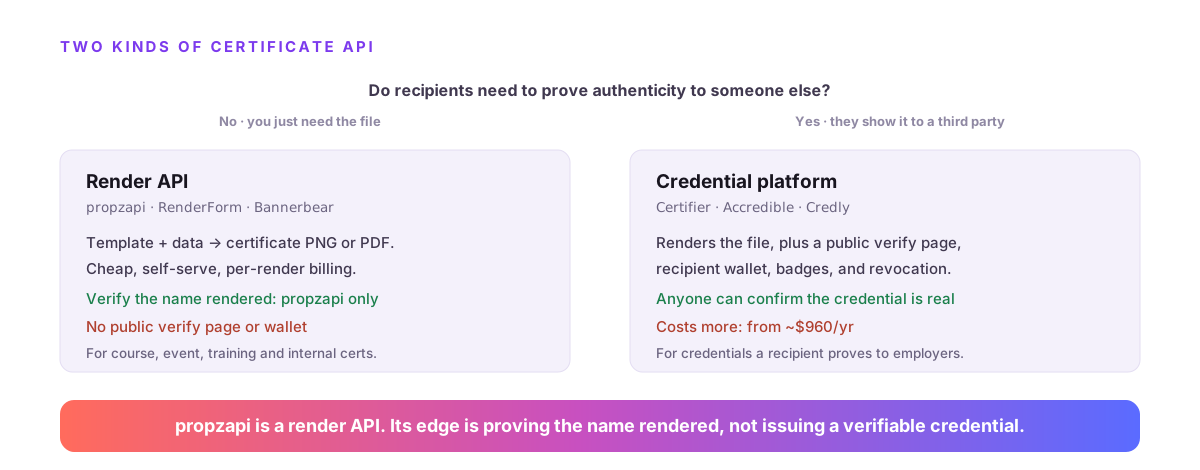
A certificate generation API takes a template plus a recipient's data and returns a finished certificate as a PNG or PDF. But "certificate API" splits into two different products: render APIs that produce the file (propzapi, RenderForm, Bannerbear), and credential platforms that also issue a verifiable credential with a public verify page (Certifier, Accredible). Which you need depends on one thing: whether recipients must prove the certificate is authentic to someone else.
I build propzapi, which is a render API, so I'll be clear about that line the whole way through. If you need verifiable credentials, I'll point you at the tools that issue them. What propzapi does is generate the files, at scale, and prove the name rendered.
What is a certificate generation API?
It's an HTTP endpoint that takes a template and a recipient's data and returns a finished certificate file. You design the certificate once, then your app sends each recipient's name and details and gets back a PDF or image, so a course or event issues hundreds of certificates without anyone touching a design tool. It renders the document. It does not, by itself, make that document verifiable to a third party.
The shape is the same one behind every "generate from data" tool.
You define a certificate layout with placeholders where the name, course, and date go. Your backend calls the API with a data object per recipient. The API fills the placeholders and renders the finished certificate, and you get a URL to the file.
That covers the generation job completely. The word that trips people up is "verify," because it means two different things in this space, and getting them mixed up leads to picking the wrong tool.
Render a certificate, or issue a verifiable credential?
Render APIs (propzapi, RenderForm, Bannerbear, Templated) turn a template plus data into a certificate file and stop there. Credential platforms (Certifier, Accredible, Credly) do that and add a hosted verification page, a recipient wallet, badges, and revocation, so anyone can confirm the credential is real. If a recipient needs to prove authenticity to an employer or a registry, you need a credential platform. If you just need the file, you need a render API.
This is the fork that decides everything, so be honest about which side you're on.
| You need | Category | Examples | What you get |
|---|---|---|---|
| A certificate file from data | Render API | propzapi, RenderForm, Bannerbear | PNG/PDF per recipient, cheap, self-serve |
| Recipients to prove authenticity | Credential platform | Certifier, Accredible, Credly | Public verify URL, wallet, badges, revocation |
A credential platform is the right call for a professional certification a recipient adds to LinkedIn and an employer checks. That's a real, valuable job, and it costs accordingly: Accredible starts around $960 a year, and Credly runs $1,500 to $7,500 a year plus onboarding.
A render API is the right call when you own the certificate and just need to produce it: course completions, event attendance, internal training, a badge on a receipt. If that's you, paying credential-platform prices for a verify page you don't need is the wrong trade. The rest of this is about that render case, where propzapi lives.
How do you generate certificates in bulk from data?
Design the template once, then loop your roster and render one certificate per row, or send a batch. With propzapi you store an HTML template with placeholders, then POST each recipient's data to /v1/images, or up to 25 rows at once to /v1/images/batch, and get a certificate URL per recipient billed one credit each. Read the roster from a CSV, map each row to the template's variables, done.
Start by storing the design as a template you keep in your repo.
# Design the certificate once as HTML in your repo, with {{variables}}.
curl https://api.propzapi.com/v1/templates \
  -H "X-API-Key: pk_live_…" -H "Content-Type: application/json" \
  -d '{"name":"certificate","width":1600,"height":1130,
       "html":"<div style=\"padding:140px;text-align:center;font:44px Georgia\"><h1>Certificate of Completion</h1><p>Awarded to</p><h2>{{recipient}}</h2><p>{{course}} · {{date}}</p></div>"}'
# → { "template": "tpl_9d06…", "width": 1600, "height": 1130 }
Then render one certificate per recipient. For a whole roster, the batch endpoint takes up to 25 at a time so you're not making a call per row.
# Or issue a whole roster in one call, up to 25 recipients, 1 credit each.
curl https://api.propzapi.com/v1/images/batch \
  -H "X-API-Key: pk_live_…" -H "Content-Type: application/json" \
  -d '{"images":[
       {"template":"tpl_9d06…","format":"pdf","modifications":{"recipient":"Ada Lovelace","course":"Engines 101"}},
       {"template":"tpl_9d06…","format":"pdf","modifications":{"recipient":"Grace Hopper","course":"Compilers 201"}}
     ]}'
# → per-recipient results, each with its own certificate URL
A failed render costs nothing, and identical renders are cached, so re-running a batch after a fix doesn't double-charge for the rows that already succeeded. One credit is one certificate, and the free trial covers fifty of them with no card.
Where propzapi fits, and where it doesn't
propzapi is a code-first certificate render API. Your template is HTML and CSS with placeholders that you write and keep in version control, and it renders to PNG, JPEG, WebP, or PDF. What it is not: a visual certificate designer, a credential issuer, or a verifiable-credential wallet. If a non-developer needs to design the certificate in a canvas, an editor-first tool like RenderForm or Templated is the honest fit.
There are two limits here, and both are worth saying plainly.
propzapi has no drag-and-drop editor. The certificate is markup, which suits a developer who'd rather diff a template in a pull request than log into a canvas, and frustrates a marketer who wants to drag a logo around. Render tools like RenderForm pair a visual editor with a spreadsheet upload, and for that person they're the better pick.
propzapi also doesn't issue credentials. There's no hosted page where an employer confirms the certificate is genuine. If you need that, this is the wrong layer, and Certifier or Accredible is the right one. What propzapi adds that neither the render tools nor the credential platforms do is proof that the certificate rendered correctly in the first place.
How do you make sure every recipient's name rendered?
Pass verify with the exact name you expect, and propzapi's response returns verified plus a check confirming it rendered as visible pixels and wasn't clipped or dropped. This is a rendering check, not a credential check: it proves the recipient's name actually appears on the certificate. On a batch of a thousand, where one clipped or misspelled name is the failure people remember, that turns a manual spot-check into an assertion.
Think about how certificate batches actually break.
A long name overflows the box and clips. A custom font fails to load on the render host and the name falls back to something ugly. A missing data field renders blank. Any of those ships a broken certificate with someone's name on it, and you find out when they email you a screenshot.
Verify catches it in the same call that renders the file.
# Render one recipient and PROVE the name rendered, in one call.
curl https://api.propzapi.com/v1/images \
  -H "X-API-Key: pk_live_…" -H "Content-Type: application/json" \
  -d '{"template":"tpl_9d06…","format":"pdf",
       "modifications":{"recipient":"Ada Lovelace","course":"Analytical Engines 101","date":"May 2026"},
       "verify":["Ada Lovelace"]}'
# → { "url":"https://images.propzapi.com/img_0dea….pdf",
#     "verified": true,
#     "checks": [ {"text":"Ada Lovelace","found":true,"clipped":false} ] }
That verified: true is a DOM check in the render pass, not OCR, and no other certificate render API offers it. Wire it into your batch and a clipped name becomes a caught error before the certificate is sent, not a reprint after. It's the one thing that's genuinely propzapi's, and on certificates it earns its keep.
Adding a verification QR to your certificates
propzapi can render a QR code into the certificate with the qr filter: {{ verify_url|qr }} encodes any URL to a crisp QR in the design. That lets you print a scannable link to a verification page, but be clear about what it is: the QR points at a page you host, not one propzapi runs. propzapi renders the code; it doesn't verify the credential behind it.
This is the honest middle ground between render and credential.
If you want recipients to scan a certificate and land on a "this is genuine" page, you can build that page yourself, store a record per certificate, and have propzapi render a QR pointing at it. The qr filter is pure compute, so the code goes straight into the certificate with no extra service.
What you don't get is the credential platform's version, where the verify page, the record, and the recipient wallet are managed for you. If that managed layer is the point, use a credential platform. If you're happy owning the verify page, propzapi renders the QR into the design for free.
Certificate API pricing in 2026
Render APIs are the cheap tier: RenderForm is $9/month for 250 with a free 50, and propzapi is pay-as-you-go from a $5 pack that never expires, with 50 free and no card. Credential platforms cost more because they do more: SimpleCert is $19–29/month, Certifier is free up to 250 recipients a year then $1 each, and Accredible starts near $960/year. Match the price to whether you need verification, not rendering alone.
| Tool | Type | Free tier | Entry price |
|---|---|---|---|
| propzapi | Render API | 50 (one-time) | $5 PAYG · $29/mo |
| RenderForm | Render API | 50 credits | $9/mo |
| Certifier | Credential | 250/yr | $1 per recipient/yr |
| SimpleCert | Credential | trial | $19/mo |
| Accredible | Credential | no | ~$960/yr |
Prices checked August 2026 from each tool's public pricing. Per its own capabilities doc, propzapi is not the price leader in the render tier, and it doesn't claim to be. It's the render API that also verifies the output.
Which should you choose?
Choose a credential platform (Certifier, Accredible) if recipients must prove authenticity through a hosted verify page. Choose an editor-first render tool (RenderForm, Templated) if a non-developer designs the certificate in a canvas. Choose propzapi if you're a developer who'd rather template the certificate in HTML and needs proof every recipient's name rendered right. All three read the same data; pick by the job.
The honest summary: most people issuing course and event certificates need to render a file, not mint a verifiable credential, and for that a certificate generation API is cheaper and simpler. If you're rendering, do it from a template you control and check the name before you send it.
Grab a free key, POST a certificate template, and render one with verify on. Fifty certificates on the house, no card, then a $5 pack or a $29 plan.
Frequently asked questions
- What is a certificate generation API?
- It's an HTTP endpoint that takes a template plus a recipient's data and returns a finished certificate as a PNG or PDF. You design the certificate once, then your app sends each recipient's name and details and gets back a file, so a course or event can issue hundreds of certificates without anyone opening a design tool. It renders the document; it doesn't, on its own, make the certificate verifiable to a third party.
- How do I generate certificates in bulk from a spreadsheet?
- Loop your roster and call the render API once per row, or send a batch. With propzapi you POST your template id plus each recipient's data to /v1/images, or up to 25 rows at once to /v1/images/batch, and get back a certificate URL per recipient billed one credit each. Read names from a CSV, map each to the template's variables, and the API returns a PDF for every row.
- Does propzapi issue verifiable digital credentials?
- No. propzapi renders certificate files; it does not host a public verification page, a recipient wallet, or a badge network, and it can't revoke a credential. If a recipient needs to prove authenticity to a third party through a hosted verify URL, use a credential platform like Certifier or Accredible. propzapi is the render layer, and it can embed a QR that points at a verify page you host yourself.
- How do I confirm the recipient's name rendered correctly?
- With propzapi you pass verify with the exact name you expect, and the response confirms it rendered as visible pixels and wasn't clipped or dropped. This is a rendering check, not a credential check: it proves 'Ada Lovelace' actually appears on the certificate, which is the failure that ruins a batch. No other certificate render API offers it. It runs in the same call and a failed check still costs nothing extra.
- Can I generate certificate PDFs, or only PNGs?
- Yes. Pass format: pdf to /v1/images and propzapi renders the certificate template to a one-page PDF at the template's size, backgrounds preserved. A certificate is usually landscape at a fixed size, so a one-page PDF is exactly right for printing or emailing. You can also render PNG, JPEG, or WebP from the same template if you need an image instead.
- What is the best certificate API for developers?
- It depends on whether you need verifiable credentials. If recipients must prove authenticity through a public verify URL, a credential platform like Certifier or Accredible is the fit. If you just need to generate certificate files from data in code, a render API is cheaper and simpler, and propzapi is the only render API that also proves the recipient's name rendered correctly.